
omnlmpcokinacfneimcobljjplcjnddb

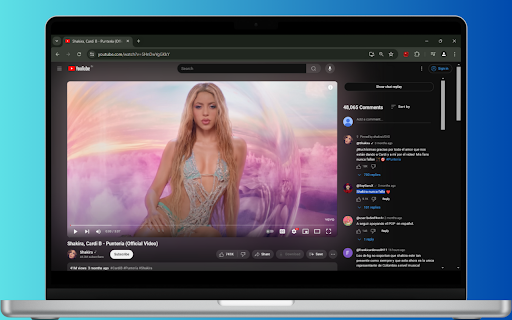

Show YouTube comments in a sidebar and autoplay videos on hover with one popup. See YouTube comments next to the video. Read comments as you watch! Want to read comments while watching a YouTube video? Fed up with scrolling or pausing to read comments? Comments now show up beside the video player, and suggested videos are below the video player. Show YouTube comments on the right of the video. Read comments while you watch videos!

Picture in Picture | PiP | Floating Player for Youtube
Watch video in a floating PiP window. Picture in Picture for YouTube, Netflix & all sites. Always on top. Watch any video in a floating video player — always on top, always visible. Picture in Picture (PiP) pops out video from any website into a resizable floating window that stays above all tabs and apps while you browse, work, or multitask. How it works Click the extension icon while a video is playing. The video pops out into a floating PiP window. Move it anywhere, resize it, and keep watching while you switch tabs or work in other apps. Features ✅ Floating video window — always on top of other windows ✅ Works on every website with an HTML5 video player ✅ One-click activation from the Chrome toolbar ✅ Reposition and resize the floating player freely ✅ PiP mode stays active across all tabs ✅ Keyboard shortcut: Alt+P (⌥+P on Mac) Does Picture in Picture work on YouTube? Yes. Click the icon on any YouTube video to open it in a floating PiP window instantly. Does PiP work on Netflix? Yes. Works on Netflix, Disney+, Prime Video, and all major streaming platforms. How do I enable Picture in Picture mode? Install the extension, go to any page with a video, click the PiP icon in your Chrome toolbar. Done. Can I resize and move the floating window? Yes. Drag to reposition, pull edges to resize. Does the floating player stay visible when I switch tabs? Yes. The PiP window stays on top of all other windows across every tab and app. What is the keyboard shortcut for Picture in Picture? Alt+P on Windows/Linux, ⌥+P on macOS.

Sidesy: Your Comments Sidebar For YouTube
Bring YouTube comments to the side. Dive into the comments without scrolling past the video. Features - 1. Easy toggle via keyboard shortcut or the button integrated right into the comments section to easily switch between default and sidebar views. 2. Built for convenience with an eye for aesthetics. Unlike other similar options in the market, the sidebar comments don't feel out of place. They look nice and work well. 3. Dark & light modes depending on your YouTube settings. If you enjoyed using Sidesy, please consider leaving a review - it really helps a lot! And if you’re feeling extra generous, you can buy me a coffee here: https://buymeacoffee.com/abin.john

Show YouTube comments while watching
Show YouTube comments on the right of the video. Read comments while you watch! ---------- Want to read comments while you watch a YouTube video? Tired of scrolling or pausing just to read comments? We got you. Comments now appear to the right of the video player, and suggested videos are moved underneath the video player. Thank you so much for your comments! I do read all of them and appreciate your feedback. 1.0.5 - 2026-05-13 * Fixed the extension breaking due to YouTube layout changes. Thank you all for your quick bug reports. 1.0.4 * Fixed the extension breaking due to YouTube layout changes. Thank you all for your quick bug reports. 1.0.3 * Fixed a bug where comments would only swap after refreshing the page. * Migrated to Manifest V3 (new thingies from Google) before it becomes mandatory. Will be monitoring closely for bugs.

CommentSync - Real-time YouTube Comments
Sync YouTube comments with video playback. See reactions and timestamps appear automatically as you watch. Bring your YouTube comments to life! Have you ever found yourself scrolling down while watching a video just to understand what a timestamped comment was referring to? With CommentSync, you no longer have to choose between the video and the community. CommentSync automatically detects comments with timestamps and displays them as elegant, non-intrusive overlays at the exact moment they are mentioned. Experience the energy of a live premiere or a Twitch chat on any YouTube video! Key Features: 🚀 Lightning Fast Experience: No more waiting for comments to load. Enjoy instant access to community reactions the moment you start watching. ✨ Elegant Design: Experience a modern, distraction-free interface. Our sleek overlays blend perfectly with the YouTube player for a premium, native feel. 🧠 Curated Highlights: Don't get overwhelmed during popular moments. The extension automatically highlights the most relevant and high-quality reactions, keeping your screen clean. 🛡️ Distraction-Free Viewing: Your viewing experience is sacred. The overlay automatically tucks itself away during advertisements and when you're interacting with player controls. How it works: Install the extension. Watch as community insights, jokes, and reactions "pop up" on your screen at the perfect time. Stop scrolling and start watching. Upgrade your YouTube experience with CommentSync today!
