
omekflilffhmkkibiadbbhahdhmjdlkp

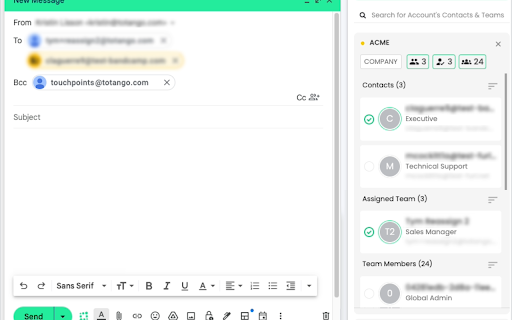
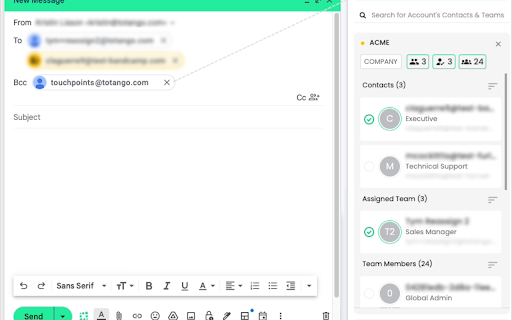
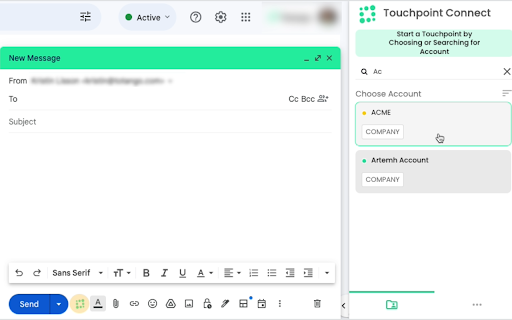
Without leaving Gmail, users can search for accounts, select contacts, and automatically log the email as a touchpoint in Totango Using Touchpoint Connect increases productivity and improves cross-functional visibility into customer communication by allowing users to: - Search for accounts - Select accounts and associated contact - Add selected accounts and contact information to the emails distribution list - Record a copy of the email in the Totango platform for that account To use Totango Touchpoint Connect, you need a valid Totango account.

Mixmax: AI-Powered Sales Engagement, Email Tracking and Meeting Scheduling
Make sales outreach feel effortless—not endless—with the only sales engagement tool that lives in Gmail. Mixmax is an AI Sales Execution Platform that lives inside your inbox. Sequences, meeting scheduling, real-time engagement tracking, and CRM sync — without leaving Gmail. 90% of teams adopt Mixmax in week one. Because it works where you already work. 🆕 NEW: Connect your AI assistant to your sales activity Ask Claude or ChatGPT about your recent calls, meetings, and sequences — right from your AI assistant. Mixmax now connects directly to the AI tools you're already using, so you can prep for calls, draft follow-ups, and review what happened in meetings by asking in natural language. 📥 WHAT YOU GET IN GMAIL - Your entire sales workflow in one place — no more tab-hopping - Multi-step email sequences — build and send directly from your inbox - One-click scheduling — meeting booked, no back-and-forth - Real-time tracking — know who's hot. See who opened, clicked, and replied - AI-powered writing — draft, rewrite, and personalize at speed - Interactive elements — polls, surveys, CTAs embedded in your emails - Salesforce updated. Automatically. Every email, meeting, and touchpoint logged — no manual entry 💬 Inbox Copilot — Know exactly what to do next. Prioritizes your pipeline, surfaces deals going cold, recommends actions. 🎙️ Meeting Copilot — AI note-taking in Zoom and Google Meet. Meeting prep briefs, auto-generated summaries, action items pushed to your CRM. 📧 Engagement Copilot — Multichannel sequences (email, LinkedIn, phone, SMS). 52% reply rates vs. the 2–3% industry average. - Gmail integration (lives in your inbox) - Email tracking (opens, clicks, replies) — 20 emails/month - Instant meeting scheduler (one-click booking) - Email templates - Follow-up reminders - Interactive email widgets (polls, surveys) - AI email writing - Multichannel sequences (email, LinkedIn, phone, SMS) - Meeting Copilot — AI notes in Zoom & Google Meet - Salesforce & HubSpot automation - Advanced analytics and reporting - Custom branding for emails and scheduling links - Rules, automations, and task management - Sidechat — collaborate on deals with your team inside Gmail - Connect to Claude, ChatGPT, and other AI assistants for natural-language access to your sales activity 14-day free trial of the full Suite — no credit card required. Start at https://mixmax.com/signup 📜 TERMS AND CONDITIONS By installing this extension, you agree to:

SalesHood
Enhance your SalesHood experience by improving integrations with other systems. Boost your sales productivity with the SalesHood Chrome Extension! Sales reps can now seamlessly manage and share content with clients, right from their browser. Key features include: - Find and Share Content: Easily search for content from the SalesHood Library and share it directly to a SalesHood Client Site. - Upload and Share: Upload content and share it to Client Sites in just a few clicks. - Gmail Integration: Insert links to shared content straight into your Gmail emails, simplifying communication with prospects and customers. - Salesforce Connection: Link your Client Sites to Salesforce opportunities, keeping your sales pipeline and content in sync. - Preview Content: Within the SalesHood Library, reps can preview most content so that they do not need to open it in source systems. Streamline your content-sharing process and close deals faster with SalesHood’s Chrome extension.

Owler
Prospect, Engage and Close Faster with Owler Max. Owler’s Chrome Extension ensures you are equipped with business news, data, insights and contact details when you are visiting company sites, company pages on LinkedIn and within your CRM. Owler gives you everything you need to - Prospect more effectively - Have better conversations with context - Monitor competitors, key accounts and industry trends - Scale up your pipeline ‘Write with Owler AI’ to - Create impactful personalized messages faster - Use relevant news and insights in your outbound communications - Increase your open rate and build your pipeline The Owler Chrome Extension is available for all Owler Subscribers - Download it today! Not using Owler yet? Check out which plan works for you - https://www.owler.com/pricing "Owler enables more automated personalized outreach campaigns" “Great for prospecting and finding new accounts”

Gmail Settings Extender
Bookmark mails and start compose in chrome-like tabs, add custom rich-text editor, auto add CC/BCC, reverse conversations and more.. Version 4.6: -Added an option to always show attachments on top of the mail body. Version 4.5: -Fixed the new Google AI assistant is not working on tabbed compose window. -Fixed the compose window is not auto scrolling after adding new line. -Added an option to auto show CC or BCC list separately. By default, Gmail doesn't allow dragging mails outside the opened window, so you'll not be able to download your mails or transfer them as attachment to another browser window or tab, unless you download them manually from mail menu. Also, you can't drag an attachment from any opened mail and drop it into the compose window as attachment, the same when you need to transfer this attachment to another account opened in another browser window. By using this extension, you'll be able to drag attachments directly to any opened compose window, you'll notice a download mail button which is draggable to your file system, or to compose window, or even to another browser tab, you'll get another button which will move the attachment section to top. To make it easy for you to reply or forward mails, this extension adds action buttons and moves the inline compose view to top. A new tab bar will change the look of Gmail and will allow composing mails in new tabs inside the same window, or add mails as chrome like bookmark tab. For those who are using a delegated Gmail accounts and looking for a way to auto change the signature without being forced to select it manually on each compose or change it from the main settings, this extension adds an option to do it for you, just enter the name of the signature from the main settings and the account you are delegated access to and it will be selected automatically. That's it!. add this extension to your browser now and enjoy. wanted scrolling area.
