
ombhfdknibjljckajldielimdjcomcek
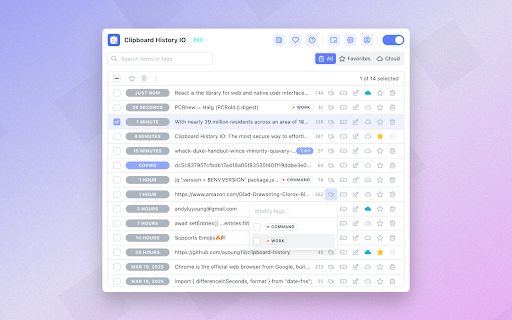


Powerful clipboard history manager. Save, search & organize everything you copy. Tags, shortcuts & unlimited storage. Clipboard History IO - Open Source Clipboard Manager & History for Chrome The most secure clipboard history manager for Chrome - fully open source, privacy-focused, and packed with powerful features. Experience professional clipboard management without compromising your security. Unlike traditional clipboard managers that require invasive permissions to "read and change all your data on all websites," Clipboard History IO only accesses your clipboard - nothing more. As the first fully open-source clipboard history extension, every line of code is transparent and auditable on GitHub, ensuring your sensitive data stays secure. 🚀 Powerful Features for Every User • Complete Clipboard History - Never lose copied text again. Access your entire clipboard history with instant search, favorites, and custom tags for organization. • Multiple Access Methods - Use clipboard history your way: popup window, floating resizable window, Chrome sidebar panel, right-click context menu, or keyboard shortcuts. Quick access with Alt+Shift+V to open the extension instantly, plus Alt+Shift+1/2/3 for direct pasting. • Smart Organization - Tag entries with colors, mark favorites, search instantly, and sort by date or alphabetically. Monitor your storage usage with the built-in storage analytics tool to optimize your clipboard history. Perfect for managing code snippets, passwords, templates, and frequently-used text. • Cross-Device Sync (Pro) - Seamlessly sync your clipboard across all devices. Copy on your computer, paste on your phone with our native mobile apps - now available on the App Store for iOS (https://apps.apple.com/us/app/clipboard-history-io-mobile/id6747272140) and Google Play Store for Android (https://play.google.com/store/apps/details?id=com.andyluyoung.clipboardhistoryio). True universal clipboard access. • Import/Export & Migration - Switch from Clipboard History Pro or other clipboard managers easily. Export your data anytime for backup or portability. • Advanced Merge Tool - Combine multiple clipboard entries into one. Essential for developers merging code blocks or writers combining research notes. • Customizable Experience - Dark/light themes, adjustable storage limits, default tab preferences, and multiple language support. Your clipboard contains sensitive information - passwords, personal data, confidential documents. That's why Clipboard History IO is built with security as the foundation: 💼 Perfect For: Developers - Manage API keys, code snippets, terminal commands, and configuration files with tags and search. Writers - Organize research, quotes, and drafts. Never lose important edits or references. Professionals - Quick access to email templates, meeting links, and frequently-used information. Security-Conscious Users - The only clipboard manager with verifiable privacy through open-source code. While other clipboard extensions remain closed-source black boxes, Clipboard History IO provides complete transparency. Compatible with both Chrome and Firefox, supporting Manifest V3 for future-proof performance. Import your existing data from Clipboard History Pro and experience a better, more secure clipboard manager. Pro Features: Unlock cloud synchronization to access your clipboard history from any device. Download our mobile apps from the App Store for iOS (https://apps.apple.com/us/app/clipboard-history-io-mobile/id6747272140) and Google Play Store for Android (https://play.google.com/store/apps/details?id=com.andyluyoung.clipboardhistoryio) for seamless cross-platform access. Your clipboard becomes truly universal - copy anywhere, paste everywhere. Join thousands of users who've chosen security without sacrificing functionality. Your clipboard history should be private, secure, and always accessible - with Clipboard History IO, it finally is.

Clipboard History
Keep a history of the text you copy and paste in your Chrome Browser. Need a simple way to track all the text you copy and paste each day? You can do so when you install this simple extension today. This software will store in your own computer, all the phrases/paragraphs of text you copy and paste in the Google Chrome browser each day. Please note this information is stored on your computer and is NOT uploaded onto our servers. The software will also show you when a specific piece of text was copied and marks down the exact date/time this text was copied. You can also choose to delete any piece of history from the Clipboard manager. This clipboard software is simple to use and all the data which you copy & paste will never leave your computer.

Permanent clipboard
Keep your most-used replies, templates, and notes one click away. Insert anywhere from the popup or right-click menu. Stop retyping the same messages, replies, and instructions in your browser. Permanent Clipboard saves your most-used text — responses, templates, links, notes — and puts them one click away. Open the popup to browse your library, or insert directly from the right-click menu without breaking your flow. What you get: * Save once, reuse anywhere — keep common wording ready instead of rebuilding it from memory * Organized in folders — group work, personal, and teaching snippets so your library stays usable * Two ways to insert — popup for browsing, context menu for speed while you're already typing * Flexible storage — keep data local, sync across devices, or export a backup Works best for support teams, recruiters, educators, developers, and anyone who keeps typing the same things.

Clipboard History
Use copy paste history as your clipboard manager. This is the easiest way to access and copy clipboard history. Introducing the copy paste history chrome extension! 🎉 Unlock the full potential of your clipboard with the copy paste history extension, designed to enhance your productivity by efficiently managing copying and pasting tasks. This powerful tool allows to keep track of everything that we copy, ensuring that our clipboard hist is always at the fingertips. Why choose our copy paste extension? 1️⃣ Seamless Clipboard Management: With our clipboard manager, users can easily access and reuse any text, images, or links he have copied. No more losing important information! 2️⃣ User-Friendly Interface: The extension features an intuitive design that makes it easy for anyone to navigate through their clipboard history without any hassle. 3️⃣ Advanced Search Functionality: Quickly find specific items in your clipboard history using our powerful search feature. Clipboard manager saves time and boosts efficiency when you're looking for that one piece of text. 4️⃣ Pin Favorites: Keep frequently used items close at hand by pinning them to the top of the copy paste history. This ensures that your most important content is always accessible. 5️⃣ Enhanced Security Features: Copied content remains private and secure. Our clipboard manager does not store sensitive information from password managers, ensuring that your data stays safe. Key features of copy paste history: Comprehensive clipboard history: Automatically saves every piece of text client copy, allowing him to access and reuse it easily at any time. Clipboard manager for mac: Specifically optimized for mac users, this clipboard manager seamlessly integrates with any operating system to collect clipboard history mac. Clipboard history app functionality: Enjoy the benefits of a dedicated copy paste history app right within every browser, making it easier than ever to manage your copied content. Copy text history tracking: Keep a detailed record of all copied text, making it simple to retrieve past entries whenever user need them. Manage clipboard effectively: With our clipboard manager, you can organize entries into favorites and tags, streamlining workflow. 💡 How to get started with copy paste history: Install our copy clipboard app by clicking "Add to Chrome". -Start copying text from any source. -Access clipboard history by clicking on the extension icon. -Use the search function to find specific entries. -Pin important items for quick access in the future. 🌟 Why you need a clipboard manager: Using a clipboard manager like copy paste history can significantly improve productivity: Efficient workflow: By keeping track of all copied items, there is a possibility to streamline tasks and reduce time spent searching for information. Increased organization: The ability to tag and favorite entries helps maintain a tidy workspace, making it easier to find what clients need when clients need it. Enhanced collaboration: Share snippets of information quickly and easily with colleagues or friends without losing context. 📝 Features that set us apart: Multi-Language support: Our copy paste history manager supports multiple languages, making it accessible for users around the world. Customizable settings: Tailor the extension's behavior to fit your personal workflow preferences, ensuring maximum efficiency. Regular updates: We are committed to continuously improving the clipboard manager based on user feedback and technological advancements. 🔍 Frequently asked questions (FAQs): 📌 How does copy paste hist work? The copy clipboard extension saves everything you copy into a local database. You can then access this database to retrieve past entries whenever needed. 📌 Can I use this extension on mac? Absolutely! Our clipboard history manager is fully compatible with Mac systems, providing a seamless experience for Mac users. 📌 Is my data safe? Yes! The extension prioritizes user privacy by not storing sensitive information from password managers or other secure sources. 📌 How many items can I store in my clipboard history? There is a possibility to store up to 1000 recent copied items, ensuring that you'll never run out of space for important snippets. 📌 Is there a mobile version available? Currently, the extension is designed for desktop use; however, we are exploring options for mobile compatibility in future updates. 💼 Maximize your productivity today! With copy paste history, you'll never have to worry about losing track of important information again. This powerful copy paste hist app is designed to make managing tasks easier than ever before. Whether you're a student, professional, or creative individual, our clipboard manager will help you stay organized and efficient in all endeavors. ✨ Start using copy paste history now and transform how you manage your clipboard! For any questions or feedback regarding the extension, please reach out via our support email at devbycores@gmail.com💌

Clipboard Manager Pro
Smart clipboard manager : Save and find your copied text anytime. Simple, fast, and organized. Never lose copied text again! Powerful clipboard manager with smart snippets, organized notes, and instant search. Boost productivity for developers, writers, and multitaskers. KEY FEATURES: - Clipboard History - Save & access all copied text instantly - Smart Snippets - Reusable templates with custom shortcuts - Quick Notes - Capture ideas, web content & selections - Fuzzy Search - Find anything in milliseconds (Cmd/Ctrl+Shift+F) - Color Tags - Organize with visual categories - QR Codes - Share clipboard items easily - Auto-Capture - Never miss important copies - Dark/Light Themes - Customize your experience - Backup/Restore - Export/import your data anytime - 100+ Languages - Full multilingual support - Sync seamlessly across all your devices PERFECT FOR: ✓ Developers - Code snippets & documentation ✓ Writers - Research & references ✓ Support Teams - Template responses ✓ Students - Study materials ✓ Everyone - Daily copy/paste tasks SECURE & PRIVATE: Your data stays on your device. Optional cloud sync available. Lightning-fast performance. Install now and transform your clipboard into a productivity powerhouse!
