
hocnnmhgcikjadmcgimjfabidalgejio
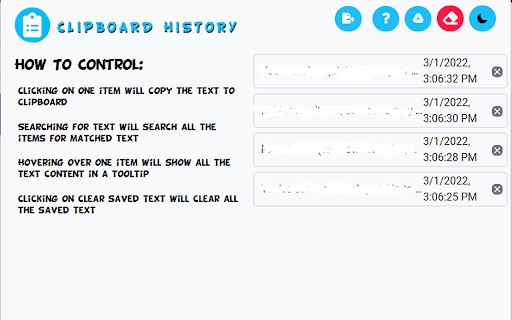
Keep a history of the text you copy and paste in your Chrome Browser. Need a simple way to track all the text you copy and paste each day? You can do so when you install this simple extension today. This software will store in your own computer, all the phrases/paragraphs of text you copy and paste in the Google Chrome browser each day. Please note this information is stored on your computer and is NOT uploaded onto our servers. The software will also show you when a specific piece of text was copied and marks down the exact date/time this text was copied. You can also choose to delete any piece of history from the Clipboard manager. This clipboard software is simple to use and all the data which you copy & paste will never leave your computer.

Clipboard History Plus: best productivity tool
Clipboard history manager extension for your browser: history of copied text & instant paste Clipboard History Plus is an advanced clipboard manager extension for your browser, designed to optimize your copy-paste experience. This tool tracks everything you copy on your computer and allows you to manage your clipboard history effortlessly. the best in its branche - Comprehensive History Management: Automatically saves every piece of text you copy, allowing you to access and reuse it easily at any time. - Search Functionality: Quickly find specific items in your clipboard history with a powerful search feature, making it easy to locate the information you need without scrolling through a long list. This tool is ideal for boosting productivity, especially well-suited for study, development, copywriting and many more. Active Development Clipboard History Plus is an actively developed project, and we are committed to continuously improving its functionality. We are eager to hear your thoughts and suggestions for new features. Please send your feedback (bugs, feature request or anything else) via email or through the support options below to help us shape the future of this extension! Response time is maximum 24 hours during working days. Please don't forget to support us by giving a 5-star review if you like the extension and got value from it. UPDATE: Keep sending us feedback and leave a 5-star review. We are building based on the most frequently asked features.

Clipboard History
Effortlessly access, check, and view clipboard history on Mac and Windows 10. Easily see macos and windows clipboard history. 💻 Clipboard History: A Tool to Transform Your Workflow and Supercharge Your Productivity! - Are you tired of juggling multiple text snippets, complex code blocks, or those frustratingly hard-to-find links? - Do you ever wish you could effortlessly access a comprehensive and detailed archive of everything you've copied? - Then view clipboard history as the ultimate extension designed for you, whether you're a dedicated Mac user or a diehard Windows enthusiast. 💪 Unleash the Extraordinary Potential of Your Clipboard (Discover the True Power That Lies Dormant Within!) This extension transforms your previously simple clipboard into a productivity powerhouse: ⚡ Experience Lightning-Fast Access at Your Fingertips: • Instantly find the information you need with a simple click. • Your complete data, from your accessed clipboard history mac to see your detailed clipboard history windows 10, is always readily available and waiting to serve you. 📦 Effortlessly Store and Retrieve a Vast Array of Information: • Meticulously build a history archive of your last 100 copied elements (text, links, code snippets, and so much more). • Say goodbye forever to lost data and tedious retyping with the help of this powerful and robust clipboard manager! 🔍 Powerful Search: • Use the extension's precise search feature to instantly find specific details hidden within your vast clipboard history macos, windows clipboard history, or detailed Linux archive. 📂 Stay Organized and Maintain an Efficient Workspace: • Effortlessly delete unneeded entries, personalize your usage, and maintain a streamlined and distraction-free workspace that fosters focus. 💡 Access Clipboard History: Your Indispensable Productivity Game-Changer (Change the Way You Work and Achieve New Levels of Efficiency) • Transform the way you work and experience unmatched gains in efficiency with these life-changing benefits: ✨ Eliminate Tedious Retyping Forever: Reuse frequently-used text blocks, complex email templates, intricate code – anything you diligently copy for mac, Windows, or otherwise! 🌍 Experience Universal Compatibility and Seamless Functionality: • Enjoy an effortlessly easy and remarkably smooth experience whether you need to view clipboard history on macOS, access clipboard history on Windows, or check your history on Linux! 🛡️ Reliable Clipboard Backup That You Can Trust: • Rest easy knowing your history acts as a secure and reliable safety net. • Accidentally overwrite something important? There's an excellent chance it's preserved within the depths of the app. 🔄 Maintain Uninterrupted Focus and Flow: • Avoid distracting context switches and eliminate the frustration of endless re-copying. • Stay focused on your task, maintain your flow state, and achieve more in less time with mac Clipboard History! An Essential Tool for Your Success (If You Work with Text, Code, or Any Type of Data, This Transformative Extension is a Must-Have!): clipboard History 🔹 Writers and Researchers: Effortlessly streamline your workflow by referencing your extensive and detailed computer data of quotes, notes, and research materials. 🔹 Developers: Boost your productivity to extraordinary new levels with this powerful clipboard manager. Instantly access intricate code patterns and minimize errors for both Mac and Windows users. 🔹 Students: Easily track research, key information, and essential course materials, all accessible within your comprehensive history of clipboard items. 🔹 Busy Professionals: Streamline your tasks effortlessly by storing and quickly accessing commonly used email signatures, addresses, login details, and countless other frequently needed bits of information. 🚀 Maximize Your Productivity Potential Ready to embrace a smarter, faster, and more efficient way to copy and paste? Install today and revolutionize your workflow on Mac or Windows! ❓ How do I find my archived data? 💡 The extension provides a clear and intuitive interface to access clipboard history. ❓ Can I exercise complete control over what's stored within? 💡 Absolutely! You can easily manage your history clipboard by deleting items to match your preferences. ❓ Will this extension function seamlessly on my operating system? 💡 Designed to work on macOS (macos clipboard history), Windows (windows clipboard history), and Linux systems. ❓ Is my data safe and will my privacy be respected? 💡 The extension prioritizes your privacy by storing your data locally on your device, ensuring maximum security. 💥 Level Up Today – Install Clipboard History! (Don't Worry About the Occasional Typo) We understand that sometimes you're in a hurry! It might even be helpful if you're searching with typos like 'clip bord'.

Chrome Clipboard - Type less, browse faster.
Save your frequently used info and never type them again. Chrome Clipboard makes your browsing journey less frustrating. Instead of having to type too often the same info such as your e-mail, just paste them! Save them only once in the extension, and retrieve them from any synced devices. Edit and delete your information within a cutting-edge user experience. Filter your info using the search bar.

Clipboard Archive
Remember what you copied with Simple and Free Clipboard archive Clipboard Archive is an easy-to-use free chrome extension that will directly help you track your clipboard history and free your time from searching the source. 👉Page Source: Helps you in redirecting to the source page from which the content was copied and it also has fav-icon to help you navigate the archived clipboards list. 👉Character Length: Helps the user in tracking the character length of each and every clipboard, so you don't have to go find other tools to find the character limit of your context. 👉Delete Clipboard History: Delete all the clipboards by clicking the “Clear All” button on the top-right corner or delete the individual clipboard by clicking the recycle action icon. 👉Safe & Secure Data: We don't store any of your personal or private or clipboard information in our database , all of the clipboard data is stored in your local system which expires when you delete the clipboard archives. We no way possess any of your data for your safe and secure user journey.
