
olldjcoidgojgheennokeojekgepgnhg
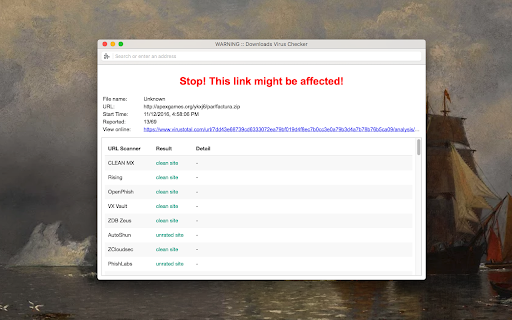
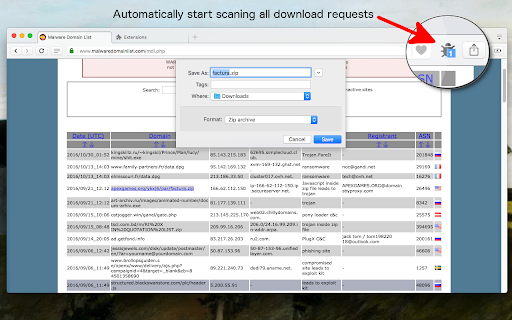
Automatically check all the download files against well-known anti-viruses using VirusTotal API The "Virus Checker for Downloads" extension provides an additional security level to your browsing experience by checking all download links against 68 antivirus solutions. The extension needs zero configuration. Once a new download request is submitted, the download link is sent to VirusTotal web service and will be checked for viruses. Once the report is ready, the extension evaluates the response and notify you if the link is a threat. If there are more than pre-defined positive responses to the link, a warning window will appear to notify you about the possible threats of this download. You can either decide to allow or deny this download. Features: 1. Check every downloading job that is placed to the download manager 2. Works asynchronously, which means your downloading job is not being interrupted. 3. Respects the rate limits of VirusTotal free API (it only checks once per 20 seconds for job results) What is VirusTotal (from Wikipedia): --- VirusTotal aggregates many antivirus products and online scan engines to check for viruses that the user's antivirus may have missed, or to verify against any false positives. Files up to 128 MB can be uploaded to the website or sent via email. Anti-virus software vendors can receive copies of files that were flagged by other scans but passed by their engine, to help improve their software and, by extension, VirusTotal's capability. Users can also scan suspect URLs and search through the VirusTotal dataset. VirusTotal for dynamic analysis of malware use Cuckoo sandbox. VirusTotal was selected by PC World as one of the best 100 products of 2007. ---

WebDefender: Antivirus & Privacy Protection
WebDefender is a lightweight addon designed to clean browser from malware, prevent phishing and protect your private information. Enjoy a safe and clean browsing experience with WebDefender! WebDefender is a cyber-security-based Chrome extension, which blocks all site notifications and adds a new layer to your in-browser cyber protection. • Block site notifications & popups- By enabling popup protection you make sure your browsing experience is safe and smooth, uninterrupted by the annoying popups. • Block harmful sites - Avoid sites that could be harmful to your device and steal your information. • Suspicious sites detection - Get alerts when you visit sites with low credibility. • Link protection - Protects the links you send to your peers by using a secure environment in which to be opened. • Automatic App Removal - Disables immediately any malicious app found on your browser. • Pre-install App Alerts - Harmful extensions are initially detected and alerts show the possible threat. • Data Leaks Supervision - If you enable Data Leaks Supervision you can be sure that if any leaks of your information are detected you will immediately be notified and can take the necessary actions to prevent it. Disclaimer: No strings attached. You can cancel your subscription at any time. Our team is available at support@getwebdefender.com. By installing WebDefender you confirm and agree with WebDefender’s Privacy policy and Terms and Conditions:

Malware & URL Scanner
Malware & URL Scanner Chrome extension helps to scan websites or domain, IP for malware, phishing, and spam content. The URL & Malware Scanner - Stay protected from malicious, phishing, scam websites when visit or redirect to suspicious URL and malware from infecting your windows or mac by using this extension. Now, this extension available on all major browsers Chrome, Firefox and Microsoft Edge. Note: This extension is built with freely available resources so it comes with restricted usage per day basis. We are working on to come up with upgraded version soon. You can consider supporting me with a dime to continue to develop and enhance extension features and maintenance. If you would like to support, please visit Buy Me A Coffee https://www.buymeacoffee.com/d09r to donate. I would like to hear your valuable feedback or requirements to consider in upcoming features, if you have any such feature request or come across any usage issues and would like to contribute to improve the user experience, then please provide a rating and leave a comment on the Chrome Web Store review page. Features: - URL lookup & File scan with Malware datasets or Antivirus (VirusTotal, Google Safe Browsing, PhishTank, WOT, McAfee, Norton, Trend Micro) - Whois lookup - Website's SSL certificate lookup - Geolocation IP lookup - Reverse IP lookup - DNS & Reverse DNS lookup - Reverse Google Analytics lookup - Website historical screenshots lookup - Live HTTP headers and website extract URLs - Google's cache & Internet Archive Wayback Machine cache lookup - Website category & subdomains lookup - Website passive DNS replication lookup - Using Google dork search queries to gather info for an URL investigation Upcoming features: -- Security News -- Copy or download scan report -- urlscan.io lookup -- Multilingual support -- Beta release for Safari browser >> Mozilla Firefox This extension also available for Firefox browser (Desktop and Android smartphones): https://addons.mozilla.org/firefox/addon/malware-url-scanner/ >> Microsoft Edge This extension also available for Microsoft Edge browser: https://addons.mozilla.org/firefox/addon/malware-url-scanner/ For Chrome: https://chrome.google.com/webstore/search/d09r?_category=extensions For Firefox: https://addons.mozilla.org/firefox/user/D09r/ For Microsoft Edge: https://microsoftedge.microsoft.com/addons/search/d09r

Security Tweaks
Improve your online security with few tweaks via toolbar popup! Security Tweaks is an extension that helps you improve your security while browsing by using eight different techniques. Simply open toolbar popup UI and mark a desired tweak. Please note that, only few tweaks are selected by default. There are few settings (related to JavaScript, inline-script and cookie) available in toolbar popup to adjust. Currently there are 8 tweaks available for this add-on: 1. Block most common ads. 2. Block third-party JavaScript. 3. Enable safe-browsing. 4. Block cookies. 5. Block inline-script. 6. Block Flash contents. 7. Disable window.eval(). 8. Block most common malware URLs. Note 1: I have made this extension with Yubi's collaboration. This add-on is inspired by Speed Tweaks made by Yubi: https://chrome.google.com/webstore/detail/speed-tweaks/afebilemcaepdkmhmibgmnpfppnjimjf Note 2: to report bugs, please fill the bug report form in the addon's homepage (https://mybrowseraddon.com/security-tweaks.html).

OPSWAT File Security for Browser
Scan files and downloads with OPSWAT File Security for Browser Scan every download from your Chrome browser with over 30 anti-malware engines and industry-leading vulnerability scanning technology. OPSWAT File Security for Chrome is an easy-to-use tool that examines every download via MetaDefender Cloud. Leverage the file hash database, fast multi-scanning, patented vulnerability scanning and effective data sanitization (CDR) to detect and block threats in files and applications before you download them. You can also try out MetaDefender Cloud by visiting https://metadefender.opswat.com
