
okmbiihjdbcblijmobaacddifcoaggeg

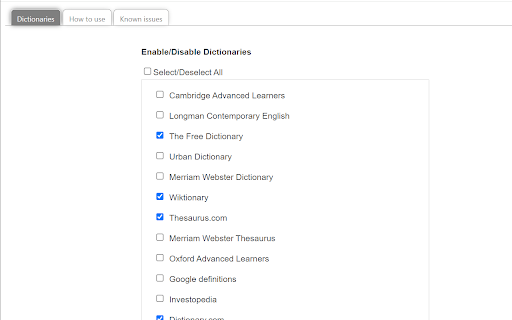

Lookup free online dictionary and thesaurus sites for definitions. This extensions helps you easily lookup definitions of words in free online dictionaries/thesaurus. Current version of the extension includes Cambridge Advanced Learner's dictionary, Oxford Advanced Learner's dictionary, Collins English Dictionary, Online Etymology Dictionary, and many more. You may contact the developer if you wish to add a dictionary of your choice to this browser extension.

Google Dictionary (by Google)
View definitions easily as you browse the web. IMPORTANT: - The pop-up bubble will not work in tabs that were open prior to installation. After installing this extension, either reload your open tabs or restart Chrome. - Note that all extensions are disabled on Chrome Web Store pages (including this one). Do not test the extension on this page; it will not work! - If the extension is not working for you, please make sure it's up to date. Visit chrome://extensions/, click the "Update extensions now" button, then restart Chrome. With this extension, you can: 1) Double-click any word to view its definition in a small pop-up bubble. 2) View the complete definition of any word or phrase using the toolbar dictionary. 3) Store a history of words you've looked up, so you can practice them later. Foreign words are automatically translated to your language of choice. If you opt in (via the options page), this extension will store a history of all your looked-up words and their definitions. You can download this history as a CSV file at any time. In addition, you can allow other Chrome extensions to access this history. For example, a third-party extension could produce flashcards to help you practice words you've looked up before. By installing this extension, you agree to the Terms of Service: https://www.google.com/policies/terms Having problems with this extension? If the suggestions above didn't work, please fill out a problem report: https://chrome.google.com/webstore/support/mgijmajocgfcbeboacabfgobmjgjcoja

Click dictionary
This extension saves you time when reading text on a web page, in a foreign language, by allowing you to double click on the words you don't understand and providing you an intuitive translation popup.

Dictionariez: Your Dictionary, Your Language
A customizable dictionary extension that supports double-click lookups in 20+ languages, 1000+ dictionaries, and Anki integration. 📚 Dictionariez: Your All-in-One Language Learning Toolkit 🚀 Learn any language faster and more effectively directly from your browser. Dictionariez combines instant lookups, your favorite dictionaries, text-to-speech, translation, and powerful Anki integration to turn reading into rapid vocabulary acquisition. ✨ Features: ⚡ Instant Lookup: Double-click any word on any webpage for a quick definition pop-up. Right-click or starting the app for a deep dive into detailed explanations. 📖 Choose Your Dictionaries: Fully customize your learning by selecting and prioritizing your favorite dictionaries. Supports multiple dictionaries for in-depth, multilingual study. 🧠 Seamless Anki Integration: Transform words from your lookup history into Anki flashcards with a single click. Effortlessly move vocabulary into your long-term memory. 🗣️ Master Pronunciation: Get instant realistic pronunciation using the built-in Text-to-Speech (TTS) feature, just select any text to hear it read aloud. 🌍 On-Demand Translation: Select any text on any website for an instant translation to your target language. 🎛️ Flexible Customization: Set customizable keyboard shortcuts that match your workflow for lightning-fast access, and benefit from auto-complete suggestions while typing your search. 🌐 Community, Support & Open Source Dictionariez is built for and by language learners. We welcome your contributions! * Contribute on GitHub: This project is Open-Source! Help us improve Dictionariez by reviewing, reporting, or contributing code. https://github.com/pnlpal/dictionariez/ * Explore Dictionary Collections: Find and import new dictionaries curated by the community. https://pnl.dev/category/4/dictionariez-trove * Suggest & Feedback: Request a new dictionary or suggest features directly. https://pnl.dev/category/3/feedback * Join Our Discord: Connect with other language learners and the Dictionariez team. https://discord.gg/sazRac4kSa

Cambridge Dictionary
Look up selected text in 'Cambridge Dictionary' page. Look up selected text in https://dictionary.cambridge.org, using predefined dictionary. While in Cambridge Dictionary page, automatically focus on search box when typing. When popup tab is closed, previous active tab will be active again. This is very helpful if you are in middle of handful of tabs.
