
diojcfpekhhnndfmggknljpnfpcccbhc


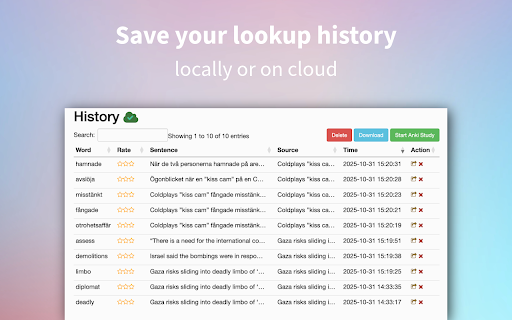

A customizable dictionary extension that supports double-click lookups in 20+ languages, 1000+ dictionaries, and Anki integration. 📚 Dictionariez: Your All-in-One Language Learning Toolkit 🚀 Learn any language faster and more effectively directly from your browser. Dictionariez combines instant lookups, your favorite dictionaries, text-to-speech, translation, and powerful Anki integration to turn reading into rapid vocabulary acquisition. ✨ Features: ⚡ Instant Lookup: Double-click any word on any webpage for a quick definition pop-up. Right-click or starting the app for a deep dive into detailed explanations. 📖 Choose Your Dictionaries: Fully customize your learning by selecting and prioritizing your favorite dictionaries. Supports multiple dictionaries for in-depth, multilingual study. 🧠 Seamless Anki Integration: Transform words from your lookup history into Anki flashcards with a single click. Effortlessly move vocabulary into your long-term memory. 🗣️ Master Pronunciation: Get instant realistic pronunciation using the built-in Text-to-Speech (TTS) feature, just select any text to hear it read aloud. 🌍 On-Demand Translation: Select any text on any website for an instant translation to your target language. 🎛️ Flexible Customization: Set customizable keyboard shortcuts that match your workflow for lightning-fast access, and benefit from auto-complete suggestions while typing your search. 🌐 Community, Support & Open Source Dictionariez is built for and by language learners. We welcome your contributions! * Contribute on GitHub: This project is Open-Source! Help us improve Dictionariez by reviewing, reporting, or contributing code. https://github.com/pnlpal/dictionariez/ * Explore Dictionary Collections: Find and import new dictionaries curated by the community. https://pnl.dev/category/4/dictionariez-trove * Suggest & Feedback: Request a new dictionary or suggest features directly. https://pnl.dev/category/3/feedback * Join Our Discord: Connect with other language learners and the Dictionariez team. https://discord.gg/sazRac4kSa

Youtube2Anki
Downloads the transcript of a YouTube video to a CSV or send it directly to Anki as a new deck, using the original audio/video of the current sentence and without having to download the original media.

Oxford Dictionary Lookup
Looks up the selected text on Oxford Learner's Dictionaries Look up the selected text on https://www.oxfordlearnersdictionaries.com. Simply right-click on the selected text and choose "Oxford Lookup..." Automatically close old popups. Maintain a history of 15 words you've looked up. Full privacy protection, no data collection.

Vocab Tracker
VocabTracker is inspired by LingQ, Readlang and LWT: it helps you track your vocabulary on any web page. VocabTracker is a vocabulary tracking tool which can let you track your vocabulary on any page so that you can use any website as a language learning resource. It supports the following features: - Support English, French, Spanish, German, Italian, Russian, Ukrainian, Japanese, Chinese, Korean, Dutch, Arabic, Latin, Polish and more languages are being added now. - Analyze words on any web page and highlight the words with different colors based on your familiarity with the words. - Support adding user's own dictionaries to the tool, for example: NCIKU, Glosbe, merriam-webster and so on. - Support flash card and SRS system to help you memorize your vocabulary. - Support two modes -- "Lemma" and "Variant": in "Lemma" mode, the tool can find the lemma for word variants such as "were", "was", "is", "are", "am" and treat those variants as the same word ("be"). - Support adding phrases to your vocabulary. - Support segmenting Chinese (both Mandarin and Traditional Chinese) and Japanese with a very high accuracy. - Support exporting vocabulary to CSV file so that you can add your vocabulary to Anki or other tools. Note: This extension doesn't save your vocabulary data locally -- it saves them on a remote server. So in order to use this tool, you will need to register a user for this extension first.

Anki Dictionary
Look up words instantly and save them as Anki flashcards, 100x faster than manual entry. Any language, auto-detected. Anki Dictionary is the fastest way to capture, learn, and remember vocabulary in any language while browsing the web. Look up words in seconds, get context-aware definitions, and export beautiful flashcards to Anki for long-term retention. 🔥 Now with Multi-Language Support powered by Wordwise! Learn Spanish, German, French, Italian, Russian, Hungarian, and more - all with the same seamless experience you love. ⚡ Instant Lookup: Double-click any word for instant definitions. 🌍 Multi-Language: Auto detects language from context, get clear, structured definitions in your target language. 📥 One-Click Anki Export: Generate beautifully designed flashcards optimized for Anki. No manual formatting needed. Context sentence auto-captured. 📖 Context-Aware: Definitions adapt to the sentence context, so you learn the right meaning. Double-click any word to see definitions instantly (additional trigger key can be configured in settings) Export to Anki with one click That's it! Enjoy your learning in Anki. No account required for English lookups; Multi-language support available with Wordwise (7-day free trial included) ✅ Install now and start learning without breaking your reading flow. 🛠️ Setup: Connect to Anki (Required for Export) To export flashcards directly to Anki, you need the AnkiConnect plugin: Step 1: Open Anki on your computer Step 2: Go to Tools → Add-ons → Get Add-ons Step 3: Enter this code: 2055492159 Step 4: Click OK and restart Anki Step 5: ⚠️ Important: Refresh any open browser tabs after installing AnkiConnect That's it! Your flashcards will now sync directly to Anki. --------------------------------------------------- Change log v2.1.18 Smart head word v2.1.16 Bug fix v2.1.15 Since last export in lookup history page. Option to trigger auto-sync to AnkiWeb after export. Bug fix. v2.1.13 bug fix v2.1.12 Dark / auto mode; improved onboarding; bug fix v2.1.8 Show word on top of context (optional but default) v2.1.7 Bulk export via txt v2.1.6 Bug fix v2.1.5 Local look-up history management and batch export is now available! v2.1.2 Improved performance v2.1.1 Fix audio on AnkiDroid and card size on AnkiMobile v2.0.10 & v2.0.11 Improved export hints & banner v2.0.9 Allow showing pronunciation on card front v2.0.8 Getting started & clarify free usage v2.0.5 Improved sign up display v2.0.4 Minor bug fixes v2.0.1 Brand new design with multi-language support by Wordwise v1.0.18 Add a feedback form v1.0.17 Fix audio play button style on certain pages. v1.0.16 Better scrollbar for pop up window. v1.0.15 Do not redirect to onboarding page from manage page. Fix onboarding description for Mac. v1.0.14 Fix the bug that selected words count is not updated in the manage page. v1.0.13 Add an onboarding page to guide new users, and a congratulations page after looking up 50 words. v1.0.12 Add row to sort by words or added time. v1.0.11 Add a clear all saved words button in options page. v1.0.10 Add a search box to filter all words in manage page. v1.0.9 Support Option or ⌥ key for Mac v1.0.8 Optimize export file v1.0.7 Update AnkiDict template url v1.0.6 Add a warning line when not using AnkiDict template v1.0.5 Minor fix to always show export hint v1.0.4 Use AnkiDict card template for a better card appearance. v1.0.3 Make clear when no definition is found v1.0.2 Fix bug of looking up from right click menu v1.0.1 Change from double click to Ctrl + double click to avoid conflicts with select and copy etc.
