
mgijmajocgfcbeboacabfgobmjgjcoja


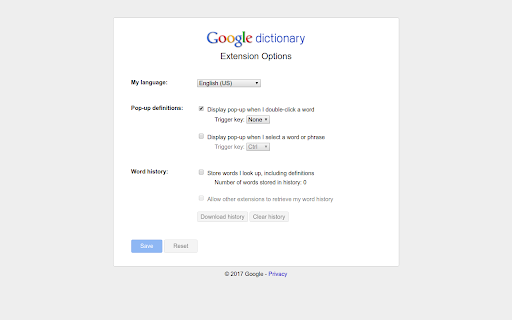
View definitions easily as you browse the web. IMPORTANT: - The pop-up bubble will not work in tabs that were open prior to installation. After installing this extension, either reload your open tabs or restart Chrome. - Note that all extensions are disabled on Chrome Web Store pages (including this one). Do not test the extension on this page; it will not work! - If the extension is not working for you, please make sure it's up to date. Visit chrome://extensions/, click the "Update extensions now" button, then restart Chrome. With this extension, you can: 1) Double-click any word to view its definition in a small pop-up bubble. 2) View the complete definition of any word or phrase using the toolbar dictionary. 3) Store a history of words you've looked up, so you can practice them later. Foreign words are automatically translated to your language of choice. If you opt in (via the options page), this extension will store a history of all your looked-up words and their definitions. You can download this history as a CSV file at any time. In addition, you can allow other Chrome extensions to access this history. For example, a third-party extension could produce flashcards to help you practice words you've looked up before. By installing this extension, you agree to the Terms of Service: https://www.google.com/policies/terms Having problems with this extension? If the suggestions above didn't work, please fill out a problem report: https://chrome.google.com/webstore/support/mgijmajocgfcbeboacabfgobmjgjcoja

Shortcuts for Google™
For the latest features, install G App Launcher: https://chrome.google.com/webstore/detail/ponjkmladgjfjgllmhnkhgbgocdigcjm Display all Google™ services as buttons in a space-saving popup next to your address bar. Reach services like Gmail, Google Drive, Google Keep, Google Maps, Google Calendar, and many more in just two clicks from your browser. The extension includes more than 1000 Google services and websites. Main features =================================== ✓ More than 1000 Google™ shortcuts, continuously updated ✓ shortcuts can be sorted and rearranged according to your needs (take a look at the screenshots) ✓ Support for different icon sizes ✓ Add your own custom URL button like a link to Facebook ✓ Change names of services ✓ Integration of GMail this!, Map this!, etc. Support =================================== Please report bugs and requests using the following link and not the comments: https://apps.jeurissen.co/shortcuts-for-google/contact The developer of this extension is not affiliated in any way with Google Inc. All Google icons and names are a trademark of Google Inc. Use of this trademark is subject to Google Permissions. Notice: All referenced brands, product names, service names and trademarks are property of their respective owner(s). The extension is free at the moment, you can buy me a coffee here: https://apps.jeurissen.co/shortcuts-for-google/donate

Rememberry - Translate and Memorize with Flashcards
Translate words while browsing and turn them into spaced repetition flashcards to build foreign language vocabulary. Never forget a word again. Rememberry is the smart tool for effortless language learning. Simply translate a word or phrase while browsing and turn it into a study card with a single click. Using a scientifically-proven spaced repetition system, Rememberry adapts to your memory. You'll review words just when you need to, maximizing long-term retention while saving study time. 🌐 Instant Translation - Translate any word or phrase on websites, in PDFs, or in a dedicated popup - Supports 100+ languages - Translation results are categorized by parts of speech - See reverse translations to gain deeper context - Listen to audio pronunciations for both original and translated words - Learn words in context with real-world examples - Get detailed definitions and expand vocabulary with synonyms and antonyms - Master phonetics with transcription 🎯 Efficient Learning - Spaced repetition for optimal efficiency - Optionally, practice cards anytime with manual repetition, bypassing the schedule - Choose your study mode: Text-based, Audio-based, or Typing practice - Practice cards in a forward or reverse direction ✨ In-page Highlights - See your saved flashcards highlighted directly on the web pages you visit - Review cards in-place with mini-repetition sessions to stay focused on the page content 📱 Mobile Application - Use it on any device with a browser, or install it on your phone for a seamless, standalone app experience - Study anywhere, anytime: translate words and learn new vocabulary on the go - AI Tools: instantly generate custom decks, practice through dialogues and dynamic exercises in chat, and receive personalized tips - Works offline: your learning continues even without an internet connection - Always up to date: your progress and flashcards are instantly synchronized across all your devices 💾 Sync & Control - Organize vocabulary into custom decks - Sync your cards, decks, and progress across devices, including the mobile app - Import and export decks (JSON/CSV) for easy sharing 🔔 Smart Reminders - Push notifications help you stay consistent - A visual badge on the extension icon shows pending cards Whether you're a beginner, an advanced learner, or a professional, Rememberry adapts to your style and schedule, making vocabulary acquisition efficient and enjoyable.

Mouse Dictionary
A super fast dictionary for language learners Mouse Dictionary is a super fast dictionary for Google Chrome. Designed mainly for English and Japanese. Features: * Super fast!!! * Awesome phrases detection * Capable of importing your own text data * Customizable view * Available on various documents: * PDF documents * YouTube captions * input elements * textarea -------- In addition to the built-in default English-Japanese dictionary, you can import data as you like including Japanese-English, English-English and so on. Please check here.

NDIC - 누렁이 영어사전 (Noorung Dictionary)
영어 단어의 뜻과 예문을 쉽게 찾을 수 있습니다. [4.5.5 업데이트: 2026.04.13] - 아이콘을 눌렀을때 팝업으로 열기 기능이 추가되었습니다. - 팝업으로 열기 혹은 사이드패널로 열기는 설정에서 선택 가능합니다. - 설정 페이지 스크롤 버그가 수정되었습니다. [4.5.4 업데이트: 2025.08.13] - Ctrl+Shift+E 로 사이드패널을 열 수 있음 (Mac : CMD+Shift+E) - 추후 지원 사항 - 사이드패널이 열릴때 인풋에 포커스 주는 기능은 아직 브라우저에서 지원되지 않습니다. - 브라우저 레벨에서 API가 추가되면 바로 업데이트 할 예정입니다. [4.5 업데이트: 2025.07.26] - 검색된 단어를 사이드패널에서 볼 수 있도록 변경 - 로고 및 익스텐션 이름 수정 - 피드백 남기러 가기 수정 - 버그 제보나 개선 의견은 아래 링크에서 해주세요! https://slashpage.com/ndic [4.4 업데이트: 2022.07.24] - 주요 버그 수정 - 변형된 단어 제안 기능 추가 [4.2 업데이트: 2022.05.08] - 사전 보조키 및 위치 설정 추가 - 다크 테마 지원 [이렇게 사용하세요] - 검색할 단어를 더블클릭하거나 드래그하면 단어 위에 사전이 나타납니다! - 주소창 옆의 익스텐션 버튼을 눌러서 검색하실 수도 있어요. - 사이드패널이 열려 있으면 더블클릭/드래그 시 사이드패널에 결과가 나타나요. - 설정 메뉴에서 가장 쓰기 편한 방법을 찾아보세요. 고맙습니다.
