
baohinapilmkigilbbbcccncoljkdpnd
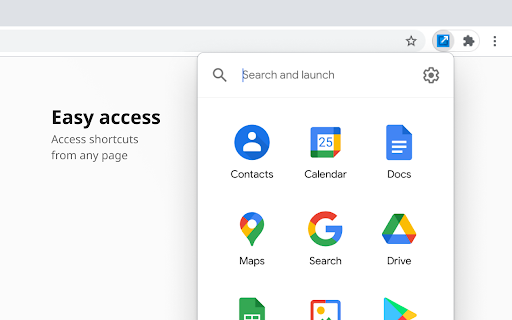

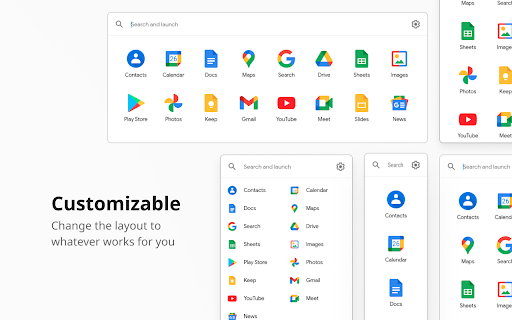

For the latest features, install G App Launcher: https://chrome.google.com/webstore/detail/ponjkmladgjfjgllmhnkhgbgocdigcjm Display all Google™ services as buttons in a space-saving popup next to your address bar. Reach services like Gmail, Google Drive, Google Keep, Google Maps, Google Calendar, and many more in just two clicks from your browser. The extension includes more than 1000 Google services and websites. Main features =================================== ✓ More than 1000 Google™ shortcuts, continuously updated ✓ shortcuts can be sorted and rearranged according to your needs (take a look at the screenshots) ✓ Support for different icon sizes ✓ Add your own custom URL button like a link to Facebook ✓ Change names of services ✓ Integration of GMail this!, Map this!, etc. Support =================================== Please report bugs and requests using the following link and not the comments: https://apps.jeurissen.co/shortcuts-for-google/contact The developer of this extension is not affiliated in any way with Google Inc. All Google icons and names are a trademark of Google Inc. Use of this trademark is subject to Google Permissions. Notice: All referenced brands, product names, service names and trademarks are property of their respective owner(s). The extension is free at the moment, you can buy me a coffee here: https://apps.jeurissen.co/shortcuts-for-google/donate

App Launcher in Popup
Allows you to access the Google App Launcher right from the Chrome toolbar This app has been replaced with G App Launcher, see: https://chromewebstore.google.com/detail/g-app-launcher-shortcuts/ponjkmladgjfjgllmhnkhgbgocdigcjm This extension allows you to access Google's App Launcher right from the chrome toolbar. This way, you don't need to open a new tab or browse to a google website to access it.

Black Menu for Google™
The easiest access to the Google universe with Gemini AI and sidebar support The easiest access to the Google universe with Gemini AI and Sidebar support. Black Menu for Google gives you quick access to your favorite Google services with a convenient drop-down menu that lets you use Search, Google+, Translate, and many others without leaving the page you’re on. Click on menu items to get a small windowed preview or click on the open in new button on the right to open them in a new tab. Customize the menu by pointing at ‘Add’ and dragging/clicking the services you want from a comprehensive list of services. To remove services, drag them to the right to remove them. Access these and more with Black Menu for Google: Search page. Quickly search the web or switch tabs to search for images, books, news, etc.—all within the mini window. Translate page. Type or paste text into the box to get a quick translation for that comment you received in a foreign language. View your translate history and save your favorite ones. Maps page. Find the next restaurant to try out by using the mini map that has search, Street View, and layers for satellite, traffic, public transport and cycling. YouTube page. Watch popular videos or those recommended to you. Do a search and filter the results to find that one video you wanted to share. Sign in to find useful shortcuts at the bottom. News page. Read top news from your locale or any country you choose. Also browse sections like World, Business, Sci/Tech and Entertainment. Use search to find news about any topic. Gmail. Get a full-featured Gmail inbox to check or send mail from. Reply to colleagues, edit labels, forward emails, or archive them—do almost everything Gmail can do right from the menu. Drive page. Browse folders or search for files in a nice familiar layout. View your documents as a list or see images in a grid view. Click the add button to upload files or make new ones. Calendar page. See your upcoming events summarized in a list. Toggle which calendars you’d like to see from the side drawer or just search for specific events. Keep page. Create lists, reminders, or paste snippets from the web. All your notes are here, including archived ones. Organize and rearrange them as you want. Apps page. Access shortcuts to common (and obscure) Google websites like Contacts, Groups, Art Project, Follow Your World and 1250+ more! Right click the Black Menu icon to send me feedback, suggestions, or to report a problem.

Extentie - extension manager
A simple and elegant Chrome extension manager allows you manage your extensions in a popup window. Extentie is a simple and beautiful tool that allows you to toggle and manage Chrome extensions in a popup. Latest update: - Now you can create your own groups to manage your extensions - Revamped from ground up, added more features

Ink for Google™
Get your favourite Google sites a new coat of paint. Update their look with Material Design Ink for Google improves the look of well-known Google websites like Search, Gmail and Calendar. It unifies them under the guidelines defined by the Material Design team at Google. Ink takes inspiration from the visual style of Android apps and their newest websites to create a better and consistent experience across all of these services. Ink currently works on most Google websites, even websites which already have material design. On those websites, it improves the design to better match the guidelines. This extension requires the permission to read and change your data on google.com sites to make the visual changes. See something that you think needs a visual tweak? Click the Ink icon to send us some feedback or to report a bug.
