
okllglaeplgffbdagpjfoklecoepldfh
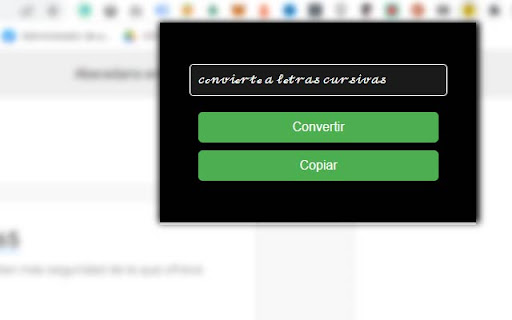

Convierte texto a letra cursiva en unicode Conversor de Letras Cursivas es una extensión de Google Chrome diseñada para brindar a los usuarios una herramienta fácil y rápida para convertir cualquier texto en hermosas letras cursivas en Unicode. Con esta extensión, puedes darle un toque elegante y personal a tus publicaciones en redes sociales, correos electrónicos, blogs y más. La funcionalidad de esta extensión es simple y eficiente, lo que la convierte en una adición útil a tu navegador Chrome. Funcionalidad y características principales: Conversión rápida de texto a letra cursiva en Unicode: Conversor de Letras Cursivas utiliza un algoritmo eficiente para convertir cualquier texto en letra cursiva Unicode. Esto permite a los usuarios agregar rápidamente un estilo distintivo a su texto, lo que resulta especialmente útil para resaltar publicaciones o agregar un toque artístico. Interfaz de usuario intuitiva y moderna: La extensión cuenta con una interfaz de usuario fácil de usar y moderna. El diseño es minimalista y elegante, con un fondo oscuro y elementos visuales contrastantes. Esta interfaz es perfecta para aquellos que buscan una experiencia de usuario agradable y sin complicaciones. Funcionalidad de copiado al portapapeles: Conversor de Letras Cursivas también incluye una función de copiado al portapapeles, lo que facilita a los usuarios copiar y pegar su texto convertido en cualquier aplicación o plataforma. Con solo hacer clic en el botón "Copiar", el texto en cursiva se copia al portapapeles y está listo para usarse donde sea necesario. Compatibilidad con múltiples idiomas y alfabetos: La extensión está diseñada para funcionar con una amplia variedad de idiomas y alfabetos, lo que la hace versátil y accesible para usuarios de todo el mundo. Esto incluye la capacidad de convertir caracteres latinos y otros caracteres específicos en su versión cursiva. Actualizaciones y soporte constantes: Conversor de Letras Cursivas se actualiza regularmente para garantizar que la extensión siga siendo compatible con las últimas versiones de Chrome y para corregir cualquier error o problema que pueda surgir. También ofrecemos soporte a los usuarios que necesiten ayuda con la extensión. Configuración personalizable: Los usuarios pueden personalizar la extensión según sus preferencias, como cambiar el color de fondo, el tamaño del texto y otros ajustes visuales. Esto garantiza que la extensión sea adecuada para cada usuario y sus necesidades individuales. Seguridad y privacidad: Conversor de Letras Cursivas no recopila ni almacena ninguna información personal de los usuarios. Todas las conversiones de texto se realizan localmente en el dispositivo del usuario, lo que garantiza que su privacidad esté protegida en todo momento. Respetamos la privacidad de nuestros usuarios y nos comprometemos a mantener un entorno seguro y confiable para todos. Amplia gama de aplicaciones: La extensión Conversor de Letras Cursivas es útil en una amplia variedad de situaciones y contextos. Los usuarios pueden utilizarla para darle un toque especial a sus publicaciones en redes sociales, como Facebook, Instagram o Twitter, así como para personalizar sus correos electrónicos, mensajes de texto y otros tipos de comunicación. También es perfecta para personalizar títulos y subtítulos en blogs y sitios web, así como para crear efectos visuales interesantes en proyectos de diseño gráfico y arte digital. Instalación y uso sin complicaciones: La extensión Conversor de Letras Cursivas es fácil de instalar y usar. Simplemente descárgala desde la Chrome Web Store y comienza a convertir tu texto en cursiva de inmediato. No se requiere configuración ni ajustes adicionales. Comunidad de usuarios y soporte: Conversor de Letras Cursivas cuenta con una comunidad creciente y activa de usuarios que comparten sus experiencias y ofrecen consejos y trucos para aprovechar al máximo la extensión. Además, proporcionamos soporte a nuestros usuarios a través de la Chrome Web Store, donde puedes dejar comentarios y obtener respuestas a tus preguntas.

Audio to Text Converter
Audio to text converter is designed to effortlessly transcribe audio to text. Convert audio to text with the latest ai transcription Why Choose the Audio to Text Converter? Audio to Text Converter makes it simple to transcribe: whether you need to record a lecture, summarize a meeting, or just convert audio to text. Its AI-driven algorithms handle a variety of accents, speech patterns, and even background noise, ensuring that tasks like voice to text and audio to text transcription are effortless and precise. User-Friendly: Quickly install the extension and start converting audio to text without any hassle. High Accuracy: Advanced AI ensures converted audio or speech are precise and accurate. Time-Saving: Transcribe automatically to focus on more important tasks. ⭐ Supports multiple audio formats, including MP3, WAV, and others. ⭐ Compatible with popular video platforms like YouTube to convert audio speech to video text. ⭐ Offers multilingual ai transcription for wide voice to text opportunities. ⭐ Transcribes not only previously recorded audio, but also real-time events including speech to text. ⭐ Provides export options of audio transcription by copying to clipboard or downloading as txt. This versatile tool is more than just an app to transcribe audio to text. It boosts productivity, making it an ideal choice for anyone needing an audio convert to text tool. ✔ Real-Time Transcription: Perfect for capturing live events or webinars instantly. ✔ Multilingual Support: Break language barriers with seamless audio to text conversion in multiple languages. ✔ Flexible Export Options: Save your transcribed audio, video or speech in the format that works best for you. ✔ And many more: With audio file to text converter. This tool is designed for a wide range of users: Students: Simplify note-taking with voice to text technology. Journalists: Accurately transcribe interviews. Content Creators: Convert recorded speech to text and scripts. Professionals: Document meetings efficiently via transcript generator. Anyone: Looking for fast and reliable audio to text transcription. 1️⃣ Simple Interface: No technical expertise required. 2️⃣ Regular Updates: Continuous improvements to stay ahead of user needs. 3️⃣ Dedicated Support: Quick and helpful responses to any queries. 4️⃣ Privacy-Focused: Ensures secure and confidential handling of user data. This tool is perfect for drafting papers, creating subtitles, or summarizing long-form content like podcasts. Its reliable transcript generator guarantees professional results tailored to your specific needs. ❶ Convert audio file to text for personal, academic, or professional projects. ❷ Transcribe live or recorded speech to text. ❸ Convert MP3 audio file to text for easy editing. ❹ Use it as an audio recording to text converter for on-the-spot transcription. ❺ Generate subtitles using its video to text converter feature. Download the audio to text converter extension from the Chrome Web Store. Upload an audio or video file or start a live transcription. Edit the text output as needed. Save or Export the final version in your preferred format. Why It’s the Perfect Fit The Audio to Text Converter google extension excels at handling complex scenarios, such as noisy environments, overlapping speech, and technical jargon. Whether you’re working on class notes, turning podcasts into articles, or documenting brainstorming sessions, this service simplifies your workflow. It even converts MP3 to text smoothly, adapting to diverse needs. By using the audio to text converter app, you can: 1. Save time and focus on what truly matters. 2. Enhance productivity with minimal effort. 3. Get professional-quality results with ease. The last but not the least Embrace the future of transcription with our audio to text converter google extension. From converting audio files to text to generating transcripts from video content, this tool is designed to meet diverse needs. Whether you're looking to transcribe audio recordings to text or convert mp3 audio files to text, our audio converter to text ensures accuracy and efficiency. Every word matters, and this audio to text converter ensures you never miss a detail. Experience the future of transcription today with the audio to text converter ai transcription app.

Number to Words
⚑ NumberToWords is an extension which helps you carry out day to day number conversion to words in very easy to go way. ⚑ NumberToWords simply allows user to select any number on any webpage and converted words are shown in popover just above the selection. Here are some examples that shows how one can use the extension: e.g. 1 = One 2 = Two 95450 = Ninety Five Thousand Four Hundred Fifty 100000 = One Lakh 10000000 = One crore. The website can be used on the financial websites like Zerodha Kite, Yahoo Finance, google Finance and many more. This extension can be used by the financial institutes like Mutual Funds, LIC, banking sector etc. The extension is made by India by Luwak technologies. Enjoy the creation.

Simplify: Text Simplifier
🌟 Simplify: Your AI-Powered Text Simplifier Transform intricate texts into easily understandable content with Simplify! This revolutionary browser extension is your key to effortlessly deciphering challenging information. Perfect for students, professionals, researchers, and everyone in between, Simplify is your personal AI-powered tool for conquering complex text on the web. 🔍 Simplify Mode: Instantly turn complicated content into clear, concise insights. Perfect for making sense of dense websites and documents. 🤔 Explain Mode: Delve deep for thorough understanding. Ideal for exploring and grasping detailed topics. 📝 Summarize Mode: Get the gist quickly with concise summaries of lengthy material. 🎓 For Students: Effortlessly grasp academic concepts. Make studying more efficient and effective. 💼 For Professionals: Quickly interpret jargon-heavy reports and articles. Stay ahead in your field with ease. 🌍 For Non-Native English Speakers: Enhance your understanding of English content. Break down language barriers. 🔬 For Researchers & Academics: Navigate complex academic papers with simplicity. Focus on your research, not on deciphering text. 👀 For General Web Users: Make any online text more accessible. Simplify brings clarity to the web. 💡 How Simplify Works: Select complex text, click Simplify, and watch as our AI transforms it into something easy to understand. It's that simple! ✨ Why Choose Simplify? Save time, improve comprehension, and access information with ease. Simplify is more than a tool; it's your partner in understanding the complex world of text. 👉 Join the Simplify Community Today: Download now and experience the ease of comprehending complex information like never before! It's free for 20 uses a month, with optional upgrades.

Upper Lower - Text Case Converter
Change a text to uppercase and lowercase quickly and easily **Includes a converter in the right-click menu** The extension is very easy to use: - Copy a text and paste it into the extension box. - Press the button according to how you want it (Uppercase, Lowercase, Capitalize, Capitalize All, Add hyphen, No spaces and No line break). - The extension will automatically select the result for you to copy. - Done, paste it wherever you want.
