
clhpelfcjphahimcabjdabcocdnphnfe

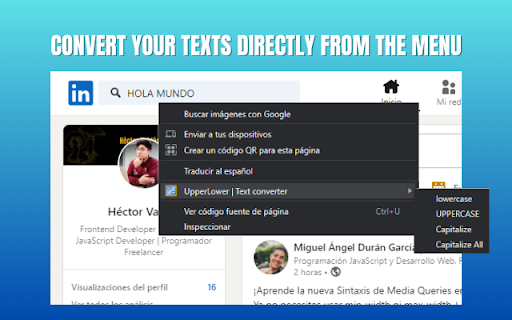
Change a text to uppercase and lowercase quickly and easily **Includes a converter in the right-click menu** The extension is very easy to use: - Copy a text and paste it into the extension box. - Press the button according to how you want it (Uppercase, Lowercase, Capitalize, Capitalize All, Add hyphen, No spaces and No line break). - The extension will automatically select the result for you to copy. - Done, paste it wherever you want.

Congree Web Interface
Write according to your company's Style Guide This extension helps you to integrate your company's Congree Authoring Server into specific websites. Research Meets Practice Content optimization solutions based on scientific insight and long-standing industry experience Higher text quality with less effort Apart from the reuse of sentences and consistent use of terminology, Congree offers a comprehensive Language Check that covers 98 percent of the English and German languages. The Congree Authoring Server is scalable and thus supports the editorial work in small, medium-sized, and large enterprises. Rule-Based Language Check Apart from the spelling, grammar, and terminology, the rule-based Language Check also checks the style. Predefined rule sets cover most application cases; additional company-specific rules can be added as needed. Authoring Memory The Authoring Memory serves as a sentence repository, which shows all text segments that are similar to your text and that were written and approved in the past. You can apply these text segments with a click. New sentences are included in the Authoring Memory after they are checked and approved. Congree Data Grooming can help to maintain and improve the quality of your Authoring Memory. Terminology Component The connection of third-party terminology software enables access to a wide range of information on terminology hits. The terminology component in Congree delivers definitions and usage information on specialized terms – including preferred terms, admitted terms, and deprecated terms.

case converter | capital letters to lowercase
effortlessly convert uppercase text to lowercase with our intuitive tool! save time and ensure clean, readable content. 🌟 transform your text effortlessly! are you tired of manually changing capital letters to lowercase? look no further! our uppercase to lowercase converter is designed to simplify your text editing tasks, saving you time and effort. 🔄 key features: ✨ quick conversion: instantly convert caps to lowercase with just a click! ✍️ user-friendly interface: simply paste your text, hit the button, and watch the magic happen! 💡 why use our extension? ⏱️ save time: stop struggling with tedious manual edits and let our tool do the work! 📄 perfect for writers and coders: quickly adjust your text case for documents, code, and more! 🎯 reliable results: with our extension, you can convert capital letters to lowercase in bulk, ensuring accuracy and consistency across your projects. 🔍 what you can do: convert capital letters to lowercase easily without worrying about formatting issues. effortlessly change uppercase to lowercase with our intuitive case converter. easily convert text from uppercase to lowercase for emails, reports, or any written content you manage. 🔗 seo-friendly features: 🚀 boost your productivity by converting upper case to lower case in one go! ✅ you can convert to lowercase while maintaining the original format of your text. 📝 get precise conversions with our powerful lowercase converter that guarantees fast results. 🌈 unlock the power of case conversion: convert lower case with advanced algorithms that ensure accuracy in every character. change upper case to lower case and impress your audience with clean, readable text. transform text from all caps to lowercase effortlessly, ensuring clarity in communication and professionalism in your documents. 🛠️ how to use: 1. paste your text: enter the text you want to convert in the provided field. 2. hit convert: click the button to let the converter perform its magic! 3. copy & paste: get your lower case text ready for use in any application. 🎯 ideal for various users: 📚 students: perfect for essays and assignments that require a polished look. ✏️ writers: ensure that your manuscripts are formatted correctly without manual edits. 💼 professionals: maintain a consistent tone and style in reports and presentations. 📈 enhance your text editing skills: with our tool, you can convert all caps to lowercase quickly and efficiently. convert capital to lowercase in bulk, making it a valuable resource for anyone handling large amounts of text. convert upper to lowercase with just a click, saving you countless hours of manual adjustments. 💬 feedback welcome! we love hearing from our users! your feedback helps us improve and create an even better experience. share your thoughts and suggestions! ✨ experience the ease of lowercase conversion: try our uppercase to lowercase converter today and say goodbye to manual edits! 🔄 convert to lowercase effortlessly with our innovative tool. ✨ change uppercase to lowercase in just a few simple steps. 🎉 lowercase conversion has never been easier or more efficient! 📞 get support anytime: if you encounter any issues or have questions about how to use the extension, our support team is here to help you. we aim to provide the best experience possible. 🌟 download now and start converting! don't waste time on tedious text editing. join countless satisfied users who have streamlined their workflow with our uppercase to lowercase converter.

Add to LinkJoin
Organize and automatically open virtual meetings. Keep all of your links in one central location where they can be sorted, searched for, and opened from any device with just a click. Receive reminders up to 30 minutes before a meeting and automatically opens it when the time comes. LinkJoin Bookmarks store links for access from any device at any time. Add to LinkJoin streamlines this process into a two-click process in your browser. Add to LinkJoin operates in the background so you can open links or open Zoom meetings automatically without any tabs running. Share links and bookmarks with others via the LinkJoin website, transferring your saved information to them as well.

News Storyline
Know Thy History and Be Notified About Future A Chrome sidebar extension and companion newsletter that gives you an unbiased, context-rich timeline of any news story and quietly watches for what happens next—so you never miss a beat (or waste time scrolling). 📖 On-Demand Timelines in Your Sidebar • One-click access while you’re reading any article: hit the extension icon to slide open a concise, chronological view of past reports on that story. • Facts, not opinions: we aggregate across dozens of reputable outlets, stripping out commentary bias so you see the unvarnished sequence of events. • Top highlights only: instead of drowning you in every mention, we surface a handful of the most relevant milestones—headlines, timestamps, and sources—so you instantly understand “what led here.” 🤖 Background Story Scanning & Positive Alerts • Hands-free monitoring: once you’ve opened a timeline, our service continues scanning in the background for new developments on that very story. • Positive-only notifications: you decide what matters—receive alerts only when something significant (and positive) happens, so your inbox isn’t full of noise. • Peace of mind: no more endless manual refreshes or fear of overlooking a breaking update. 📰 Daily Newsletter & “New Developments” Bulletin • Daily digest delivered each morning: a simple roll-up of every event we tracked across your subscribed stories in the past 24 hours—no grouping, no spin. • On-demand “New Developments” email: when fresh updates arrive mid-day (for critical beats), we’ll ping you separately so you stay in the loop around the clock. 🔔 Story Subscriptions & Future Tracking • Subscribe in one click: any timeline can be turned into a “watched” story. From that moment on, we’ll keep you posted on each follow-up report. • Tailored alerts: choose your stories—finance, politics, tech, climate—and we do the rest, surfacing only the most impactful next chapters. 🔧 Platform & Integration • Chrome-based browsers supported (Chrome, Edge, Brave, Opera). • Privacy-first: minimal permissions, no tracking beyond the stories you opt in to follow. • Lightweight: sits quietly in your toolbar, loading only when you ask. Who It’s For • Journalists & analysts who need quick, neutral context before filing next headlines. • Researchers & students chasing down backstory and evolution of key events. • Curious readers who want more than a single outlet’s perspective—and zero surprises when the story moves on. Why Know Thy History? • Context at your fingertips—instantly see what happened before. • Stop missing updates—positive alerts mean you’ll always catch the next big development. • Save time & mental bandwidth—no more endless feeds or biased roundups. Install now and start each story with the past in view—and the future on your radar.
