
okebhnfgbipakfncnjlhhfjiamilalen
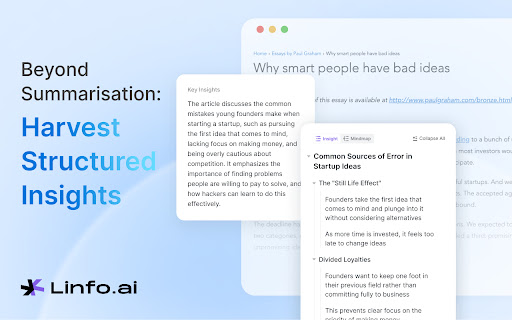


Summarize and Mind map web articles, YouTube videos, and PDFs into clear and structured insights, powered by ChatGPT and Claude. Enhance your learning with linfo.ai, the Chrome extension that simplifies complex articles into structured mind maps and insights. Ideal for students and professionals, it makes information digestible and retention effortless. Click, learn, and understand faster—transform the way you read online with linfo.ai. ** Reviewed as the best solution by many users.** Structured Insights: Organize information for easy understanding. Ease of Use: SUPER INTUITIVE design for seamless browsing, keep it simple! Collect as you read: Save original and digested content into your collection with a click. Dive In and Personalize: Customize the content hierarchy to match your reading preferences for a more personalized experience. Experience smarter reading with linfo.ai today! 🔍 For Researchers: - Dive deep into topics and emerge with comprehensive insights that fuel academic or professional projects. 🎓 For Students: - Tackle the barrage of educational material efficiently, creating summaries and notes that enhance learning and retention. 💼 For Professionals: - Stay ahead in your field by quickly assimilating industry trends, news, and professional literature into actionable intelligence. 🧠 For The Curious Minds: - Build a personal knowledge base on topics of interest. Linfo.ai serves as your assistant, simplifying the complexity of information discovery. 🚀 Start your journey to smarter, more efficient online interactions. Install Linfo.ai today and transform information into insights from anywhere. Thank you for trusting Linfo.ai. If you have any concerns or questions about our privacy practices, please contact info@linfo.ai

YouTube Summary with ChatGPT & Claude
Summarize YouTube videos, web articles, and PDFs to save time, powered by ChatGPT, Claude, Mistral AI, and Gemini. YouTube Summary with ChatGPT & Claude is a free Chrome Extension that lets you quickly summarize YouTube videos, web articles, and PDF you're consuming. Use this extension to save time and learn more quicker. YouTube videos, web articles, and PDF summarization functions are powered by ChatGPT (OpenAI), Claude (Anthropic), Mistral AI and Google Gemini. ## What are the benefits of using YouTube Summary with ChatGPT & Claude? The main benefits are saving time, increasing productivity, and improving learning. YouTube Summary with ChatGPT & Claude reduces the need to watch long videos when you're just looking for the main points. The summaries let you absorb information quickly so you can spend time on other tasks. ## How do I use YouTube Summary with ChatGPT & Claude? Using YouTube Summary is easy. After installing the browser extension, simply open a YouTube video you'd like to summarize. Click the YouTube Summary icon in your browser toolbar, and it will generate a summary and provide an option to access the video transcript if available. You will see a summary of the video with or without timestamps. You can click on the timestamps to jump to the corresponding part of the video. You can also click the "Copy Transcript" button to copy the transcript of the YouTube video to your clipboard. ## Can I customize the length of the YouTube video summaries? Yes, you can customize the length of the video summaries generated by YouTube Summary. Adjust the settings within the extension to tailor the summaries to your preferred level of detail. Also, you can customize the prompt to use to summarize the content. ## Is YouTube Summary with ChatGPT & Claude suitable for educational purposes? Yes, YouTube Summary with ChatGPT & Claude is a valuable tool for educational purposes. It provides concise summaries and transcripts that can aid in research, studying, and learning from YouTube videos. ## Can YouTube Summary with ChatGPT & Claude handle videos in languages other than English? Yes, YouTube Summary is capable of summarizing videos in multiple languages, making it a valuable tool for international users. You can also choose what language you want the transcript to be in. Fore more details, please visit the website: https://glasp.co/youtube-summary

YouTube Summary with ChatGPT & Claude
Automatically summarize articles, blogs, emails, and YouTube videos instantly with AI. SnipIt – AI That Reads the Internet for You SnipIt is your AI reading assistant and productivity browser extension. It helps you read faster, learn smarter, and save time on web content—right from your browser’s sidebar. – AI Summarizer – Instantly generate concise summaries of web pages, articles, research papers, and emails. – PDF Summaries – Instantly generate concise summaries of PDFs. – YouTube Video Summary – Quickly extract key points from videos without watching them in full. – Text-to-Speech (TTS) – Listen to summaries for multitasking or accessibility support. – Quiz Mode & Flashcards – Reinforce learning with AI-generated quizzes and study tools. – Multi-Language Support – Summarize content in your preferred language. – Explain Like I’m 5 – Get simplified explanations for complex topics. – Easy Sharing – Share summaries via email, social media, or copy with one click. – Personal Stats – Track summaries created and time saved. – Accessibility First – Designed for inclusivity with TTS and simplified content features. – Boost Productivity – Learn more in less time and improve content retention. – 30 Monthly Summaries – Basic AI Summarization for web pages, research, and emails – Language Selection for multilingual users – Usage Stats and History – Getting Started Guide with step-by-step onboarding Pro Features (Upgrade for Full Access) – Unlimited Summaries – PDF Summaries – Faster AI Processing – Smarter, More Contextual Summarization – Advanced Text-to-Speech Functionality – AI-Generated Quiz Mode & Flashcards – Priority Customer Support and Early Access to New Features – Click the SnipIt icon in your browser to launch the sidebar. – Select "Summarize This Page" to generate instant insights. – Customize results with language options, TTS, and simplified explanations. – Learn, review, and share—all from one tool. Ideal For – Students & Researchers – Summarize academic content and enhance learning. – Professionals – Process reports, emails, and news more efficiently. – Lifelong Learners – Stay informed and improve comprehension. – Anyone Reading Online – Save time and retain more from digital content.

Glasp Web Highlighter: PDF & Web Highlight
AI-powered Web Highlighter for Websites, PDF, and YouTube videos. YouTube Summary with ChatGPT, Claude, and Gemini. Highlight PDF and Websites, save it for later, and share it with everyone. Glasp is a PDF & Web highlighter that helps you collect and organize your favorite quotes and thoughts from the web. You can also access other like-minded people’s learning and build your AI clone from your highlights and notes. "Glasp Web Highlighter: PDF & Web Highlight" is a free Chrome Extension that lets you quickly highlight websites and PDF files with colored highlighting options, which are then automatically curated to your Glasp homepage. These highlights can then be tagged, searched for, linked to, and shared on a variety of other platforms, including Twitter, Teams, and Slack. YouTube, web article, and PDF summarization functions are powered by AI models such as ChatGPT (OpenAI), Claude (Anthropic), Mistral AI and Gemini. You can see all the highlights and notes in the sidebar on the web and PDF, and clicking each highlight takes you to the highlighted place in the web page or inside the PDF. Also, you can tag the web page and PDF and see what other people highlighted in the website or PDF from the sidebar. With one click, the content you’ve collected appears across all your devices! Check out your highlights on your Glasp page or in the original source, where they remain highlighted. Discover more content on the Glasp website and connect with other like-minded readers who share your interests. By following your friends or like-minded people, you will discover insightful and thought-provoking content that deepen your knowledge and understanding. Key Features: ✅ Web & PDF highlight with multiple colors: 🔴 🟡 🟢 🔵 ✅ Highlight & annotate on YouTube videos: 🎥 ✅ AI-powered summary based on annotations: 💎 ✅ Highlight & annotate on PDF files: ✍️ ✅ Highlight & annotate on Images: 🖼️ ✅ Make notes on the highlights: ✍️ ✅ Tag and link-to your highlights: 🏷️ 🔗 ✅ Copy-and-paste all the highlights and notes with meta data into your note-taking app in one click 📝 ✅ Discover more useful content from other curators: 🤝 ✅ Sync all your highlights and notes from Kindle eBooks: 📚 ✅ YouTube Summary with ChatGPT and Claude: ❤️ ✅ Summarize YouTube videos, web articles, and PDF: ❤️ ✅ Generate stunning quoteshots from webpages 🎨 - Click “Add to Chrome” - Log in to Glasp from the extension menu - Select the text you want to highlight using your mouse or trackpad - Select the highlight color from the Glasp pop-up highlighter tool ### Using Your Highlights - View you highlights on your Glasp Profile Page - Tag your highlights, make notes, summarize your highlights with a page comment, and share your highlights and notes by creating links or directly copy and pasting into other apps. It’s that easy. To see a tutorial of how to use the Glasp Chrome Extension, please click the link to see a demonstration video on YouTube: https://www.youtube.com/watch?v=Tgbszoeokv4 - Adding tags to saved content will help you organize your interests. - If you can’t highlight on a web page, try switching tabs or refreshing the page. - For more details, please check our our FAQs page ;) https://blog.glasp.co/faqs/ Why Choose Glasp? What you collect says so much about who you are. Glasp lets you grasp it! Meet and learn with 500,000+ life-long learners! + Retain information, keep it organized, and easily use it 📚 + Discover useful information from like-minded people 🔍 + Share your highlights & notes with friends and peers with one click 🚀 + Contextualize what you learned and be a better write ✍️ + Leave your digital legacy for future generations (contribute to human history) 🙌 Trusted by 500,000+ Users: Glasp is trusted by content writers, avid readers, active note-takers, researchers, thinkers, students, and people who seek for better reading and knowledge management workflow. Write your feedback to hi@glasp.co If you find bugs, please let us know from here: https://docs.google.com/forms/d/e/1FAIpQLSf-l_PApQyXi7cX4ZO7kZ6ARW8JXLesiTzvwae-nvWISp3P3A/viewform By installing the extension, you agree to Glasp’s Terms of Service, Privacy Policy, and Community Guidelines (which can be found here: https://glasp.co/privacy-policy).

AI Summarizer: Web, YouTube & PDFs with ChatGPT, Claude & More
Summarize web pages, YouTube videos, and PDFs in a snap with top AI like ChatGPT, Claude, and Gemini. Works in tons of languages! Say hello to AI Summarizer 👋, your new favorite Chrome plugin that makes long content short and sweet 🍬! Powered by badass AI models like ChatGPT 🤖, Gemini 🌌, Grok 💡, DeepSeek 🔍, and Qwen 🔧, it sums up web pages 🌐, YouTube videos 🎥 (with subtitles 📝), Bilibili videos 📺 (with subtitles ✨), and PDFs 📄 faster than you can say "TL;DR." ⏱️ Perfect for students 🎓, researchers 🕵️♂️, or anyone who's tired of wading through endless stuff 🏞️. It works in big languages like English 🇺🇸, French 🇫🇷, German 🇩🇪, Italian 🇮🇹, Spanish 🇪🇸, Chinese 🇨🇳, Russian 🇷🇺, Hindi 🇮🇳, Japanese 🇯🇵, and Korean 🇰🇷—basically, wherever you're from, it's got you covered 🌍. ## What's Awesome About It: **One-Click Magic 🪄:** Hit the summary button in the bottom right ➡️ or click the extension icon 🔧—both work like a charm! Use shortcuts too ⌨️—boom, done! **Smart Selection Power 🎯:** Select any text on a webpage and hit summarize—it'll focus on your selected content first! No selection? No problem, it'll summarize the whole page like before! 📄 **Pick Your AI 🎲:** Choose from a lineup of top-notch AI models 🤩. **Drag & Drop Vibes 📍:** Grab that summary button and slide it up and down the right side of your page! Perfect positioning, your way! 🎨 **Hide When You Want ❌:** Hover over the button and spot the little "X" in the top-right corner—click it to temporarily close the button for clean browsing! 🧹✨ **Make It Yours 🎨:** Tweak the AI prompts to get summaries your way ✍️. **Global Vibes 🌏:** Summarize stuff in all kinds of languages 🗣️. **Bilibili Support 📺:** Support Chinese content creators with Bilibili video summaries! 🇨🇳 ## How to Roll: 1. Install the plugin ➕ and log into your fave AI model's site 🔐. 2. Open a webpage 🌐, YouTube vid 🎬, Bilibili video 📺, or PDF 📚. 3. Click the summary button 🖱️, hit the extension icon 🔧, or tap the shortcut ⌨️. 4. Kick back with a slick summary 😎. Save time ⏳, learn fast 🚀, and ditch the fluff 🗑️. Join the crew already loving AI Summarizer ❤️—try it out now! 🎉
