
ojfkenmmieminleikclgocedgpggeecp

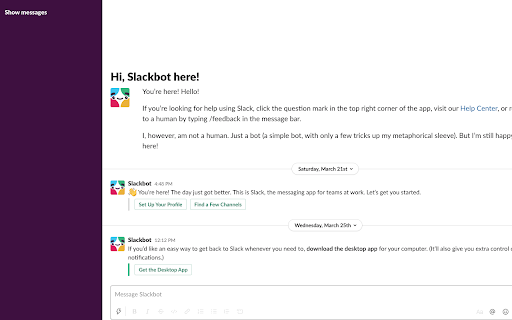
Hide your slacks to focus and get in the flow. Unhide them whenever you're ready. UPDATE: In September of 2023 Slack updated their UI, so I updated this extension so it works with their new UI. If you see any issues, please file them in the github repository below and I will look into them. Thanks! ---- Now you can hide your slack messages when using the web app. This lets you get in the flow and do more deep work. After you open the slack web app, click the "Hide messages" button to hide your messages. You'll still be able to search slack and use it as a reference, just without all the messages appearing in the left sidebar. When you're ready to view your messages, just click "Show messages". This extension only works for the web app. It doesn't work for the desktop app. View the code on github: https://github.com/mthurmond/slack-hider --> Try my other extensions to remove distractions. Both are free & open source: - Distraction free for Linkedin™: https://chrome.google.com/webstore/detail/distraction-free-for-link/kigfnbfbpfpgphbocdkmeablbgdbpfke?hl=en&authuser=0

Distraction Free for LinkedIn™
Hide distractions on LinkedIn™ when you need to focus. This extension hides potential distractions on LinkedIn™, including the newsfeed, suggested news, ads, and suggested people to follow. This lets you get in, get out, and get it done. This extension is free and opensource. It is is not affiliated with or produced by LinkedIn™. I've gotten a lot of value from LinkedIn™ in the past, and hope this extension will help you use it even more effectively. View the code on github: https://github.com/mthurmond/distraction-free-for-linkedin --> Try my other two extensions to remove distractions. Both are free & open source: - Hide My Email for Gmail™: https://chrome.google.com/webstore/detail/gmail-inbox-hider/koobmglbcddgeoopgphanmhjppfaehaa?hl=en&authuser=0

Hide My Email for Gmail™
Hide your emails in Gmail™ to focus and get in the flow. Unhide them whenever you're ready. Now you can hide your emails in Gmail™ whenever you want so you can get in the flow and do more deep work. ## Overview After you open Gmail™, click the "Hide emails" button to hide your messages. You'll still be able to search Gmail™ and use it as a reference, just without all your emails appearing and distracting you. When you're ready to view your the emails in your inbox again, just click "Show emails". This extension only works if you use the Gmail™ website on chrome. It doesn't work if you're using the Gmail™ desktop app. ## View the code https://github.com/mthurmond/hide-my-email-for-gmail ## More helpful extensions Try my other two extensions to remove distractions. Both are free & open source: - Distraction free for Linkedin™: https://chrome.google.com/webstore/detail/distraction-free-for-link/kigfnbfbpfpgphbocdkmeablbgdbpfke

vParam
What is vParam? View the parameters of the current page. And it makes it easy to create new URLs with modified parameters.

Message Deleter for Slack 3.0
Automatically delete Slack messages from channels, private channels, threads and direct messages. Take control of your Slack history. You can bulk delete Slack messages, clear chat histories, or even handle tasks like removing yourself from direct message conversations. Dive into the future of Slack conversation management and clear those unread, outdated, or unnecessary messages with precision and ease. 🚀 NEW UPDATED VERSION - 2023 ⭐️ The only tool tailored for the new Slack interface with unmatched compatibility. 🚀 Did you know? ⭐️ Team Owners and Admins can export message and file history from Slack. ⭐️ With Compliance Exports enabled the exports include messages and files even from private channels and direct messages. 🚀 Why should you use it? ⭐️ It gives you peace of mind knowing that sensitive or temporary discussions won't be accessible in the long run. ⭐️ Regular deletion of messages can protect individual user privacy, ensuring personal conversations or details are not left lingering indefinitely. ⭐️ It minimizes the digital footprint, reducing potential vulnerabilities or exposure points. 🚀 Why should your organization use it? ⭐️ It helps in maintaining a professional environment, especially when new team members join and review past communications. ⭐️ For organizations, it can assist in adhering to data retention policies or standards. ⭐️ It can help reduce the amount of data stored in Slack, which can be useful for teams with limited storage space. ⭐️ It reduces the chances of outdated information causing confusion or misdirection within teams. 🚀 Notice ⭐️ Direct messages from others cannot be deleted, neither in the app nor in the native Slack interface. This is a limitation imposed by Slack. 🚀 Warranty/uncertainty of functionality ⭐️ Message Deleter for Slack 3.0 relies on third-party functionalities, so feature consistency cannot be guaranteed indefinitely. Features might be added or discontinued, and in rare cases, there's a possibility that all features could stop working. Completely free and with no ads Made with ❤️ by Peta Sittek
