
gpjmcgacbkeokgllnkjkiahiegkaalfb
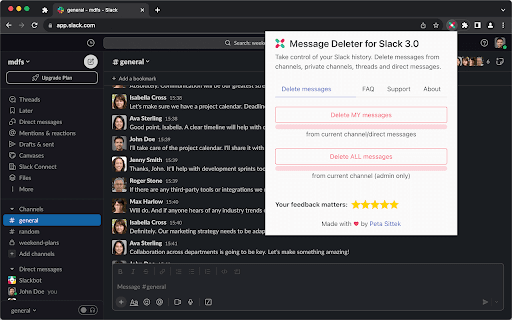
Automatically delete Slack messages from channels, private channels, threads and direct messages. Take control of your Slack history. You can bulk delete Slack messages, clear chat histories, or even handle tasks like removing yourself from direct message conversations. Dive into the future of Slack conversation management and clear those unread, outdated, or unnecessary messages with precision and ease. 🚀 NEW UPDATED VERSION - 2023 ⭐️ The only tool tailored for the new Slack interface with unmatched compatibility. 🚀 Did you know? ⭐️ Team Owners and Admins can export message and file history from Slack. ⭐️ With Compliance Exports enabled the exports include messages and files even from private channels and direct messages. 🚀 Why should you use it? ⭐️ It gives you peace of mind knowing that sensitive or temporary discussions won't be accessible in the long run. ⭐️ Regular deletion of messages can protect individual user privacy, ensuring personal conversations or details are not left lingering indefinitely. ⭐️ It minimizes the digital footprint, reducing potential vulnerabilities or exposure points. 🚀 Why should your organization use it? ⭐️ It helps in maintaining a professional environment, especially when new team members join and review past communications. ⭐️ For organizations, it can assist in adhering to data retention policies or standards. ⭐️ It can help reduce the amount of data stored in Slack, which can be useful for teams with limited storage space. ⭐️ It reduces the chances of outdated information causing confusion or misdirection within teams. 🚀 Notice ⭐️ Direct messages from others cannot be deleted, neither in the app nor in the native Slack interface. This is a limitation imposed by Slack. 🚀 Warranty/uncertainty of functionality ⭐️ Message Deleter for Slack 3.0 relies on third-party functionalities, so feature consistency cannot be guaranteed indefinitely. Features might be added or discontinued, and in rare cases, there's a possibility that all features could stop working. Completely free and with no ads Made with ❤️ by Peta Sittek

Sourcescrub Vitals
Access the Sourcescrub profile from a company's website Deal origination tool to streamline the *M&A professional's* workflow straight from a company's website. Perform real-time market research and due diligence by qualifying a company's firmographic data (such as location, headcount, and funding), relevant news updates, and historic/upcoming conference attendance

Bulk Slack Message Removal
Delete Slack messages in bulk. It supports removing slack messages in public channels, private channels, group chat, and DM.… Delete Slack messages in bulk. It supports removing slack messages in public channels, private channels, group chat, and DM. (Caveat: for group chat and DM, you can ONLY remove your own messages). ATTENTION: There are 2 different types of licenses. You must be an admin in order to delete other people's messages. Once again, you can't delete other people's DM or group chat messages. Admin License - If you are a Slack admin, you should choose this license. It would allow you to remove other people's messages in channels. A non-admin license will let you remove your own messages only. NOTE: you can only remove your own messages in a DM, however. Non-admin License - You should choose this license if you are simply a member in your Slack workspace. Nothing prevents you from using an admin license, but you'll still only be allowed to remove your own messages. Instructions * Log in with your Slack login. * Get a license via Gumroad and enter it in the extension popup. * Select the target channel, DM, etc.. * Select the message sender whose messages you would like to delete. * Click on the Bulk Delete button. For detailed instructions, please visit https://github.com/noitcudni/bulk-slack-message-removal-extension UPDATE (6/27/2025) * Don't need to go thru Oauth anymore. UPDATE (5/1/2024) * Handles External users. UPDATE (4/2/2024) * Delete Deactivated users' messages. UPDATE (11/24/2023) * Delete by matching subtext UPDATE (11/21/2023) * Able to delete bot messages. * More efficient fetching of messages and thread messages. * Overall more smooth experience for the end users. UPDATE (12/4/2022) Able to delete bot messages only if you select *ALL* as the target user. UPDATE (8/7/2022) Time filter For support and feature requests: please ping me at https://twitter.com/noitcudni

Slack Deleter Pro - Delete Messages in Bulk
Bulk delete your Slack messages across channels and DMs. Fast, safe, and easy. Free with Pro upgrade for unlimited deletions. Bulk delete your Slack messages across channels and DMs. Fast, safe, and easy. Free with Pro upgrade for unlimited deletions. KEY FEATURES: - Bulk delete content with one click - Smart rate limiting to avoid API throttling - Auto-pause and auto-resume when rate limited - Real-time progress tracking with estimated time - Pause, resume, or cancel at any time - Free tier: 100 deletions per month - Pro: Unlimited deletions (one-time payment) - 6 languages: English, Japanese, Korean, Chinese, Spanish, Portuguese - All data processed locally - nothing sent to external servers - Works with your existing login session PRIVACY & SECURITY: - All data is processed locally on your device - No data is sent to external servers - No analytics or tracking - No account creation required - Works with your existing login session - Open and transparent privacy policy HOW IT WORKS: 1. Install the extension from Chrome Web Store 2. Navigate to the target website and log in 3. Click the extension icon to open the popup 4. Follow the on-screen instructions SUPPORT: If you have any questions or issues, please contact us at support@zenithapps.dev

Slack PM Nuke
Quickly and securely delete all your private messages from any Slack conversation with a single click. Short Description: A simple tool to remove your messages from any Slack conversation or channel. Just open the conversation and let the extension do the work. Detailed Description: Slack PM Nuke is an unofficial extension that helps you clean up your message history in Slack conversations and channels. With a single click, you can remove all your messages from any Slack conversation. How It Works: The extension simulates human interaction to safely remove messages: • Starts with the most recent messages • Processes each visible message one by one • Once current messages are handled, it automatically loads older messages • Continues this process from newest to oldest messages • Uses natural delays and interactions to ensure reliable operation Key Features: • Simple one-click operation • Works in both direct messages and channels • Automatically scrolls through conversation history • Respects Slack's message deletion permissions • Built-in rate limiting to prevent API issues • Natural interaction patterns to ensure reliability How to Use: 1. Open Slack in your browser 2. Navigate to the conversation or channel where you want to remove your messages 3. Click the extension icon 4. Confirm the deletion process 5. Keep the tab open until the process completes Important Notes: • The extension will attempt to delete ALL messages that you have permission to remove • The process continues until it reaches the beginning of the conversation • Built-in delays ensure smooth operation with Slack's API • Due to the nature of the extension, you might need to run it multiple times • You can navigate to any recent message to start the deletion process from there • Please note that thread messages are not deleted • If the process stops before completion, simply run it again • The extension works with Slack's web interface and may need updates when Slack changes ⚠️ Disclaimer: This is an unofficial tool and is not affiliated with or endorsed by Slack. The extension may stop working if Slack updates their web interface. Instead of leaving a negative review if something breaks, please contact the developer for support. Support: If you encounter any issues or have suggestions, please contact the developer through the support link instead of leaving a negative review. We're committed to maintaining and improving the extension as Slack evolves. Note: This extension is provided as-is and may require updates to maintain compatibility with Slack's interface changes.
