
ojffpakdfnmeckiibdieibhmbpfnlgbe
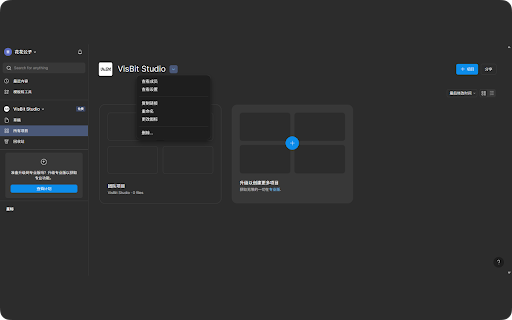


Figma的完美汉化,方便使用中文汉语的设计师使用,持续更新。 介绍:Figma的完美汉化,为几乎所有的页面元素都做了汉化处理,方便使用中文汉语的设计师使用。 说明:安装后打开 Figma 网站,界面会自动汉化。 Tips:本插件不时更新,有问题请联系: Q:3130477599@qq.com V:dawtbh 更新日志: 1.5版本更新:增加时间翻译,大量其他文本翻译。 2.0版本更新:优化性能。 2.1版本更新:修复没有自动翻译的bug。 2.2版本更新:增加一些翻译。 2.3版本更新:增加一些翻译。

WeTab 新标签页
用小组件自定义你的新标签页,支持暗黑模式 用小组件自定义你的新标签页,支持暗黑模式,已整合 WetabAI 组件。 Wetab新标签页 是一款多功能的新标签页插件,允许你亲手打造专属的高颜值主页,提供了丰富的小组件选择、精美的界面和便捷的功能体验。与 Infinity New Tab、iTab 等插件类似,Wetab 同样主打小组件功能,采用 iOS 风格的小组件卡片设计,内置倒计时、纪念日、天气、热搜、计算器等实用功能,让信息一目了然,标签页整洁美观。 Wetab 功能亮点: 1. 自定义新标签页中的小组件和图标,支持随意拖拽布置,任意搭配。 2. 自定义生日倒计时、工资倒计时、节假日等专属小组件。 3. 快速添加常用网站或小组件到主页。 4. 自定义搜索引擎,支持快捷切换百度/谷歌/必应等搜索引擎,还可以添加其他自定义搜索引擎。 5. 自定义壁纸,海量高清壁纸任你选择,包括自然、海洋、建筑等类别。 6. 笔记和待办小组件助你更好地记录灵感和任务。 7. 深色或浅色模式,可跟随系统设置。 8. 自定义左侧栏和底部栏,办公娱乐更得心应手,支持隐藏显示功能。 9. 登录 Wetab 账号,在不同设备备份和同步数据。 10. 阅读榜单、热搜榜单、换算器、日历等多种小组件,支持热门话题、每日资讯等。 11. 动态壁纸、渐变背景等丰富的美化选项。 12. 支持多种专业小组件,如股票、货币汇率、系统状态显示等。 联属营销声明:Wetab 部分搜索和图标链接包含百度、京东、淘宝等联属营销链接,使用这些链接可能会产生收益,以支持我们不断优化和提升产品。感谢您的理解和支持。 在线版地址:https://web.wetab.link/ 问题反馈:https://support.qq.com/product/422565 官方网站:https://www.wetab.link/zh/

FigmaEX
FigmaEX 增强你的 Figma 这是 Moonvy · 月维官方发布的 FigmaEX(https://moonvy.com/figmaEX/)浏览器插件 ━━━━━━━━━━━━━ ⚠️ 汉化需要在设置中开启 ✅ (见截图) ━━━━━━━━━━━━━ 功能 - 插件侧边栏,让你能更方便的调用你的插件 - 汉化 Figma 界面 - 智能搜索插件,支持用中文关键词搜索 Figma 插件 - 增强型字体选择器,支持直接预览字体,并优化中文字体的选择 - 切图助手按钮 - 属性助手按钮 - 选中图层上下文面板 这个插件可以汉化浏览器中的 Figma 界面,如果你在寻找 Figma 桌面客户端的汉化,请前往 https://moonvy.com/figmaEX/

Axure RP Extension for Chrome
An extension that allows viewing of locally published Axure RP prototypes (HTML files) from Google Chrome. Add this extension to view locally published prototypes (HTML files) created from Axure RP in Google Chrome. This extension requires a high access level to allow the viewing of the file:// protocol. This extension only requires these permissions to allow viewing of prototypes in Chrome - Axure does not track or access any of your information. IMPORTANT: After installing the extension you must check the setting "Allow access to file URLs". You can access this by going to: Tools > Extensions > Axure RP Extension for Chrome from the Chrome > Preferences menu. This extension allows you to view Axure RP prototypes in Google Chrome. It is not used to open Axure RP project files (.rp, .rpteam) for editing in Google Chrome. You do not have to install this extension if you want to view prototypes hosted on the web. For example, you don't need this to view prototypes from Axure Cloud (app.axure.cloud) or Axure Cloud for Business (axure.com/enterprise). If you have any issues or questions, please email support@axure.com To download the latest version of Axure RP or a free 30-day trial, visit axure.com/download.

Billfish - Free material management tool
Quickly and easily manage your design materials-so you have more time to focus on the design itself. Help users quickly get web page pictures through the browser
