
aikflfpejipbpjdlfabpgclhblkpaafo

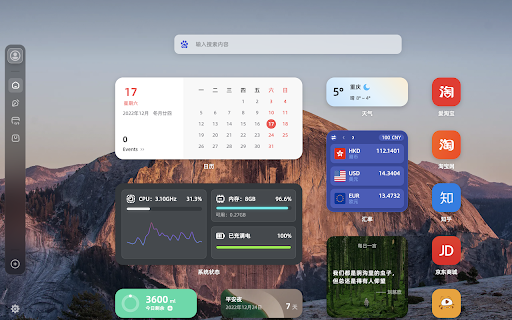


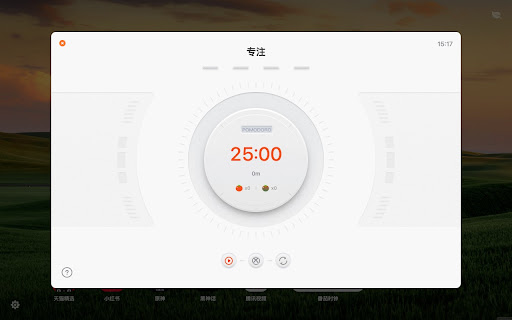
用小组件自定义你的新标签页,支持暗黑模式 用小组件自定义你的新标签页,支持暗黑模式,已整合 WetabAI 组件。 Wetab新标签页 是一款多功能的新标签页插件,允许你亲手打造专属的高颜值主页,提供了丰富的小组件选择、精美的界面和便捷的功能体验。与 Infinity New Tab、iTab 等插件类似,Wetab 同样主打小组件功能,采用 iOS 风格的小组件卡片设计,内置倒计时、纪念日、天气、热搜、计算器等实用功能,让信息一目了然,标签页整洁美观。 Wetab 功能亮点: 1. 自定义新标签页中的小组件和图标,支持随意拖拽布置,任意搭配。 2. 自定义生日倒计时、工资倒计时、节假日等专属小组件。 3. 快速添加常用网站或小组件到主页。 4. 自定义搜索引擎,支持快捷切换百度/谷歌/必应等搜索引擎,还可以添加其他自定义搜索引擎。 5. 自定义壁纸,海量高清壁纸任你选择,包括自然、海洋、建筑等类别。 6. 笔记和待办小组件助你更好地记录灵感和任务。 7. 深色或浅色模式,可跟随系统设置。 8. 自定义左侧栏和底部栏,办公娱乐更得心应手,支持隐藏显示功能。 9. 登录 Wetab 账号,在不同设备备份和同步数据。 10. 阅读榜单、热搜榜单、换算器、日历等多种小组件,支持热门话题、每日资讯等。 11. 动态壁纸、渐变背景等丰富的美化选项。 12. 支持多种专业小组件,如股票、货币汇率、系统状态显示等。 联属营销声明:Wetab 部分搜索和图标链接包含百度、京东、淘宝等联属营销链接,使用这些链接可能会产生收益,以支持我们不断优化和提升产品。感谢您的理解和支持。 在线版地址:https://web.wetab.link/ 问题反馈:https://support.qq.com/product/422565 官方网站:https://www.wetab.link/zh/

cat-catch
Open Source: https://github.com/xifangczy/cat-catch For bug submissions, please visit GitHub or find other submission methods in the documentation. Documentation: https://o2bmm.gitbook.io/cat-catch/ The extension is not responsible for the content downloaded by users, so please check the copyright and permissions before downloading.

FeHelper - JSON格式化、编解码、二维码、开发者工具箱
FeHelper is a powerful developer tool designed for front-end developers. It integrates various practical tools to help developers improve work efficiency. However, FeHelper strictly adheres to the principle of single function activation. By default, FeHelper only provides the JSON auto-formatting function, and all other functions are disabled by default. If users need them, they can go to the plugin configuration page to install and enable them. The following are the main functions of FeHelper: ## JSON Tools: - JSON beautifier: Automatically detects and formats JSON data, supports manual formatting, decoding of messy codes, sorting, BigInt processing, editing, downloading, and skin customization, greatly facilitating developers' processing of JSON data. - JSON comparison tool: Supports automatic key-value comparison of two JSON contents, highlights differences, and helps developers quickly identify data changes. ## QR Code Tool: - QR code generator: Supports custom color and icon QR code generation, suitable for a variety of application scenarios. - QR code decoder: Supports multiple modes of QR code decoding, including decoding after pasting a screenshot, which is convenient and fast. ## Encoding tool: - String encoding and decoding: Supports multi-format information encoding and decoding, such as Unicode, UTF-8, URL, Base64, MD5, etc., to meet different encoding requirements. Code beautification tool: Supports code beautification for multiple languages, including Javascript, CSS, HTML, XML, and SQL, helping developers maintain clean and tidy code. Code compression tool: Provides simple code compression functionality, supports HTML, Javascript, and CSS code compression, and optimizes web page loading speed. ## Developer Tools: - AI assistant: A super intelligent dialogue tool powered by AI, supporting code writing, code modification, scheme design, and other tasks to improve development efficiency. - Simple Postman: An interface debugging tool that supports GET/POST/HEAD request methods, automatically formats JSON content, and simplifies the API testing process. - Websocket tool: supports packet capture testing for Websocket interfaces, including connection testing for ws services, message sending testing, result analysis, and more. ## Other tools: - Time (stamp) conversion: mutual conversion between localized time and time stamp, supporting second/millisecond, world time zone switching, clock display in various time zones, etc. - Random password generation: Generate passwords by randomly combining various characters, supporting specified length and character type to ensure password security. - My sticky notes: A sticky notes tool that supports creating directories to categorize and manage notes. Notes can be exported/imported with one click for convenient information management. - Markdown conversion: Markdown editing/preview tool, supports direct conversion of HTML fragments to Markdown, and supports downloading content in PDF format. - Webpage screenshot tool: It can take screenshots of any webpage, supporting both visible area screenshots and full-page scrolling screenshots. The final result can be previewed before being saved. - Page color picker tool: You can directly collect color values for any element on the webpage. Move the cursor to the location where you want to pick the color, and click OK.

Saladict - Pop-up Dictionary
Look up and translate selected text with multiple dictionaries, flexible selection modes, vocabulary notes, and PDF lookup. Saladict is a free, open-source browser extension for focused cross-language reading. Select text on a web page or in the built-in PDF viewer to open a dictionary panel with results from multiple dictionaries and translation services. Core features: - Look up and translate selected text on web pages and in PDFs. - Use flexible selection modes, including icon-triggered lookup, double-click lookup, modifier keys, and instant capture. - Combine multiple dictionaries and tune which dictionaries appear by language and word count. - Keep search history and save words to the vocabulary notebook. - Open a standalone quick-search panel for clipboard text or manual lookup. - Configure supported sync or export workflows with services such as WebDAV, Shanbay, Eudic, and Anki Connect. - Customize profiles, panel appearance, context menus, blacklists, whitelists, and keyboard shortcuts. Dictionary content and translation results come from the third-party dictionary services you enable.

Pinbox - 跨平台收藏
将散落各地的内容集中在一处 Pinbox 是一款跨平台的收藏工具,您可以用它来记录灵感,保存资料甚至网络上的任何内容。 专为创意者们设计 收藏网页、图片、创意、代码片段的绝佳工具,设计简单功能强大。 支持 web、浏览器扩展、iOS、Android,一处收藏,处处同步。 快速访问 只需 0.4 秒即可访问常用网站。 您无需在茫茫收藏中寻找某个特定的网站,只需要给它设置一个快捷键,就可以快速访问。根据我们的数据显示,这将平均节省约 20 倍的时间。 自动化工作流 无需任何代码即可设置自动化流程,根据收藏的标题或链接进行自动分类整理。 更多有趣的流程陆续开发中。 功能: 1.收藏网页、图片、文本,甚至网络上的一切内容; 2.编辑标题和备注:您可以编辑已经收藏的内容,使之更加清晰直观; 3.多级收藏集:帮助您整理收藏的内容; 4.编辑模式:支持多选、拖拽等功能,可以批量整理您的收藏; 5.搜索:搜索收藏的标题、链接、同样也支持您自定义的标题和备注; 6.导入书签:一键快速导入浏览器书签,并保留书签结构; 7.回收站:放心的删除收藏,它们都将自动进入回收站,随时恢复; 8.跨平台支持:网页 + 浏览器扩展 + APP; 9.注重隐私:我们十分注重用户隐私,您的收藏只有您自己能看到。 本次更新 新功能: 1. 支持地址栏搜索; 2. 关联搜索适配 F 搜; 3. 侧边栏和新标签页收藏增加刷新功能; 4. 新标签页支持隐藏搜索框; 5. 新标签页和侧边栏支持加密收藏集和颜色。 用户体验: 1. 标签搜索支持大小写; 2. 优化选项页面; 3. 关联搜索适配深色模式。 Bug 修复: 修复侧边栏样式问题。
