
piohkopmiebhgodfkcfcmjbmgkcnjnmf


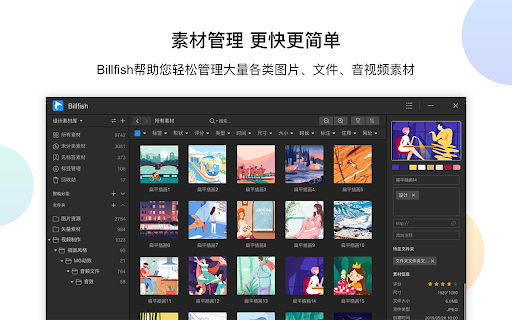
Quickly and easily manage your design materials-so you have more time to focus on the design itself. Help users quickly get web page pictures through the browser

iTab New Tab
iTab is a new personalized tab with free customized widgets: Calender, Weather, Breaking News, Wallpapers and so on.

Saladict - Pop-up Dictionary
Look up and translate selected text with multiple dictionaries, flexible selection modes, vocabulary notes, and PDF lookup. Saladict is a free, open-source browser extension for focused cross-language reading. Select text on a web page or in the built-in PDF viewer to open a dictionary panel with results from multiple dictionaries and translation services. Core features: - Look up and translate selected text on web pages and in PDFs. - Use flexible selection modes, including icon-triggered lookup, double-click lookup, modifier keys, and instant capture. - Combine multiple dictionaries and tune which dictionaries appear by language and word count. - Keep search history and save words to the vocabulary notebook. - Open a standalone quick-search panel for clipboard text or manual lookup. - Configure supported sync or export workflows with services such as WebDAV, Shanbay, Eudic, and Anki Connect. - Customize profiles, panel appearance, context menus, blacklists, whitelists, and keyboard shortcuts. Dictionary content and translation results come from the third-party dictionary services you enable.

Lingocloud - AI Translate Web, PDF & Subtitles
Web bilingual, PDF link, YouTube ; Lingocloud V4 + multi-model with glossary for fluent, accurate translation 1. Personalization: Customize translation styles to better match your linguistic habits. 2. Floating Ball Upgrade: Redesigned floating interactions and menu for a lighter, more intuitive experience. 3. Seamless Experience: Switch models, glossaries, or styles without refreshing the page—translations update dynamically. 4. Glossary Enhancement: No need to set translation directions; multi-language entries can now be used together. 5. Performance Improvements and Bug Fixes. More than just a translator—it's your all-in-one AI reading assistant. Lingocloud integrates a matrix of world-class AI models to provide an intelligent bilingual experience for web pages, documents, videos, and social media. V4 Model: Our proprietary model optimized for nuanced context, delivering natural and fluent translations. AI Aggregation: One-click toggle between DeepSeek V3, GPT, Qwen, GLM4, and more for multi-perspective references. 🧠 AI Bilingual Web Translation: Automatically recognizes web content for side-by-side reading. Supports AI bilingual subtitles on YouTube, Netflix, and more. 📂 AI Document Parsing: Smartly translate PDF, Word, PPT, and arXiv papers while perfectly preserving the original layout. ⚡ Real-time AI Lookup: Select text on Reddit, Discord, or X (Twitter) for instant AI-powered explanations and translations. 🌟 Core Features 1. Bilingual Webpage Translation 🌐 Click the “Lingocloud icon,” and the webpage instantly displays in bilingual parallel view! Source and translation are aligned top-to-bottom for easy comparison. The innovative layout makes reading smoother and more natural. 2. Text Selection Translation 🖱️ Highlight any text to get accurate translations instantly—no page switching needed. Stay immersed in your reading while exploring foreign content effortlessly. 3. Professional Terminology Library 📚 Built-in database of 100,000+ professional terms across multiple fields, with support for custom glossaries. Ensures precise domain-specific translations while meeting personalized expression needs. 4. PDF Translation 📄 Translate PDF documents with one click while perfectly preserving formatting and layout. Supports recognition of complex formulas—ideal for research papers and technical documents. 5. Video Subtitle Translation 🎬 Supports bilingual subtitle translation on YouTube and other major platforms. Learn while watching, enhance your language skills, and easily understand foreign-language videos. 6.Image and Manga Translation Supports one-click translation of images or comics on web pages. 👥 Who It’s For • 🔬 Researchers: Accurate translations of journals and reports • 📖 Novel Lovers: Immersive reading of AO3 and foreign fiction • 📚 Students Abroad: Easily access textbooks, papers, and academic resources • 💻 Programmers: Quick access to technical documentation and developer communities • 🌐 Trade Professionals: Accurate translation of contracts, emails, and business files • 🎓 Language Learners: Improve comprehension with bilingual parallel texts • 🧳 Global Travelers: Real-time multilingual communication and information access ℹ️ Usage Notes • 🔒 Permissions: To enable text selection, auto-translation, and video subtitle features, please allow the extension to read and modify webpage data. Video translation requires access to the current tab’s audio. • 🎁 Free vs. Paid: Register to enjoy free daily usage with a quota limit. The quota refreshes automatically each day. Upgrade to membership for unlimited access. • 💌 Feedback: For questions or suggestions, visit our website at https://fanyi.caiyunapp.com and click “Feedback” to share your thoughts! 🌈 Break down language barriers with Lingocloud and explore a bigger world! 🚀🌟

Cubox
Highlighter, Clipper, AI Reader. Read, annotate and take notes with AI assistant. One-click Saving, Clipping, Highlighting and Taking Notes. Cubox is an AI reader built for learning. With the Cubox browser extension, you will unleash the full potential of highlights and notes. • You can quickly select multiple sections of text, images, or links on a webpage with just one shortcut, and easily highlight or clip them. • In capture mode, you can multi-select, or click and drag to batch select adjacent content. • Select contents on webpage with mouse dragging, then highlight them with just one click. • It supports adding notes, changing colors, allowing you to fully experience all the highlighting features right on the webpage. • Get a quick understanding of the article’s summary through summarization. Use key questions to understand the main points of the article and their answers. • Automatically highlight with Ghost Highlight and mark your favorite sections with annotations. • Save the web page you are browsing with one shortcut. • Save web snippets by dragging, Capture, dropping, and right-clicking. • Suggest tags, website title, description, and cover image. • Update information for already saved content. • Automatically detect same saves. More features on https://cubox.cc/ Please visit the Cubox web app or download Cubox apps. Your collections will automatically sync across all your devices.
