
oihkkgbnlimoffcljflafghgmaocambp
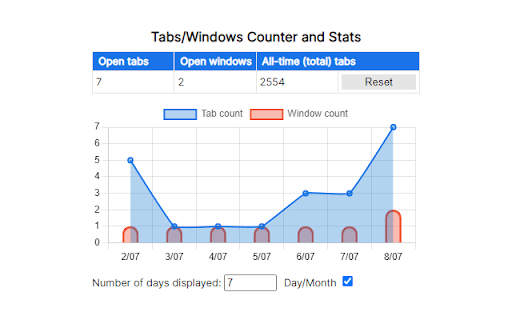


Count the number of open tabs and windows in the browser and display the data in a chart. Visualize in a chart a record of the number of open tabs and windows in the browser, and keep track of the total number of tabs ever opened. It's also possible to export/import tabs data in JSON format. Tabs/Windows Stats is free and open source. Every feedback or suggestion is welcome. If you find this extension useful, kindly consider leaving a rating. ────── Privacy Policy ────── Tabs/Windows Stats does not monitor your browsing activity, including visited links or pages, and does not track or share any of your searches or filters. All permissions required for this extension are solely for the purpose of running the features provided as they are stated.

Ultimate Tab Counter
Tab Counter, counts the number of opened tabs and windows Ultimate Tab counter helps you keep an eye on your opened tabs count, Opened windows count and opened Incognito windows count. Opened tabs across all windows can be seen with the batch on extension icon. To track incognito windows and tab count, please enable Allow in Incognito for Ultimate Tab Counter extension, open chrome://extensions/ in Google Chrome We don't collect or share information to any 3rd parties Keep on updating for new features. For suggestions, write us on fireicetechltd(@)gmail(.)com

Tab Count
Displays the number of browser tabs Simple extension that displays the number of tabs you have open on your browser. It displays total count of tabs, tab count on current window, and tab count you have on each tab group.

Tab Sorter
Extension for sorting your tabs. Tab Sorter Extension Organize Your Browser Tabs Efficiently Tab Sorter is a browser extension that helps you organize your open tabs using various sorting methods. Keep your browsing organized and find tabs quickly. Keyboard Shortcuts - Ctrl+Shift+Space - Sort tabs with your preferred method - Ctrl+Shift+L - Extract domain (move same-domain tabs to new window) Additional Features - Auto-sort - Automatically organize new tabs - Cross-window support - Works across all browser windows - Bilingual interface - English and French support - Privacy-focused - No data collection, local processing only 1. Install the extension from your browser store 2. Click the Tab Sorter icon or use keyboard shortcuts 3. Select your preferred sorting method 4. Your tabs will be organized instantly - Firefox - Available on Mozilla Add-ons - Chrome/Chromium - Available on Chrome Web Store - Works with all Chromium-based browsers For questions or issues, visit the GitHub repository: https://github.com/etienneschalk/tab-sorter-firefox/issues Tab Sorter - Keep your tabs organized.

Chrome Tab Counter
Shows a count of open windows, open tabs, max concurrent open tabs and all-time open tabs. Shows a count of open windows, open tabs, max concurrent open tabs and all-time open tabs in the extensions bar. After installing pin the extension in your extensions bar to see the counter. Features - Shows counter of open tabs, open windows, all-time opened tabs, max concurrent opened tabs - Multiple Chrome windows supported - Tweet your stats - Extension DOES NOT track your browsing history or use any other personal data NEW in the latest update: - Added pinned tabs to current window count - Color pickers to change badge background and text colors (you need to manually update the background color) - Fixed social sharing button for Twitter - Nicer design for stats in the popup This is an open-source extension, no information is shared or sent to 3rd parties. Feel free to review the code here: https://github.com/fero8/chrome-tab-counter
