
elffiigpaoabmchepbdecnnknpkejppa
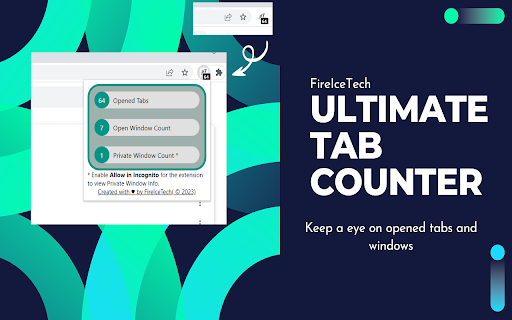
Tab Counter, counts the number of opened tabs and windows Ultimate Tab counter helps you keep an eye on your opened tabs count, Opened windows count and opened Incognito windows count. Opened tabs across all windows can be seen with the batch on extension icon. To track incognito windows and tab count, please enable Allow in Incognito for Ultimate Tab Counter extension, open chrome://extensions/ in Google Chrome We don't collect or share information to any 3rd parties Keep on updating for new features. For suggestions, write us on fireicetechltd(@)gmail(.)com

Tab Counter
Keeps count of your open tabs and windows Counts how many tabs you currently have open, and allows you to search through your tabs or filter the list based on different things. Features: - Group tabs by window, or by domain - Search tabs by page URL or title - Sort tabs alphabetically or by how many tabs are open in a specific domain - Filter tabs based on the current window, find duplicate tabs, or only tabs that are currently playing sound. - Group tabs using custom rules and names so you can always find them This is an open-source extension, feel free to contribute yourself, or have a look. No user data is collected: https://github.com/tgayle/tab-counter ✨ New: - For incognito tabs, you can now reopen or duplicate these tabs as "normal" tabs - "Move all tabs here" - Add option for moving all tabs from a group/window to the current window - Side Panel Support - You can open the Tab Counter extension as a persistent side panel by right-clicking the extension icon - Rule Helpers - You can choose an open tab to use as the base for a new tab grouping rule 🔧 Fixes: - Ensure windows are sorted properly when grouping by windows - Fix performance issue when updating badge counter after opening or closing many tabs in bulk. - Slight style tweaks and dependency updates 2.0.0: - Total UI overhaul! - Rules! Define custom groups and names for websites for organization and better tab deduplication - The "badge" showing the current number of open tabs transitions between green and red a bit more naturally - If a domain/group only has a single tab in it, the single tab is shown instead of having to expand the group to see it. - New "Dedupe Tabs" button: automatically close all but the first tab when you have several duplicate tabs open - When viewing duplicate tabs, always group them by domain regardless of current settings 1.0.1: - Fix All/Normal/Incognito filter buttons not updating the tab list

Tab Count
Displays the number of browser tabs Simple extension that displays the number of tabs you have open on your browser. It displays total count of tabs, tab count on current window, and tab count you have on each tab group.

Tab limit
Limit the number of tabs you can have open at a time The extension allows users to set the maximum number of tabs they want open across their chrome windows at a time. If a user tries to open a tab when he's already at his tab limit, the newly opened tab automatically closes. This extension will be useful to users who find themselves opening more tabs than they need to. It will also helps users get less distracted from the task at hand by finding themselves opening unnecessary tabs. It is kind of a nudge for them to remind themselves that, hey, they need to stay focused on the task at hand. The user can adjust the number of maximum tabs they want open at any point in time.

Recently Closed
View and restore recently closed Tabs and Windows A page for Recently Closed Tabs, following the design of the History and Downloads pages. Click a Tab or Window to restore it. Chrome maintains a list of the 25 most recently closed Windows and Tabs, which it allows to be restored in full: Windows will have all their Tabs and Tab Groups restored intact, Tabs will have their forward and back navigation buttons populated with the pages previously visited in that Tab. This differs from the History page, which is simply a list of website addresses that can be reopened. This extension displays the full list of restorable Windows and Tabs; anything not listed must be accessed via the History page. Keyboard shortcut: Alt+Z. To change the shortcut, paste this into the address bar: chrome://extensions/shortcuts The Trashcan and Window icons in this extension, as well as icons in promotional images, are in the public domain and available from http://paomedia.github.io/small-n-flat/
