
cflfdplhfcgapcgcahckkadgghpkhfco

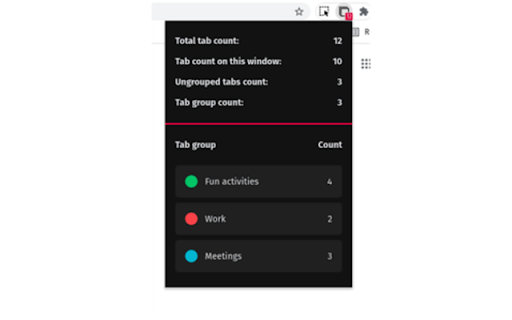
Displays the number of browser tabs Simple extension that displays the number of tabs you have open on your browser. It displays total count of tabs, tab count on current window, and tab count you have on each tab group.

Close Duplicate Tabs
Instantly close all duplicate tabs with one click. Hit the "Close Duplicate Tabs" button in your toolbar and watch your browser get organized!

Close Duplicate Tabs
Find and close duplicate tabs fast, with optional auto-close and smart tab grouping. MAJOR UPDATE: Now with automatic tab grouping & automatic duplicate tab closing! Check options to enable settings! Too many duplicate tabs can quietly slow down your browsing and make it harder to stay organized. Close Duplicate Tabs helps you spot duplicate tabs quickly and clean them up in one click. Use the popup to review duplicates before closing them, or turn on automatic duplicate cleanup for a more hands-off workflow. The extension also supports a keyboard shortcut, tab-count hover summaries, optional automatic tab grouping, URL matching controls for # fragments and ? query strings, and an exclusion list for domains you do not want to deduplicate. - One-click duplicate cleanup - Optional auto-close for new duplicates - Popup review with per-URL manual close - Keyboard shortcut for closing all duplicates - Hover summary with tab count and duplicate count - Optional smart tab grouping by domain - Matching controls for # fragments and ? query strings - Exclusion list for domains to ignore - No data collection v3.2 * Using latest Chrome APIs * Auto Group Tabs based on their domain. * Auto close duplicate tabs so you save on memory. v2.5 * Top domains listed on hovering over the extension icon. v2.3 * Now see titles for duplicate tabs, not long URLs * Special case handling for websites that "replace" tabs behind the scenes. Short version: more accurate duplicate tracking. v2.0 * Options page, with list of upcoming capabilties * NEW: Reorder (sort) pages by URL v1.8: * Lists open tab count, and duplicate tab count * List duplicate URLs, and their counts * Groundwork for options v1.6: * Now identifies & closes duplicates across windows * More accessible colors for duplicate count badge

Tabs Counter - Number of Browser Opened Tabs
Count number of opened tabs in web browser current window. Displays tabs count number on the extension/add-on icon in the toolbar 📖📖📖 Tabs Counter extension/add-on aims to provide an instants calculation of the number of open tabs in the web browser via a clean and intuitive interface. Tabs Counter might be useful for software engineers, product managers, marketing teams who do a lot of research. Also, it is a very useful tool to anyone who usually has tens of tabs opened at the same time. Tabs Counter is a simple and useful cross web-browser compatible extension/addon that lets you get in real time the number of opened tabs in your web browser. 🎨🎨🎨 Tabs Counter Version 0.1.0 - Web Browser Extension/Add-on Features: ✅ Displays the count of open tabs in the currently active open window of the web browser ✅ No permissions or requirements are needed ✅ To enable in incognito mode, turn on 'Allow in incognito' from web browser setting 🎨🎨🎨 Tabs Counter Next Version Features: ✅ Displays number of open tabs in the current active window or across all open windows of the browser ✅ Displays number of browser open windows ✅ Ability to change the icon background color ✅ Ability to add a numeric prefix before the tab's title (e.g. "2. YouTube") ✅ Detect duplicate tabs in the current active window or across all open windows of the browser 📖📖📖 Duplicate tabs are tabs with the same exact URL 📖📖📖 Adds a special icon before the duplicate tab name 📖📖📖 Close all duplicate tabs instances retaining one with a single click only ✅ Detect stale tabs which has been opened for X days. Auto close of staled tabs based on your configuration in the settings ℹ️ℹ️ℹ️ Support Email: support@oziku.tech ✅ All translations are done with a translator. For any wrong translation please reach out to us ✅ For any bugs found or feature request please do not hesitate to send us an email

Chrome Tab Counter
Shows a count of open windows, open tabs, max concurrent open tabs and all-time open tabs. Shows a count of open windows, open tabs, max concurrent open tabs and all-time open tabs in the extensions bar. After installing pin the extension in your extensions bar to see the counter. Features - Shows counter of open tabs, open windows, all-time opened tabs, max concurrent opened tabs - Multiple Chrome windows supported - Tweet your stats - Extension DOES NOT track your browsing history or use any other personal data NEW in the latest update: - Added pinned tabs to current window count - Color pickers to change badge background and text colors (you need to manually update the background color) - Fixed social sharing button for Twitter - Nicer design for stats in the popup This is an open-source extension, no information is shared or sent to 3rd parties. Feel free to review the code here: https://github.com/fero8/chrome-tab-counter
