
oiflhingbpdffgddpobdffhemhbcffmo

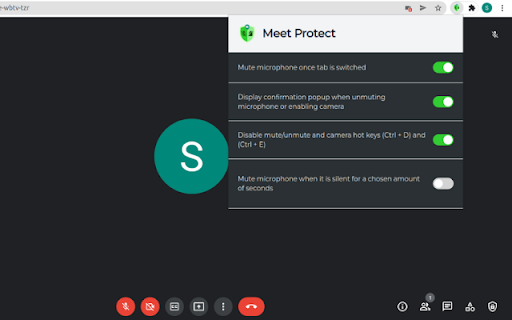
A Google Meet protector against the accidental microphone and camera opening. This simple, efficient, and reliable google meet addon safeguards you from the accidental microphone or camera opening on google meet classroom. It accomplishes this by introducing new features to google meet call, such as: 1. Mutes the microphone once the tab is switched. 2. Displays a confirmation pop-up every time the google meet video or audio gets turned on. 3. Disables the mute/unmute and camera hotkeys (Ctrl+D) and (Ctrl+E). 4. Automatically mutes the microphone when it is continuously silent for a specified amount of seconds. With Meet Protect, you can rest assured. Disclaimer: Please bear in mind that this extension was produced by an independent developer, not by Google. All copyrights are owned by their respective owners. Google does not promote or sponsor this Chrome extension. Google Inc. does not own, license, or is a parent of Meet Protect.

Specify Gmeet Mic
Don't you hate choosing your laptop's internal mic every single time you join a Gmeet call? With this extension, you can auto-select a specific mic every time you open a Gmeet call or change media devices (eg. putting your earbuds in or connecting to an external camera). Source code available for review here: https://github.com/gradywetherbee/specify-gmeet-mic

Augnito Mic Extension
Augnito mic web extension to allow MIC turn on/off using Philips mic Augnito mic web extension to allow MIC turn on/off using Philips mic. It lets the radiologists/clinicians easily control the Philips mic actions like turn mic on/off using Philips mic record button. The extension works with any RIS/PACS web based application which has embedded Augnito Voice Services as VR solution.

Camera and Microphone Control
Control camera brightness and zoom, and disable microphone auto-adjustment. This is an extension that allows you to adjust camera brightness, flip the video horizontally, and disable automatic microphone adjustment. A feature to reduce microphone noise and echo has also been added, and it will be applied when installed along with the option to disable automatic microphone adjustment. After installation, you must grant camera and microphone permissions for the extension to function properly

Haekka Phishing Chrome Extension
Haekka Phishing Chrome Extension Haekka's Phishing Chrome extension allows Haekka users to report phishing attempts in real-time from Gmail.
