
genojaonibgobhmihfdhdjlpnefdnimn
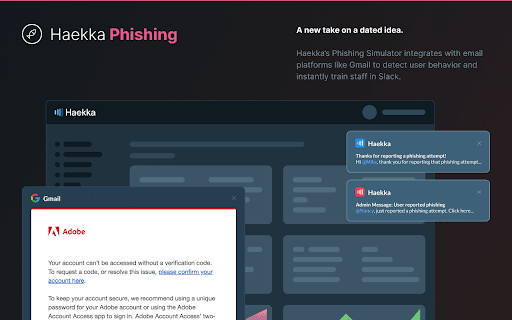
Haekka Phishing Chrome Extension Haekka's Phishing Chrome extension allows Haekka users to report phishing attempts in real-time from Gmail.

Free Adblocker for Chrome by Open Adblocker
Free Adblocker for Chrome by Open Adblocker Block ads across the web with Open Adblocker, the best free open source adblocker for Chrome. We keep our goal simple: Blocking all types of ads on all pages in one click for enjoy an easy, clean ad free browsing experience. 🍪Automatically block annoying cookie consent pop-ups across the internet for a smoother browsing experience. ⚙️A completely redesigned settings page with quick access to filters, feedback, and bug reporting. Add Open Adblocker to your browser access these features: 🧩Lightweight, memory efficient adblocker extension for Chrome - Easily block banners, popup, pop under and video ads. 🎥 Block YouTube Ads - Skip distractions and enjoy uninterrupted viewing experience. 🌐 Choose the domains you want to block - Control which sites have ad blocking on or off. 🧱 Block malware and adware - Stop unwanted and misleading content across the web. 📊 Tracking protection filters – Block trackers, analytics scripts, and tracking parameters in URLs. ⚙️ Transparent and Open Source - Our entire codebase is open source and available on GitHub. 🍪 Hide and block Cookie banners - Automatically remove cookie pop up banners across the internet. 🔌 Social media filters – Remove Like/Share widgets and embedded social elements. 🆕 The ability to report a bug - Report issues directly from the settings page to help improve Open Adblocker. Why Open Adblocker? - Lightweight hustle free experience, just one click and you are set. - Built in free cookie consent popup blocker - Optimized memory consumption. - True open source transparency. - Block cookie banners. How to get started? 1. Click “Add to Chrome” and confirm installation. 2. Pin it to your taskbar for quicker access. 3. Open the open adblocker extension and turn Ad blocking on or off. What’s New 🛡️ Advanced security filters enhancement – Block malicious sites, phishing URLs, scams, malware, badware risks, and extensive anti-malware lists. 🔌 Social media filters – Remove Like/Share widgets and embedded social elements.

Exploratory Testing Extension
Chrome extension for exploratory testing A Chrome extension designed for making web exploratory testing easier Features: - 🐛 Quickly create and track bugs, notes, ideas and questions - 📸 Capture full page or custom cropped screenshots - 🔗 Automatically track URLs for each annotation created - 🔍 Advanced filtering of annotations by type in reports - 📊 Visualize testing data through interactive charts - 👁️ View screenshot previews instantly on hover - 💾 Export testing sessions to JSON, CSV or HTML formats - 🤝 Share and collaborate by importing/exporting sessions

Request Interceptor
Request Interceptor Extension for Chrome. Request Interceptor: Native HTTP/HTTPS Traffic Manager for Chrome Request Interceptor is a developer tool that allows you to seamlessly intercept, monitor, and route network traffic directly within your browser. Core Features: - Forward, drop, or pause incoming/outgoing requests. - Modify header values and POST payload data on the fly. - Add or delete custom request headers. - Filter interceptions by specific resource types. - Export request details as JSON and browse history. What is New in Version 3.0: - Bulk Actions: Instantly "Forward All" or "Drop All" intercepted requests with a single click. - Advanced Filtering: Isolate specific request types (GET, POST, PUT, DELETE) with interactive multi-select dropdowns. - Color-Coded UI: HTTP methods now feature color badges for faster visual scanning. - Improved UX: Added confirmation dialogs for deletions, "Select All" toggles, and one-click clear buttons for search inputs. - Stability: Fixed edge cases to prevent crashes while routing headless request payloads. What is New in Version 2.0: - Upgraded the extension to the modern Manifest V3 architecture. - Added a dedicated alert page and improved error messaging output. - Refined UI copy (e.g., changing to "Save as a JSON File"). - Added titles to the History and Settings pages for better navigation. - Extension windows now close automatically when you stop debugging. - Added full support for non-Latin characters.

Proxidize Proxy Extension
Best Proxy Extension: Top Rated & Featured by Chrome The Best Proxy Extention - Top Rated & Featured by Chrome For Both HTTP(s) and SOCKS Proxies. Manage and switch between multiple proxies quickly and easily with the Proxidize proxy extension. The Proxidize proxy extension has been designed from the grounds up to be the best the easiest to use proxy extension. Adjusting proxy settings has never been more convenient. Consider the Proxidize proxy extension as an updated and modernized version of the traditional "Proxy Settings" interface, crafted to be more straightforward, faster, and significantly more efficient, with a special focus on optimizing for Chrome. Forget about navigating through the complex advanced section in Chrome's settings. Avoid the repetitive process of filling in and clearing the proxy configuration dialog in your operating system. Simply configure all your proxies with the Proxidize proxy extension, and switch between them effortlessly with just a single click. Features: 1. HTTP(s) proxies support 2. SOCKS v4 and SOCKS v5 support 3. Auto detect of backconnect IP 4. Auto detect proxy country 5. Test proxy before connecting 6. Easily import manually or bulk import via paste 7. Import via CSV file 8. One-click switching between proxies 9. Easy search and filter 10. Display custom columns 11. Auto detects HTTP(s) or SOCKS proxies 12. And more!
