
nkadlpoflphfedlipnjafdoojdcgjjlm
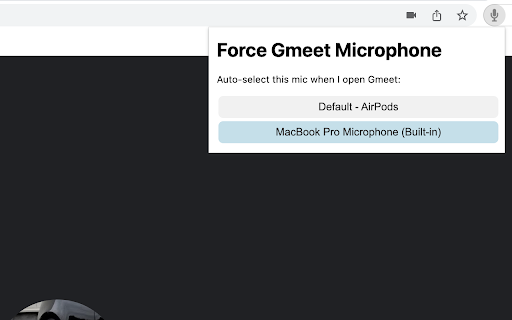
Don't you hate choosing your laptop's internal mic every single time you join a Gmeet call? With this extension, you can auto-select a specific mic every time you open a Gmeet call or change media devices (eg. putting your earbuds in or connecting to an external camera). Source code available for review here: https://github.com/gradywetherbee/specify-gmeet-mic

Mic Test
Test your microphone with delay feedback Quickly check if your microphone is working properly with this straightforward Chrome tool. Avoid audio issues in important meetings, recordings, or streams by testing your setup beforehand. Important Note: For this extension to work, you'll need to grant it "microphone" permission. You can use this link or you can follow extension directions. chrome://settings/content/siteDetails?site=chrome-extension://gijclgpbhggkagffcfoeohlmgfdbhofj - Choose Your Input Device: If you have multiple microphones connected (like a headset mic and a webcam mic), you can easily select the specific one you want to test. - Set Delay and Volume: Adjust the playback volume of your voice and add a slight delay. - Live Audio Visualizer: See a real-time visual representation of the audio your microphone is detecting. - Easy Start/Stop Testing: Begin and end your microphone test with a single click. No complicated settings or steps, just a quick and efficient way to verify your audio.

Naro
Naro is an always-on sales knowledge assistant that helps sellers organize and surface the right content and knowledge in every customer interaction -- email, in meetings, demos, and beyond. We work right alongside the apps you use today (Gmail, Gong, Zoom, etc.) and pull in data from your CRM (Salesforce, Hubspot) and LinkedIn. We remove the need to search by unifying everything a seller might need (from slides to snippets) so teams can trust everything they need is in one platform.

Google Meet Microphone Toggle
Toggle Google Meet microphone with CapsLock Use the CapsLock button as your microphone switch for Google Meet. When your CapsLock light is OFF, your mic is off. If the CapsLock light is ON, your mic is ON.

OpenText Core SCA Select Extension
Open Source Select will help developers find and use the right open source and reduce friction between organisations and developers Open Source Select helps you find and use policy compliant and great open-source for any development project. The OpenText Core SCA Select Extension is a free plugin created with developers in mind, enabling you to check the health metrics and license information of an open source project at a glance. If you need more granular data, the extension can lead you to Open Source Select for more detailed information. The three types of metrics you can examine are: Community - How healthy the community around a project is. Popularity - Is it used by many? Is the usage declining? Security - How well does the maintainers apply security best practices. The extension now supports Start Left Policies. This lets you immediately see if the open source you are browsing is compliant with your company’s open source policy, without the need to import and scan code with Software Composition Analysis tools and common source code repositories and package registries such as GitHub, pypi, npmjs, nuget and many others are supported.
