
ohpckiphfcigfekbbmaolkempahgbhfe
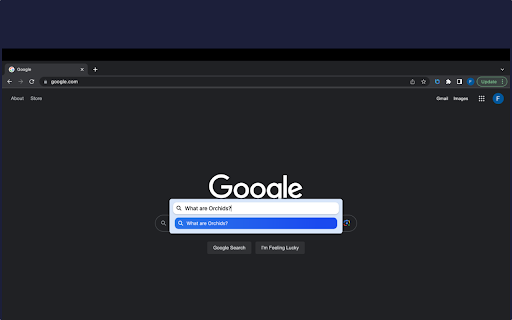
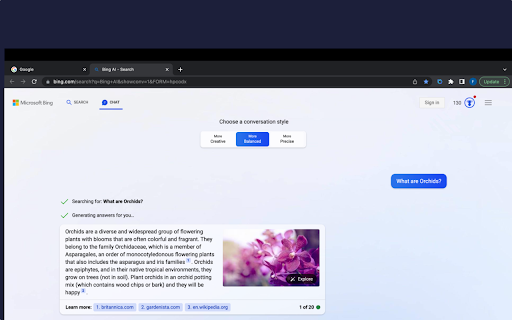
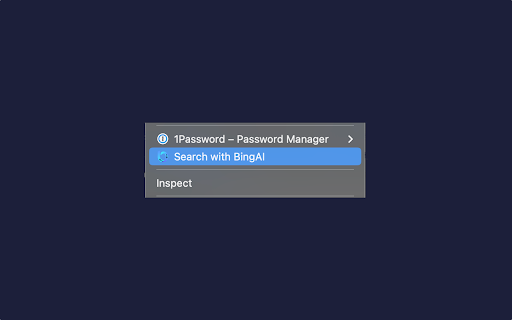
Introducing BingAI Anywhere, the edge extension that brings the power of Bing's new ChatBot LLM to your fingertips. With just one click, you can access the most advanced AI-powered search language models available today, without leaving the page you're on. BingAI Anywhere is designed to be simple and straightforward. The extension opens up a search box on any page, allowing you to submit your queries to BingAi and get the most accurate and relevant results for your search. With zero complicated settings or options to configure, BingAi Anywhere is easy to use and incredibly intuitive. Thanks to its seamless integration with Bing's AI technology, BingAI Anywhere delivers the most accurate and relevant results for your search queries. Whether you're looking for news, articles, products, or services, BingAI Anywhere makes it easy to find what you need, fast. BingAI Anywhere is not just another search extension—it's a game-changer. By seamlessly integrating with your browsing experience through context menus and the omnibox, it revolutionizes how you search, making it effortless and lightning-fast. With its powerful AI capabilities and customizable features, BingAI Anywhere is the ultimate tool for unlocking the full potential of Bing's ChatBot LLM, delivering accurate and relevant search results, and enhancing your productivity online. Disclaimer: BingAI and/or BingChat is trademark of Microsoft. The browser extension BingAI Anywhere, is in no way shape or form related to BingAI or Microsoft. It is an unofficial Extension which is developed and maintained independently by its author.

AI for Chrome
Removes the limits of Copilot AI (ChatGPT) for Google Chrome and other browsers. This add-on removes the limits of Copilot AI (ChatGPT) for Google Chrome and other browsers by setting appropriate features for the browser. Please try to disable all other browser extensions because many extensions (VPNs, ad blockers, cookies, ...) break the Bing AI functionality. The latest version of Brave has a bug that breaks the functionality so please download and install the separate package manually (Chrome Webstore doesn't support extensions with manifest v2). https://github.com/patrik-martinko/addon-bing-ai-for-chrome#brave-browser

Javy: GPT-4 powered assistant
GPT-4 powered tool for quick access to the answer to any question Javy brings the power of OpenAI's language model to your browser. With this extension, you can have a virtual assistant at your fingertips, ready to answer questions, provide information, and complete tasks. Simply type in your query, and GPT-4 will generate a response, offering you relevant and accurate information in a matter of seconds. Whether you need help with homework, want to find the latest news, or just need a quick translation, GPT-4 has you covered. The extension utilizes cutting-edge AI technology to understand natural language and deliver high-quality results. Download the GPT-4 powered assistant today and experience the future of search.

YouTube Summary with Bing Chat - All Browsers
The best summary tool for YouTube.Generating videos transcript and summary with Bing Chat AI. YouTube Summary with Bing Chat - All Browsers provides an access to the summary of YouTube videos. Let you quickly get the content of the YouTube video, save time and learn quicker. Features ● Save time:Quickly go to Youtube video location in the subtitles ● Fast speed:Load quickly to videos summary ● Easy to use:One-click summary generation, you can also copy the content How to use ● Simply go to YouTube website ● Choose video you are interested in and click to watch ● Click the Transcript & Summary drop-down box on the right side of the video,It will show you the video subtitles, if it has. ● At the same time, AI Summary button, Jump to current time button and Copy Transcript button will be displayed. ● Click the AI Summary button, we will open new tab and jump to bing.com to get summary. (you must have Microsoft account and have access to the new Bing chat). Note: It should be noted that not everyone is able to use Bing Chat's analytics feature, and you need to ensure that your Microsoft account is able to use the Edge browser's chat feature properly.If you don't have access to the new Bing Chat, you can join the waitlist at bing.com/chat. Q&A Q1:What is Bing Chat? A1:Bing Chat is powered by GPT-4, the latest and most advanced AI language model, to provide you with the most accurate and relevant answers to your queries. Q2:What is Youtube video summary? A2:YouTube video summary is a written overview of the content in a video on the YouTube platform. The summary provides a quick way to understand the video's topic and important information.

Beyond - Gemini™ AI chat for any website
Summarise or Analyse Youtube™ videos, enhance Google™ and Bing™ searches with Gemini™ Beyond Bard - Google Bard chatbot as assistant on any website and Youtube video summarizing tool . It uses google's BARD chatbot at backend. For popular sites like Google, Bing, Youtube, Duckduckgo, Github there are custom prompts written to enhance the summary(or insights) experience. For all other sites it tries to generate a summary or insights of the content on the page as much as possible. We are continuously increasing support for different types of websites. It ensures 100% privacy, none of your data is sent to any server. Do send up request of any specific site or group of sites that you need if that's not already supported at https://github.com/ishandutta2007/beyond-bard-mini/issues LEGAL: Disclaimer: Beyond Bard app is not official Bard application. It is an unofficial extension that is developed and maintained independently and has no affiliation to Google .
