
ceknbkmhppjloheidfdpmaijdcgofoif
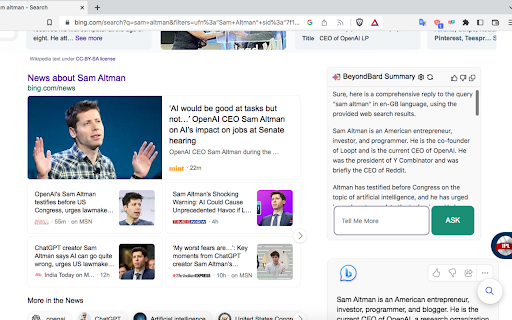

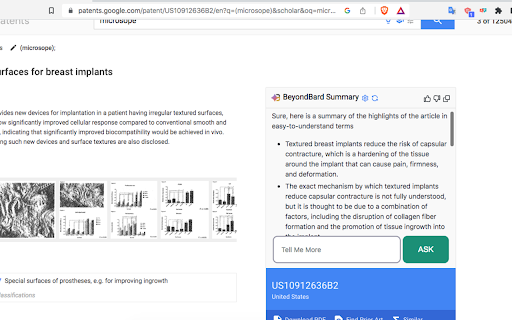


Summarise or Analyse Youtube™ videos, enhance Google™ and Bing™ searches with Gemini™ Beyond Bard - Google Bard chatbot as assistant on any website and Youtube video summarizing tool . It uses google's BARD chatbot at backend. For popular sites like Google, Bing, Youtube, Duckduckgo, Github there are custom prompts written to enhance the summary(or insights) experience. For all other sites it tries to generate a summary or insights of the content on the page as much as possible. We are continuously increasing support for different types of websites. It ensures 100% privacy, none of your data is sent to any server. Do send up request of any specific site or group of sites that you need if that's not already supported at https://github.com/ishandutta2007/beyond-bard-mini/issues LEGAL: Disclaimer: Beyond Bard app is not official Bard application. It is an unofficial extension that is developed and maintained independently and has no affiliation to Google .

Otter.ai: Record & Transcribe Meetings - Google Meet & Web Audio
Live transcription, summary, AI chat for meetings or website audio — Zoom, YouTube, online lectures, and more. No bot in Google Meet Otter.ai Chrome Extension offers real-time transcription, AI-powered summaries, and ChatGPT-style Chat to online meetings and any tab with audio—all inside Chrome. Compatible with Zoom, Microsoft Teams, and Google Meet. No-bot in Teams or Google Meet. Also compatible with YouTube, Coursera, online lectures, podcasts, and any website on Chrome browser. KEY FEATURES - Live transcription & captions – High accuracy so you never miss a word - Smart meeting summaries – bullet points, action items, and insights after the call. - AI chat with your meeting – Ask “What’s the deadline?” or “Summarize next steps” and get instant answers. - No-bot in Google Meet – no extra participant joins your call. - YouTube captions – Great for high-quality transcripts and language learning. - Works everywhere – from webinars and online classes to Twitter/X Spaces and LinkedIn Live - Search & share – locate any sentence later; export to Google Docs, Slack, CRM HOW TO PIN THE EXTENSION AND LOG IN: - After downloading, tap the extension icon, then tap the pin icon to add it to your browser bar. - You need to log in to use Otter. Tap the pinned Otter logo in your browser bar to log in to or sign up for an Otter account. HOW TO USE WITH GOOGLE MEET: - Remain logged in to use Otter. - After you join a Google Meet meeting, an Otter extension pop-up will open and ask if you want to - Record the meeting on your device, with no bot in the meeting. - Send AI Notetaker to the meeting as a normal participant. - You can see live transcript in the meeting. HOW TO USE WITH ZOOM: - Open a Zoom URL in your Chrome browser. - An Otter extension pop-up will open and ask if you want to send AI Notetaker the meeting to get an automatic meeting summary - However, if AI Noteteker is already scheduled to attend the meeting, you will not receive this pop-up. - You need to sync your calendar to enable Otter AI Notetaker to automatically join and record future meetings on your calendar. HOW TO TRANSCRIBE AUDIO ON THE BROWSER: - Open the website you want to transcribe the audio of, such as YouTube, online lectures, etc. - On this website, open the Otter Chrome Extension, and click “Record”. - If you mute or pause the audio or video you want to record and transcribe, the audio will not be recorded. - An overlay with live transcript will appear on the website that is being recorded. You can minimize the overlay.

YouTube Summary & Transcript AI | Summarize Long Videos with AI
Summarize Long YouTube videos with AI, generate Transcripts, Summaries & Chat with Transcripts Generate YouTube video summary, Transcript and main points powered by ChatGPT, AI Assistant in one click. Summaries any Podcast or Long Video No need to watch the whole video, one click to get a summary, transcript, and main points we are using AI to generate the summary, Transcript & main points In just opening the extension you will get: - A YouTube video summary in a single paragraph. - Digest the main points with bullet-point summaries. - Download the YouTube video transcript - Copy the YouTube video summary to the clipboard to re-use it - added the option that embeds the extension into YouTube, so no need to click on the extension to open it - Chat with Video & Ask any questions. - Bookmark the notes, or add notes to the video. FAQ: What is the extension about : It Generate Transcript, Main points using AI ChatGPT, is a Chrome extension that generates a summary, main points, and a transcription for a YouTube video, any video can work Do I need a ChatGPT or Open AI account to run this extension? Yes, Bring your own Key, either open AI, Gemini or Claude Does it only work for YouTube? That is correct, but we can extend that. If you have any requests, please add it in the support tab. How can I request adding a new language? Please request the new language from the support tab and we will try to prioritize it. We have one time payment, pay once and use forever, using your own API keys, think Like you bought a car but you need to fuel (your Own API, you take control of what you are using) instead of subscriptions Please if you have any questions feel free, to contact us support@summarizemyvideo.com

YouTube Summarizer & Chat — Strawberry
Summarize & chat with videos using AI. Plus hover-to-summarize, detailed summaries, chat with channels, & more. Save hours–be the first to know. Strawberry is the ultimate YouTube AI learning companion: • Hover any YouTube thumbnail—get the gist in

ChatPage - YouTube Summary | ChatGPT, Claude, Gemini Support
🚀 Summarize any YouTube video in 3 seconds for free. Perfect 5-star service chosen by thousands! Supports all premium AI models ⭐ Perfect 5-Star Rating from Real Users Thousands trust ChatPage with consistently perfect reviews. Join verified users who save hours daily with our proven YouTube summarizer. 🤖 Every Premium AI Model Supported Missing your favorite AI? Not here! We support EVERY major model: ChatGPT Family: GPT-5, GPT-5 Instant, GPT-5 Thinking, GPT-5 Pro, GPT-4o Premium AIs: Claude, Gemini, DeepSeek, Perplexity, Grok No AI left behind - complete coverage guaranteed ✅ Completely Free, No Limits No signup, no payments, no ads - ever Unlimited videos, unlimited length, unlimited usage 3x faster and more stable in v2.9.5 ⚡ Advanced Analysis Beyond Basic Summary Include comments to understand viewer reactions Timestamp navigation for precise video jumping Custom prompt templates for personalized insights Support for regular videos, Shorts, and playlists Install now and turn YouTube into your personal knowledge base!
