
aohgbidimgkcolmkopencknhbnchfnkm
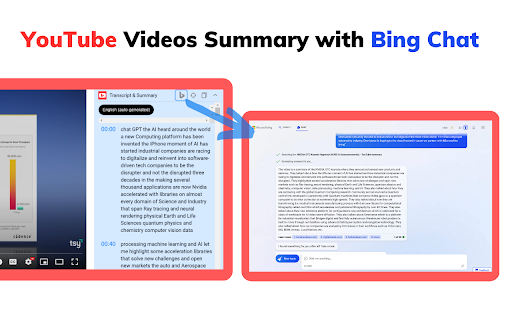
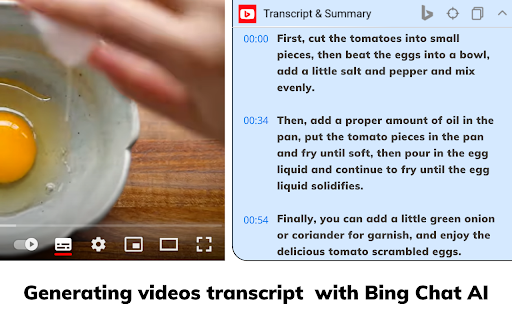
The best summary tool for YouTube.Generating videos transcript and summary with Bing Chat AI. YouTube Summary with Bing Chat - All Browsers provides an access to the summary of YouTube videos. Let you quickly get the content of the YouTube video, save time and learn quicker. Features ● Save time:Quickly go to Youtube video location in the subtitles ● Fast speed:Load quickly to videos summary ● Easy to use:One-click summary generation, you can also copy the content How to use ● Simply go to YouTube website ● Choose video you are interested in and click to watch ● Click the Transcript & Summary drop-down box on the right side of the video,It will show you the video subtitles, if it has. ● At the same time, AI Summary button, Jump to current time button and Copy Transcript button will be displayed. ● Click the AI Summary button, we will open new tab and jump to bing.com to get summary. (you must have Microsoft account and have access to the new Bing chat). Note: It should be noted that not everyone is able to use Bing Chat's analytics feature, and you need to ensure that your Microsoft account is able to use the Edge browser's chat feature properly.If you don't have access to the new Bing Chat, you can join the waitlist at bing.com/chat. Q&A Q1:What is Bing Chat? A1:Bing Chat is powered by GPT-4, the latest and most advanced AI language model, to provide you with the most accurate and relevant answers to your queries. Q2:What is Youtube video summary? A2:YouTube video summary is a written overview of the content in a video on the YouTube platform. The summary provides a quick way to understand the video's topic and important information.

Otter.ai: Record & Transcribe Meetings - Google Meet & Web Audio
Live transcription, summary, AI chat for meetings or website audio — Zoom, YouTube, online lectures, and more. No bot in Google Meet Otter.ai Chrome Extension offers real-time transcription, AI-powered summaries, and ChatGPT-style Chat to online meetings and any tab with audio—all inside Chrome. Compatible with Zoom, Microsoft Teams, and Google Meet. No-bot in Teams or Google Meet. Also compatible with YouTube, Coursera, online lectures, podcasts, and any website on Chrome browser. KEY FEATURES - Live transcription & captions – High accuracy so you never miss a word - Smart meeting summaries – bullet points, action items, and insights after the call. - AI chat with your meeting – Ask “What’s the deadline?” or “Summarize next steps” and get instant answers. - No-bot in Google Meet – no extra participant joins your call. - YouTube captions – Great for high-quality transcripts and language learning. - Works everywhere – from webinars and online classes to Twitter/X Spaces and LinkedIn Live - Search & share – locate any sentence later; export to Google Docs, Slack, CRM HOW TO PIN THE EXTENSION AND LOG IN: - After downloading, tap the extension icon, then tap the pin icon to add it to your browser bar. - You need to log in to use Otter. Tap the pinned Otter logo in your browser bar to log in to or sign up for an Otter account. HOW TO USE WITH GOOGLE MEET: - Remain logged in to use Otter. - After you join a Google Meet meeting, an Otter extension pop-up will open and ask if you want to - Record the meeting on your device, with no bot in the meeting. - Send AI Notetaker to the meeting as a normal participant. - You can see live transcript in the meeting. HOW TO USE WITH ZOOM: - Open a Zoom URL in your Chrome browser. - An Otter extension pop-up will open and ask if you want to send AI Notetaker the meeting to get an automatic meeting summary - However, if AI Noteteker is already scheduled to attend the meeting, you will not receive this pop-up. - You need to sync your calendar to enable Otter AI Notetaker to automatically join and record future meetings on your calendar. HOW TO TRANSCRIBE AUDIO ON THE BROWSER: - Open the website you want to transcribe the audio of, such as YouTube, online lectures, etc. - On this website, open the Otter Chrome Extension, and click “Record”. - If you mute or pause the audio or video you want to record and transcribe, the audio will not be recorded. - An overlay with live transcript will appear on the website that is being recorded. You can minimize the overlay.

YouTube Summary & Transcript AI | Summarize Long Videos with AI
Summarize Long YouTube videos with AI, generate Transcripts, Summaries & Chat with Transcripts Generate YouTube video summary, Transcript and main points powered by ChatGPT, AI Assistant in one click. Summaries any Podcast or Long Video No need to watch the whole video, one click to get a summary, transcript, and main points we are using AI to generate the summary, Transcript & main points In just opening the extension you will get: - A YouTube video summary in a single paragraph. - Digest the main points with bullet-point summaries. - Download the YouTube video transcript - Copy the YouTube video summary to the clipboard to re-use it - added the option that embeds the extension into YouTube, so no need to click on the extension to open it - Chat with Video & Ask any questions. - Bookmark the notes, or add notes to the video. FAQ: What is the extension about : It Generate Transcript, Main points using AI ChatGPT, is a Chrome extension that generates a summary, main points, and a transcription for a YouTube video, any video can work Do I need a ChatGPT or Open AI account to run this extension? Yes, Bring your own Key, either open AI, Gemini or Claude Does it only work for YouTube? That is correct, but we can extend that. If you have any requests, please add it in the support tab. How can I request adding a new language? Please request the new language from the support tab and we will try to prioritize it. We have one time payment, pay once and use forever, using your own API keys, think Like you bought a car but you need to fuel (your Own API, you take control of what you are using) instead of subscriptions Please if you have any questions feel free, to contact us support@summarizemyvideo.com

YouTube Video Summary & AI Chat - Summd
AI-powered YouTube video summarizer with timestamps. Chat with any video - ask questions and get instant answers SUMMD sits right next to your YouTube video and gives you the key points in seconds. No more scrubbing through timelines, no more watching at 2x speed hoping you don't miss the good part. How it works: Open a YouTube video. That's it. SUMMD automatically summarizes it with clickable timestamps so you can jump straight to what matters. Want to go deeper? Ask questions about the video - like having a conversation with someone who already watched the whole thing for you. What people use it for: → Students pulling key points from lecture recordings → Devs skimming through hour-long conference talks → Curious people who watch way too much YouTube (no judgment) → Anyone tired of "this video could've been 5 minutes" Features: • Auto-summary with smart timestamps — appears the moment you open a video • Chat with the video — ask specific questions, get precise answers • Frame analysis — pause and ask about what's on screen • Works in 17 languages Works with any YouTube video: tutorials, lectures, podcasts, reviews, documentaries, conference talks, interviews, music breakdowns, cooking videos, tech reviews, and more.

YouShort - AI Chat & Summary for YouTube
Chat with any YouTube video. Get instant summaries with clickable timestamps. In any language. YouShort lets you chat with any YouTube video directly on the page — ask questions, get summaries, and jump to the exact moment you need. No more scrubbing through hour-long videos. HOW IT WORKS: Open any YouTube video → YouShort appears as a sidebar → Ask anything or generate a summary → Get precise answers with clickable timestamps that jump to the right moment. ✅ Chat with any YouTube video — Ask questions and get direct answers from the video content ✅ Instant summaries — Get the key points of any video in seconds ✅ Clickable timestamps — Every answer links to the exact moment in the video ✅ Any language — Summaries and answers in your language (French, English, Spanish, German, Italian and more) ✅ Built into YouTube — No tab switching, the panel appears directly on the video page PERFECT FOR: - Business & finance professionals doing market research - Anyone learning from educational content - People who need to extract info fast without watching full videos - Podcast listeners who want the key takeaways FREE & PREMIUM: YouShort offers a free plan with usage limits and a premium plan for unlimited use. Install YouShort and get the information you need — without watching the whole video.
