
ogobpofhpaediomejphdlbljncngeggl
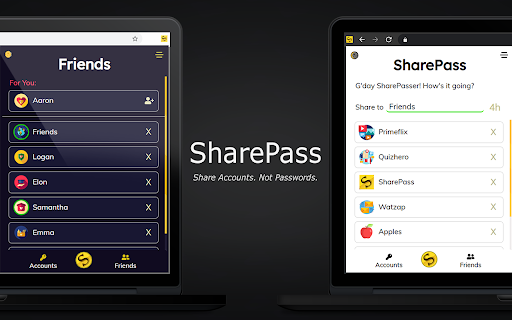

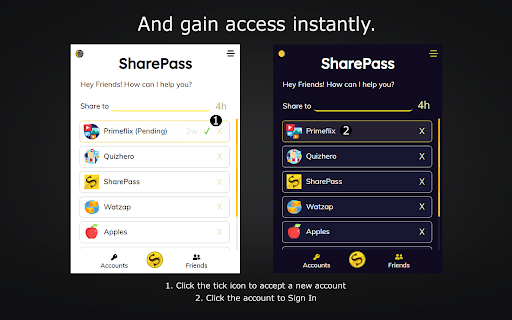
Share your accounts without giving your passwords away! Everything for a Username! - That's right. No email addresses. No mobile phones. No remembering those pesky passwords. Just you and a username you get to choose! - Don't worry though, we believe your private information should stay private hence there's strong authentication going on behind the scenes. Share Accounts - Not Passwords. - Share temporary access for 4 hours, 1 day, 7 days or 2 weeks! Perfect for a socially-distanced movie night or binge watching the latest season of your favourite TV show. - Your accounts are encrypted and sent via an SSL secured network - no need to generate manual URLs which store your sessions on a server, just type in their username and hit SharePass! - Sessions are stored locally on your device, meaning even we can't access your data. Share with Friends! - We'll automatically add to your Friends list when you SharePass or Receive so you don't have to. - If you want to SharePass to the same user again, just click on their name in your Friends list when they're online! No need to remember or type their usernames. Anytime Sharing! - Turn on Anytime Sharing in the Settings to share to Friends even when they are not online! Presence - A green circle will appear around a Friend's icon suggesting they are online - If a user is not your friend yet, the SharePass yellow underline will turn green as well. Works on a wide range of websites - We combine your cookies and storage data to create a shareable session but please do not share sensitive accounts. Notifications - When you receive new accounts, you will be notified within your browser so you can sign in automatically. SPv3 - Secure your account with email and recover your SPID if you lose access - Invite friends and climb the leaderboard to earn rewards - Major UX refresh including cleaner settings and refreshed popup - Faster, more reliable backend SPv2.8 - Fix for SharePass+ Subscription Checks - Minor Performance Improvements SPv2.7 - Fix for Sharing Durations of 2 Weeks and 1 Year SPv2.6 - Introducing SharePass Premium! Share for 1 month, 3 months, 6 months and 1 whole year! - Anytime sharing is now enabled for everyone - Improved UI and Bug Fixes - Speed and stability improvements SPv2.5 - We're back! Big updates are coming this year so stay tuned! - Forced log out when your session timer has ended - Loading screen to minimise session load issues - Updated for the latest versions of Chrome - Speed and stability improvements SPv2.4 - Anytime Sharing allows you to share with Friends even when they are not online! Go to Settings to turn it on. - Stability Improvements SPv2.3 - Rich Notifications - automatically sign by clicking on a notification when you are sent an account - Bug fixes SPv2.1 - Extension load speed significantly improved - The new Settings page allows users to fine-tune their privacy preferences - Duration countdown timer now appears all the time - Many new websites can now be SharePassed - New languages added: French, Spanish, Dutch, Bangla, Hindi, Portuguese, Thai SPv2 - Automatically add new Friends by sharing to them! - See when Friends are online: a green circle will appear around a friend's icon if they are online - No need to keep typing usernames anymore, just click on a friend in your Friends list to share to them - Find mutual friends - Dark Mode - 2 week duration option added - Support for more websites - Redesigned UI - Sender username added to notification - Bug fixed around automatic Sign In SPv1.5 - Choose to SharePass for 4 hours, 1 or 7 days! The timer starts when a receiver accepts a session and once their time runs out, the session will automatically be removed and the user will be signed out of your account - perfect for temporary access. By downloading this extension, you are agreeing to the following: - You will only share accounts to people you know and trust - You will continue to abide by the terms and conditions of the accounts you are sharing or receiving on our platform - Although efforts are made to secure and encrypt your accounts as they are shared, the security of your accounts is ultimately your responsibility - This extension uses Google Analytics to collect extension usage statistics to help improve user experience. If you want to opt-out of Google Analytics tracking, please visit http://tools.google.com/dlpage/gaoptout or you can set up a filter in Adblock Plus or similar ad blocker tools like AdBlock, uBlock or Adblock Pro. - By using this extension, you agree to the SharePass Privacy Policy available at https://sharepass.app/#three

Session Share
Share your website account cookies to your friends without login with password. Session Share can be used for account sharing on video platforms (e.g. IQiyi, Youku), educational services (e.g. New Oriental, Udacity), and similar platforms. Share exclusively with trusted individuals. Recipients will gain full account access during your active login session - this is an extremely high-risk operation. For Chrome users: After accessing the webpage, use the right-click context menu for copy/paste operations instead of keyboard shortcuts. To terminate all active shared sessions: Manually log out of your account and reauthenticate. Contact for support: scottleung@qq.com or feedback in https://github.com/scott-leung/session_share_feedback/issues

Find sci paper
Find your reference paper in sci-hub by one click Go to the reference page on journal site and click add-on button, then chrome will open a new tab to find resource in sci-hub. Or you can select doi text then right click>get by doi, then chrome will open a new tab to find resource in sci-hub. Custom domain setting: right click add-on button > Options, then input custom domain you want and save it.

Session Share - Login Sharing Made Easy
Share your website account cookies to your friends without login and password Want to share your favorite websites like Netflix and Amazon Prime with friends without giving them your password? With Session Share, you can easily share your login sessions safely and securely! 🔒 Key Features: - Easy Sharing: Share your website sessions with friends in just a few clicks. 📲 - No Passwords Needed: Keep your passwords private while sharing access. 🔑 - Secure and Safe: Your data is protected with top-notch security. 🛡️ - Unlimited Sharing: Share as many sessions as you want with our flexible plans. 🔄 - Cross-Device Sync: Access your sessions from any device, anytime. 💻📱 How It Helps: - Stay Connected: Share your favorite sites like Netflix and Amazon Prime with friends and family without hassle. 🎬🛍️ - Save Time: No need to log in and out repeatedly; just share your session. ⏰ - Peace of Mind: Your passwords stay safe, and you control who gets access. 🧘♂️ Premium Features ⭐: - Unlimited Account Saving ($2.99/month or $14.99/year - Save 37%) - Cloud Sync: Access your shared sessions across all devices - Priority Support: Get help when you need it - No Ads: Clean, distraction-free experience - Advanced Security: Extra layer of protection for your sessions - Share with Multiple Friends: Perfect for family sharing Session Share makes it easy to share your online world with others while keeping your information secure. Perfect for students, families, and anyone who loves to share! Try Premium today and unlock the full sharing experience! 🌟

LoadConnect
Plugin that simplifies communication between carriers and brokers by allowing carriers to send emails with one click from loadboard LoadConnect.io - is the ultimate Google Chrome extension for Carriers and Dispatchers! With LoadConnect extension, you can send pre-written emails to brokers, search for loads and plan the routes in Google maps - one click! LoadConnect is your all-in-one loadboard plugin. The tool allows Truck Carriers and Dispatchers to react to any posted load x10 faster 🚀 FEATURES: 📩 Send Emails With One Click - Create personalized email templates using dynamic variables for each load. 💆♂️Automatically Estimate RPM - Set filters for minimum miles and rates, exclude specific states, and see the RPM breakdown right on the load board. 🌏 Open Google Maps with Load Information - Get all the load details you need on Google Maps, including truck location, pickup origin, and destination. ⭐️ Check Brokers' Ratings - Stay informed and protected by checking brokers' ratings and reading reviews from fellow carriers, helping you identify scammers and unreliable brokers. HOW IT WORKS? 1️⃣ Click the “Add to Chrome” 2️⃣ Sign up to your LoadConnect account 3️⃣ Edit your Email Template 4️⃣ Open your Load Board 6️⃣ Start Sending Emails WHY LoadConnect.io? ⚡️ React to loads 10X faster ❤️ Every 3rd user recommends Loadconnect.io to their friends 😉 See the value in just 3 minutes - for free
