
ocofgmnfmjndinnmdimpmijogpaljmal
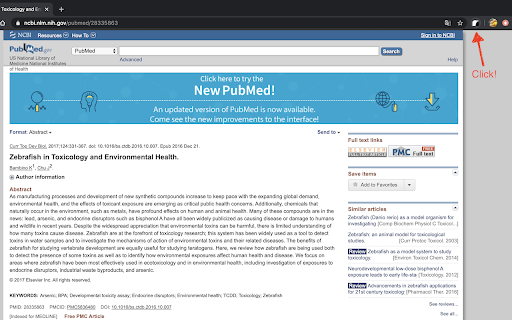


Find your reference paper in sci-hub by one click Go to the reference page on journal site and click add-on button, then chrome will open a new tab to find resource in sci-hub. Or you can select doi text then right click>get by doi, then chrome will open a new tab to find resource in sci-hub. Custom domain setting: right click add-on button > Options, then input custom domain you want and save it.

Entire screen scihub document viewer
Read the document using your entire screen without sidebar

Weava Highlighter - PDF & Web
Best highlighting tool for Website and PDF. FREE and easy to use. Highlight & organize your research with Weava online Web & PDF highlighter. Simplify your research process. Focus on Productivity. Don't waste time on keeping track of sources, copying & pasting, or making citations. On average, our users report that the Chrome extension helps them save 3.8+ hours each week. That's a lot of hours that you instead can spend on the things that really matters to you. WITH WEAVA YOU CAN: ➤ Highlight websites and PDFs with multiple colors, and make annotations. Revisit them with a single click. ➤ Organise your highlights into folders and sub-folders. ➤ Create citations automatically for your highlights. ➤ Access your highlights anywhere. Your highlights and notes are saved in the cloud. ★ TRUSTED BY 2,000,000+ USERS: Weava is trusted by students, researchers, business professionals, and people who simply just want to do better and more efficient work. The tool adapts to your needs and research style, giving you the flexibility to review your articles & sources every time you research online. ★ WEAVA PREMIUM: If you want to supercharge your research and maximize efficiency, Weava Premium is your answer. Here are some of the things that you can do with Premium: ➤ Customize any color you want ➤ Create unlimited sub-folders to organize highlights ➤ Unlimited storage in the cloud to store your files ➤ Clip images and save them in the workspace ➤ Collaborate with your friends or team in real-time ★ FREQUENTLY ASKED QUESTIONS & CUSTOMER SUPPORT: For frequently asked questions (FAQs) and customer support, please see: https://weavatools.atlassian.net/servicedesk/customer/portals ★ IMPORTANT THINGS TO NOTE: ➤ Please note that Weava only visually renders the highlights from your current active folder. ➤ You can enable/disable the highlighter pop-up with the keyboard shortcut Alt+S (Option+S on Mac). And you can customize your keyboard shortcuts in your Google Chrome settings (chrome://extensions/shortcuts) ➤ While the tool works on most websites, please note that some websites have conflicting code that results in the Weava highlighter not functioning properly. ➤ Weava fetches and visually renders your color highlights based on the respective URL you first made the highlight on (for websites and online PDFs). Please note that, while your highlights and annotations are always saved in the sidebar and dashboard, if the website URL for some reason changes, then the visual rendering of your highlights are not visible unless you update the URL in the "Edit Source" functionality on the dashboard. ➤ You can 1) highlight local PDFs directly from your computer. 2) Online PDFs, and 3) upload PDFs directly to Weava. Uploading PDFs will ensure you the smoothest experience. ➤ You are currently unable to directly highlight on PDFs inside certain 3rd party software, such as in Google Classroom, Blackboard and Canvas. Instead you would need to first download the PDF and then use it with Weava. We hope to have better solutions towards this in the future. ★ CHROME EXTENSION PERMISSIONS EXPLAINED: Weava's requested permissions are needed for the tool to function properly. However, the exact phrases provided by Chrome for these permissions are misleading and make them sound more invasive than they actually are — and you will generally see the same exact warnings on practically all Chrome extensions. Here's a further breakdown of the required permissions to run Weava: ① "Read and change all your data on the website you visit" ➤ "Read": The Weava Chrome extension has passed all of Google’s automated and manual security checks and is safe to use. The extension reads the current URL of the page you make highlights on - and is also checking if you have existing highlights on this URL so that it can visually show these to you. That's it. ➤"Change": Weava needs to modify the website you are visiting in order to show you the Chrome extension highlighter pop-up on top of it. Weava also needs this permission to be able to change the text background color accordingly whenever you make a highlight. ② "Modify data you copy and paste." ➤ Weava needs this permission simply to create and save the highlights you are making. Without it we would just be a nice color tool but without the capabilities to save the exact content you highlighted and show this to you in the sidebar and dashboard. ③ Separately, in the Weava Chrome extension settings, you can enable "Allow access to file URLs" which gives Weava permission to read PDF local file paths so that you can highlight PDFs directly from local files on your computer. Similarly to highlights on websites, it ONLY reads the file path of the file you are highlighting on and it is only doing this in order to be able to save the highlight and to fetch and visually render these highlights on subsequent visits. By installing the extension, you agree to Weava's Terms and and Privacy Policy (https://weavatools.com/terms-and-privacy).

easyScholar
显示各种文献排名,并且提供翻译、文献收藏功能,助力科研。 工欲善其事,必先利其器。好的科研工具,能够让您提升数倍的学习效率。 【显示期刊等级】 - 支持在谷歌学术、知网、pubmed、web of science、scopus、Aminer、ScienceDirect等20+主流论文搜索网站上,显示文章的来源期刊等级。 - 显示的等级包括:SCI分区(Clarivate),SCI影响因子(Clarivate),SCI分区(中科院),SCI期刊预警(中科院),CCF, 南大核心,北大核心等30+数据等级。足以满足日常科研、工作、评奖评优需要。 - 自定义数据集:若您有自己的目标期刊,可以自定义属于您的数据集。此外,在自定义数据集社区中,还可以选择:《国家自然科学基金委管理科学部认定的重要期刊》、《西南交通大学学术期刊分级目录(2022版)》、《澳大利亚ABDC期刊2022》、《吉林大学哲学社会科学高水平中文学术刊物参考目录(试行)》、《中国计算机学会推荐国际学术会议(2022年)》、《中国人文社会科学A刊引文数据库》等100+由网友制作的数据集。 【在线翻译】 - 在所有网站上,选中一段文本后,按T翻译,按Y隐藏。(edge用户最好将选择文本后弹出的迷你小菜单隐藏,才能更好的触发翻译事件) - 可以选择谷歌翻译、搜狗翻译、有道翻译、彩云小译、小牛翻译等多种主流翻译源。 【文献管理】 - 在论文搜索的详情页内,提供"easyScholar文献收藏按钮",快速的为文献添加类别。从此不再需要使用浏览器收藏夹保存网页。 感谢您看到了这里,如果您喜欢这款产品,或者认可我们的努力,可以和身边的小伙伴分享。当您使用了邀请码,或发朋友圈分享,您将会获得一定的奖励,具体的规则可以在网站的后台(https://www.easyscholar.cc/console/user/invite)查看。

SharePass - Share Accounts. Not Passwords.
Share your accounts without giving your passwords away! Everything for a Username! - That's right. No email addresses. No mobile phones. No remembering those pesky passwords. Just you and a username you get to choose! - Don't worry though, we believe your private information should stay private hence there's strong authentication going on behind the scenes. Share Accounts - Not Passwords. - Share temporary access for 4 hours, 1 day, 7 days or 2 weeks! Perfect for a socially-distanced movie night or binge watching the latest season of your favourite TV show. - Your accounts are encrypted and sent via an SSL secured network - no need to generate manual URLs which store your sessions on a server, just type in their username and hit SharePass! - Sessions are stored locally on your device, meaning even we can't access your data. Share with Friends! - We'll automatically add to your Friends list when you SharePass or Receive so you don't have to. - If you want to SharePass to the same user again, just click on their name in your Friends list when they're online! No need to remember or type their usernames. Anytime Sharing! - Turn on Anytime Sharing in the Settings to share to Friends even when they are not online! Presence - A green circle will appear around a Friend's icon suggesting they are online - If a user is not your friend yet, the SharePass yellow underline will turn green as well. Works on a wide range of websites - We combine your cookies and storage data to create a shareable session but please do not share sensitive accounts. Notifications - When you receive new accounts, you will be notified within your browser so you can sign in automatically. SPv3 - Secure your account with email and recover your SPID if you lose access - Invite friends and climb the leaderboard to earn rewards - Major UX refresh including cleaner settings and refreshed popup - Faster, more reliable backend SPv2.8 - Fix for SharePass+ Subscription Checks - Minor Performance Improvements SPv2.7 - Fix for Sharing Durations of 2 Weeks and 1 Year SPv2.6 - Introducing SharePass Premium! Share for 1 month, 3 months, 6 months and 1 whole year! - Anytime sharing is now enabled for everyone - Improved UI and Bug Fixes - Speed and stability improvements SPv2.5 - We're back! Big updates are coming this year so stay tuned! - Forced log out when your session timer has ended - Loading screen to minimise session load issues - Updated for the latest versions of Chrome - Speed and stability improvements SPv2.4 - Anytime Sharing allows you to share with Friends even when they are not online! Go to Settings to turn it on. - Stability Improvements SPv2.3 - Rich Notifications - automatically sign by clicking on a notification when you are sent an account - Bug fixes SPv2.1 - Extension load speed significantly improved - The new Settings page allows users to fine-tune their privacy preferences - Duration countdown timer now appears all the time - Many new websites can now be SharePassed - New languages added: French, Spanish, Dutch, Bangla, Hindi, Portuguese, Thai SPv2 - Automatically add new Friends by sharing to them! - See when Friends are online: a green circle will appear around a friend's icon if they are online - No need to keep typing usernames anymore, just click on a friend in your Friends list to share to them - Find mutual friends - Dark Mode - 2 week duration option added - Support for more websites - Redesigned UI - Sender username added to notification - Bug fixed around automatic Sign In SPv1.5 - Choose to SharePass for 4 hours, 1 or 7 days! The timer starts when a receiver accepts a session and once their time runs out, the session will automatically be removed and the user will be signed out of your account - perfect for temporary access. By downloading this extension, you are agreeing to the following: - You will only share accounts to people you know and trust - You will continue to abide by the terms and conditions of the accounts you are sharing or receiving on our platform - Although efforts are made to secure and encrypt your accounts as they are shared, the security of your accounts is ultimately your responsibility - This extension uses Google Analytics to collect extension usage statistics to help improve user experience. If you want to opt-out of Google Analytics tracking, please visit http://tools.google.com/dlpage/gaoptout or you can set up a filter in Adblock Plus or similar ad blocker tools like AdBlock, uBlock or Adblock Pro. - By using this extension, you agree to the SharePass Privacy Policy available at https://sharepass.app/#three
