
ogaicamnmocpjcbcfpnaccmmhpfmogbb

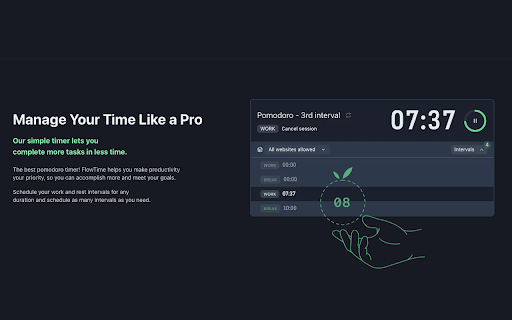
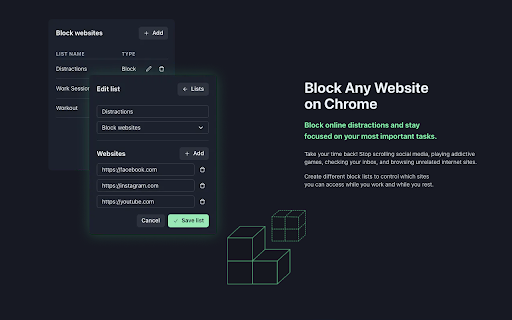


A Chrome Extension to boost your productivity! Learn more at the FlowTime Website: https://flowtime.biz/ Double Your Productivity. Guaranteed. FlowTime works as a Pomodoro-like timer & website blocker that boosts your productivity by making your mind go into the state of flow faster. The FlowTime Chrome Extension connects to the FlowTime web application, allowing users to block specific websites or the entire internet. The extension works with both basic (free) and premium (paid) accounts. Please note that the website blocking feature works while using the Chrome Extension in conjunction with the FlowTime web app [flowtime.biz]. Flow is the mental state of operation in you are fully immersed in a feeling of energized focus, full involvement, and enjoyment in the process of the activity. It is a state in which you are the most productive!

Peek-a-tab, Tabs Manager for Google Chrome™
Search, preview, jump across, and close tabs quickly in your chrome browser. Do you have a lot of tabs opened in your browser and find it cumbersome to manage them? well here is the solution. * Use Alt+Space (Option+Space for mac) to get a list of all the tabs from all the windows. * Search in the title & url to quickly get the tab you want. This extension's source code is available here: https://github.com/pramjeet/peek-a-tab

Speed Reading
Reedy Speed Reading, learn how to increase reading speed in a sec and read faster today. Take words per minute test. Boost wpm Wondering, how can I increase my reading speed and comprehension? Look no further! Behold, the “Reedy” — the magical Speed Reader app for fast reading test and learning. Key to unlocking the power of the fast speed reading. 🐼 Like the swift winds that carry whispers across the bamboo forests, we use advanced rapidreading techniques, helping you speedread. Whether you’re a scholar, a student, or a curious wanderer, it will enhance your quest for written wonders, allowing you to absorb tales and tomes as swiftly as the wind. Embrace this enchanted tool and let your mind soar across realms of knowledge. The wisdom of countless scrolls is within your grasp with speedreading! 🌐 Hey! It isn’t just about grasping content faster — it’s about making the whole experience better for you. • Imagine transforming how you consume and comprehend all the content you encounter online. • Be it a web article, news page, PDF, custom pasted text, or anything else you come across anywhere on the web. • Get through more content in less time. 🔥 Why the Speed Reading app? → Accelerate daily textual tasks. → Enhance productivity and learning efficiency immediately. → Increase textual fluency dramatically — double, triple, or even quadruple your average reading pace! → Train your brain to process information faster. → Comprehension examination, ace and keep retention. 🏃♂️ How fast can you go? Ever wondered about average read speed? Take our reading speed test and discover your current WPM (words per minute)! Then use Reedy to maximize your potential and become a fastreader in no time. Curious about the normal speed of reading? According to multiple studies and meta-analyses, the typical rate of silent absorbing content varies depending on the type of material, but in general: ► For 5th grade, 10-11 years old: 139-194 wpm ► Average reading speed: 200-300 wpm ► **Speedreaders: 300-700 wpm (average speed reading rate even among untrained Reedy users!)** ► Fastest reader in the world: 25,000+ words a minute tested! Where do you stand? Find out with a speed reading test! 📚 Speed reading and features ✓ RSVP-reading (Rapid Serial Visual Presentation) technique presents words one at a time. ✓ Focus point shifted closer to the beginning of a word for increased comprehension. ✓ Gradual acceleration, start at a lower pace and gradually elevate it. ✓ Customizable tempo, fonts, colors, shortcuts, etc. ✓ Smart slow down at punctuation marks. ✓ Reading comprehension test. ✓ Test wpm (wpm reading test). RSVP allows you to significantly increase reading speed without sacrificing comprehension. It reduces eye movement so you can focus better and absorb information faster. Think of it as a fast-forward button for your brain! 🧠 How to speed read Set your desired speed, test reading and comprehension, watch your words-per-minute soar! 💡 Tips on how to read faster 1. Practice regularly; 2. Focus on key words; 3. Minimize subvocalization, do not pronounce in your head! Remember, learning to speedread is a skill that takes time to master. Reedy boosts your ability to grasp and comprehend content effortlessly, but with practice, you can go even faster and become a true speedreading pro. 🌟 Who can benefit from the speedreading? - 🎓 Students cramming for exams, academics and researchers. - 💼 Professionals dealing with heavy workloads. - 📗 Speedreaders who want to tackle more books. - 🧒 Children or literacy skills practicioners. - 👵 Seniors keeping their minds sharp and checking their skills. - 🦥 Slowreaders controlling desired pace. - 📖 Anyone looking to improve speedreading. 🌈 Accessibility, game changing for speedreaders with diverse needs: ◦ Dyslexia: Simplifies text processing, easing comprehension difficulties (dyslexia-friendly font available!); ◦ ADHD/ADD/ASD: Enhances focus, reduces distractions for better comprehending; ◦ Visual impairment: Larger text with no scrolling; 🏆 Become the fastest reader in your circle Challenge your friends to a read speed test! See who is a fastreader and can achieve the highest wpm while maintaining good comprehension. ⚡ Quickread, fastreading, spritzreading, swiftread — whatever you call it, Reedy has got you covered! Whether you’re looking to speedread a textbook, skim through your emails, or simply breeze through the content for fun in lightning pace. 🚀 Get Reedy — your personal rapid reading app right away!

RightTasks for Gmail™
See your tasks at all times, without getting in the way. RightTasks shows your Google Tasks sidebar with new features: * Hide the Applications bar for less distraction. * Resize the sidebar to fit everything, or take up less space. * Hide and show the sidebar with a single click. * Visual tweaks for a clear view of your tasks. All the official Google Tasks features, like keyboard shortcuts or turning emails into tasks, are still available. Make sure to reload Gmail after installing the extension. * Read and change your data on mail.google.com Required for showing the tasks sidebar, hiding the applications bar, the resize and docking functionality. * Read and change your data on tasks.google.com Required for visual tweaks in the the tasks sidebar, moving the completed tasks to the bottom, adding the settings button. Required for saving settings. We do not collect any of your personal data. See our privacy policy: https://github.com/ghinda/righttasks/wiki/Privacy-policy Visit www.righttasks.com for updates.

Productivity Owl
Want to be productive? Let the Productivity Owl guide you to accomplishment. *** WARNING: This extension is very annoying. The owl is flying across your pages, annoying you, criticizing you, giving you psychological exercises, and closing your tabs. If you are not serious about being productive, this extension may not be for you.*** Do you need a new boss when working from home? Meet the Productivity Owl. The owl is very strict. He will berate and mock you. You'll be forced to complete tasks to earn break time. If you do consistent work, use the timeboxing scheduler for work/vacation, and complete the owl's psychological exercises then you might be able to earn the owl's respect. Just like the first version, the owl has 3 types of websites: Allowed, Blocked and Countdown. If a website is not on the allowed/blocked lists, you'll get a certain amount of time to get the information you need before the owl closes the tab. You can still use the scheduler to schedule free-time, and now you can also schedule work time. Version 2.0 introduced a task manager, and you get rewarded break minutes for each task you complete. There are also psychological interventions and browsing statistics in this version. Although it is technically possible to earn the owl's respect - it's highly unlikely. The owl is very judgmental. It may take years before anyone earns the owl's "ultimate respect." Of course if you uninstall the extension or disable it, all respect is lost. *************** APACHE 2.0 LICENSE OPEN SOURCE *************** Since this extension is on every webpage you visit, I wanted to let everyone know there are NO TRACKERS or DATA COLLECTORS in the owl. The owl is 100% open source. You can view the source code on Github: https://github.com/mrieck/productivityowl *Thanks to everyone who has been using the Productivity Owl over the years. He's been helping me be productive for the last 15 years. Hope he can help you too.
