
hgniockidojcaaolfcbbkaaakbjdebpe
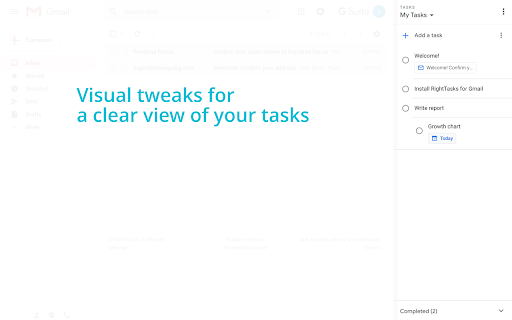

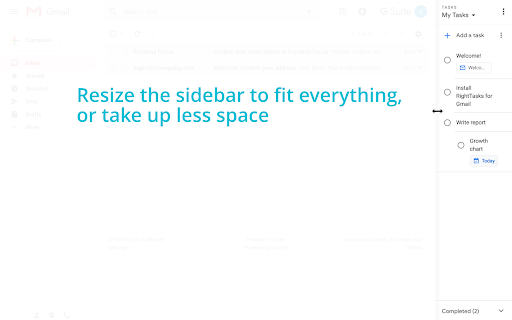

See your tasks at all times, without getting in the way. RightTasks shows your Google Tasks sidebar with new features: * Hide the Applications bar for less distraction. * Resize the sidebar to fit everything, or take up less space. * Hide and show the sidebar with a single click. * Visual tweaks for a clear view of your tasks. All the official Google Tasks features, like keyboard shortcuts or turning emails into tasks, are still available. Make sure to reload Gmail after installing the extension. * Read and change your data on mail.google.com Required for showing the tasks sidebar, hiding the applications bar, the resize and docking functionality. * Read and change your data on tasks.google.com Required for visual tweaks in the the tasks sidebar, moving the completed tasks to the bottom, adding the settings button. Required for saving settings. We do not collect any of your personal data. See our privacy policy: https://github.com/ghinda/righttasks/wiki/Privacy-policy Visit www.righttasks.com for updates.

Notifier for Gmail™
Multiple label and account notifier for Google Mail (Gmail™) Gmail™ Notifier is an open-source project that notifies you about incoming emails from all your Google Mail accounts and labels. Features: 1. No requirement to enter your credentials. 2. Multiple account support 3. Multiple label support 4. Low bandwidth usage by using RSS technology 5. Mark as read, report spam, trash or archive messages right from browser's toolbar 6. Dark theme support Source Code: Source code of the extension is available on Github: https://github.com/inbasic/ignotifier To report bugs and track them submit them: https://github.com/inbasic/ignotifier/issues?state=open FAQs: Addon's homepage has a FAQ section. Some of the QAs are listed here: Check this page for more instructions: https://webextension.org/listing/gmail-notifier.html ----------------------------------------------------------------------------- Please don't use reviews as a support forum. If you are experiencing problems with the add-on, send a support request: https://github.com/inbasic/ignotifier/issues?state=open -----------------------------------------------------------------------------

HTML Editor for Gmail by cloudHQ
HTML Editor for Gmail™ - code HTML email directly from Gmail Do you have HTML skills? Do wish you could customize Gmail emails to include things like: ✓ Tables ✓ Charts ✓ Call-to-action buttons ✓ Side by side images (great for social media logos!) If you answered yes to any of the above, do we ever have a treat for you! This email HTML editor is a top-of-the-line, split screen HTML editor that lets you customize Gmail email to include anything that your creativity can think of. cloudHQ. Helping your productivity, 1 click at a time. App website: https://www.html-editor-for-gmail.com/ cloudHQ website: https://www.cloudhq.net Pricing: https://www.html-editor-for-gmail.com/pricing Support page: https://support.cloudhq.net/category/browser-extensions/gmail_html Blog: https://blog.cloudhq.net Gmail, Google Calendar, and Google Workspace are trademarks of Google LLC. Use of these trademarks is subject to Google Permissions.

Keeping | The Original Help Desk for Gmail™
Keeping turns your Gmail into a help desk. Manage customer support from Gmail. Keeping is a Gmail extension that turns your Gmail inbox into a help desk. It’s the ideal solution for teams and businesses of all sizes to deliver better customer support without having to use an external help desk. ★ ADD COLLABORATION TO GMAIL & LET EVERYONE IN YOUR TEAM ANSWER SUPPORT EMAILS TOGETHER For excellent customer service, your entire team should be involved. Keeping lets everyone in your team receive, respond to and assign support emails directly from within their own mailbox. All support emails get shared and responses are automatically synchronized, to avoid double work. No more Cc’s, Bcc’s, Forwards and emails that get lost. There’s no bigger drain on productivity than being forced to type the same replies over and over again. When a new support email comes in, Keeping™ automatically suggests possible responses based on previous answers. Keeping™ lets you measure important metrics so that you can improve how well you assist customers over time. See how many support inquiries you’ve received and how quickly you’ve responded. Drill down by date and monitor your team’s performance. AND MUCH MORE...

GQueues for Gmail
Turn emails into actionable tasks with GQueues - the task manager built for teams on Google Workspace. Turn your emails into action items in GQueues. Link or attach the email thread to a task to view from inside GQueues. Streamline your email processing and take control of your inbox with GQueues for Gmail. The GQueues for Gmail Chrome Extension requires a GQueues account to work. GQueues is a task management app specifically designed for Google users. With GQueues you get: • Deep integration with Google Workspace including Chrome, Gmail, Calendar, and Drive • Gmail integration to turn your emails into tasks • Simple, intuitive interface • Core task management including subtasks and repeating tasks • Robust search and task filters • Easy collaboration with shared folders and assignments for delegating work • Mobile apps for Android and iOS
