
ioinaaeeacahcmbgfmeaaofhfkijpdeb

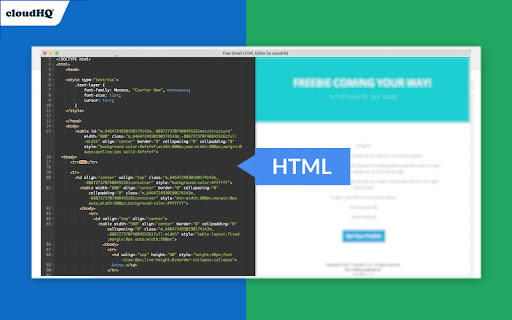


HTML Editor for Gmail™ - code HTML email directly from Gmail Do you have HTML skills? Do wish you could customize Gmail emails to include things like: ✓ Tables ✓ Charts ✓ Call-to-action buttons ✓ Side by side images (great for social media logos!) If you answered yes to any of the above, do we ever have a treat for you! This email HTML editor is a top-of-the-line, split screen HTML editor that lets you customize Gmail email to include anything that your creativity can think of. cloudHQ. Helping your productivity, 1 click at a time. App website: https://www.html-editor-for-gmail.com/ cloudHQ website: https://www.cloudhq.net Pricing: https://www.html-editor-for-gmail.com/pricing Support page: https://support.cloudhq.net/category/browser-extensions/gmail_html Blog: https://blog.cloudhq.net Gmail, Google Calendar, and Google Workspace are trademarks of Google LLC. Use of these trademarks is subject to Google Permissions.

Gmail Web Clipper by cloudHQ
Save anything you see from web articles, texts, and snippets, directly in your Gmail. Free and simple. Give it a try today! Plus - save anything you want from the web like: ✔️ Articles, ✔️ Texts, ✔️ Images, and more! Everything is neatly saved in a Gmail label directly in your email. cloudHQ. Helping your productivity 1 click at a time. cloudHQ Website: https://www.cloudhq.net App Website: https://www.gmail-web-clipper.com/ Pricing: https://www.gmail-web-clipper.com/pricing Support page: https://support.cloudhq.net/category/browser-extensions/gmail-web-clipper/ Blog: https://blog.cloudhq.net Gmail, Google Shared Drive, Google Drive, and Google Workspace are trademarks of Google LLC. Use of these trademarks is subject to Google Permissions.

MailKing: Email Campaigns in Gmail by cloudHQ
Looking for the best mass email and email marketing software available? MailKing sends your email campaigns from your Gmail address, so you're guaranteed higher open rates. Not only that, but it's built to work right in Gmail, so it's easy to access anytime you need to. Setting up a campaign is easy, intuitive, and extremely effective. ✅ Higher open rates ✅ Send emails from your Gmail, not "noreply@url.com" ✅ Thousands of professionally designed email templates for you to select ✅ Intuitive drag and drop email design editor if you prefer to design your emails from scratch ✅ HTML design editor available too ✅ Import Mailchimp templates, or Hubspot templates ✅ Easily upload CSV file from Mailchimp, Yesware, Salesforce, Zoho and other CRMs ✅ Mail merge available from any of your spreadsheets ✅ Email list builder ✅ Create multiple email contact lists for hyper-targeted campaigns ✅ Embed a branded signup form on your website with your logo, brand colors, and text ✅ Track opens, clicks, and replies ✅ Sequence and follow up email campaigns ✅ Full merge tag support: personalize name, email, or other data ✅ Detailed email campaign analytics ✅ Send up to 2000 emails/day based on Gmail send limits, upgrade to Premium Plan to remove logo on the bottom Bottom line: This is a solid mass email and email marketing software designed to help small to medium-sized businesses cut through the noise and get noticed. Enjoy this feature-rich app, a best-in-class mass email and email marketing software. Who uses MailKing? - Small Business Owners: For reliable and efficient email marketing campaigns. - Sales Professionals: To close deals faster and improve outreach efforts. - Marketers: Whether part of a small business or working as contractors, for creating impactful email campaigns. - Managers: To send internal newsletters and keep teams informed. - Organizations: For distributing internal newsletters, announcements, or notifications to employees. - Anyone: Who needs to send emails to large groups quickly and effectively. NOTE: For easy access to your settings and other cloudHQ apps, look for the cloudHQ icon in the top right corner of your Gmail inbox. Click on it to get started! NOTE: To access Hubspot and Mailchimp templates, simply click on the Hubspot or Mailchimp tab in the template browser to install the necessary extensions. cloudHQ. Helping your productivity, 1 click at a time. Website: https://www.mailking.io Pricing: https://www.mailking.io/pricing Support page: https://support.cloudhq.net/category/browser-extensions/gmail_campaigns/ Blog: https://blog.cloudhq.net Gmail, Google Shared Drive, Google Drive, and Google Workspace are trademarks of Google LLC. Use of these trademarks is subject to Google Permissions.

Email Tracker by cloudHQ
Know when your emails are opened in real-time Now you can find out when your emails are read! This email tracker software is extremely easy to use, and gives you all of the following features where you'll have: ✔️ An email tracking dashboard ✔️ Mobile text, desktop, and email notifications when your email is read ✔️ Reminders if your email goes unopened after 48 hours ✔️ Link tracking ✔️ Email tracking removal options for personal emails you don't want tracked You'll also get a Gmail label to show you: - Tracked emails that you sent, and were opened - Tracked emails that you sent, and were opened, with links that were clicked on (how many times, and which links were clicked on) - A list of all opened but unanswered emails where people need to respond back to you - A list all opened, but unanswered emails where you need to respond back - A list all unopened emails where people need to respond back to you - A list all unopened emails that are awaiting your reply ✔️ As an upgrade: You can export all of your tracked emails to Google Sheets for an up-to-date report on open rates, link clicks and more. This is ideal for salespeople, customer service reps, head hunters, and more! cloudHQ. Helping your productivity, 1 click at a time. NOTE: For easy access to your settings and other cloudHQ apps, look for the cloudHQ icon in the top right corner of your Gmail inbox. Click on it to get started! cloudHQ website: https://www.cloudhq.net/ cloudHQ app list: https://www.cloudhq.net/apps App website: https://www.mail-tracker.com/ Pricing: https://www.mail-tracker.com/pricing Support page: https://support.cloudhq.net/category/browser-extensions/email-tracker/ Blog: https://blog.cloudhq.net

Send Mass Mail + HTML inserter for Gmail
A Gmail Extension ✉️ Send Mass Mail + HTML Inserter for Gmail — Supercharge Your Gmail Campaigns with AI COMPOSE your email marketing campaigns right inside Gmail Create and send personalized campaigns to thousands of recipients directly from Gmail. Install the Send Mass Mail + HTML Inserter for Gmail Chrome extension, click “Compose,” write your message, select your list — and hit “Send Mass.” No complex tools, just Gmail. NEW: Save time with a built-in AI email assistant — generate smart, professional, and context-aware replies instantly. Perfect for sales, support, and outreach teams. SEND emails to undisclosed recipients Send mass emails as if they were personal — each recipient gets an individual email without seeing others’ addresses. Ensure privacy and boost trust in your brand. The integrated AI assistant helps you handle replies faster with intelligent suggestions tailored to your message history and tone of voice. MEASURE campaign performance All sent campaigns are stored in your Campaigns panel, where you can track deliveries, queues, and open rates. Filter and export statistics as PDF, CSV, or TXT. PERSONALIZE your messages Easily import recipient lists from Google Sheets, merge data fields, and send dynamic, personalized messages at scale. Now with AI-powered personalization: ✅ Save and reuse high-performing prompts ✅ Write follow-ups in seconds ✅ Maintain consistent tone and brand voice across emails Why choose Send Mass Mail + HTML Inserter for Gmail: ✅ Send thousands of emails in bulk ✅ Personalized emails to undisclosed recipients ✅ Real-time campaign tracking and statistics ✅ Familiar Gmail interface with advanced tools ✅ AI email assistant for faster replies and personalization ✅ Works with Google Sheets for mail merge ✅ Easy to install and use ✅ Boost your email productivity and outreach efficiency 🔑 Keywords: email automation, Gmail bulk sender, AI email assistant, mass email for Gmail, mail merge Gmail, email campaign tracking, email productivity, Google Sheets email merge
