
mhmcjokmjcnjmlmmbaopcgkbomfdlpcn


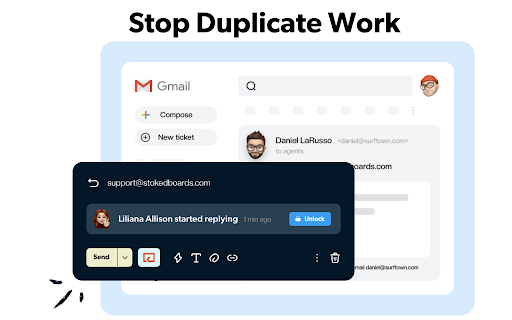
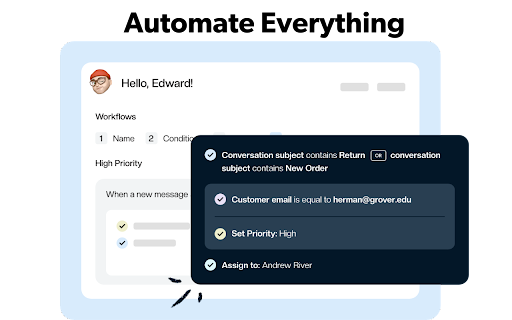
Keeping turns your Gmail into a help desk. Manage customer support from Gmail. Keeping is a Gmail extension that turns your Gmail inbox into a help desk. It’s the ideal solution for teams and businesses of all sizes to deliver better customer support without having to use an external help desk. ★ ADD COLLABORATION TO GMAIL & LET EVERYONE IN YOUR TEAM ANSWER SUPPORT EMAILS TOGETHER For excellent customer service, your entire team should be involved. Keeping lets everyone in your team receive, respond to and assign support emails directly from within their own mailbox. All support emails get shared and responses are automatically synchronized, to avoid double work. No more Cc’s, Bcc’s, Forwards and emails that get lost. There’s no bigger drain on productivity than being forced to type the same replies over and over again. When a new support email comes in, Keeping™ automatically suggests possible responses based on previous answers. Keeping™ lets you measure important metrics so that you can improve how well you assist customers over time. See how many support inquiries you’ve received and how quickly you’ve responded. Drill down by date and monitor your team’s performance. AND MUCH MORE...

We360.ai Workforce Productivity Analytics
Gain insights into remote/hybrid productivity, website usage analysis, screenshot, monitor team performance with We360.ai Extension. We360.ai Workforce Analytics presents Chrome time tracker with screenshots, online timesheets, URL & app monitoring, real-time team insights. Struggling with manual timesheets, scattered spreadsheets, or tools that miss the full picture of remote and hybrid work? End the frustration. We360.ai delivers powerful, browser-based tracking that automates everything—capturing time, activity, and insights—so you can focus on growth, not guesswork. Thousands of teams rely on We360.ai for smarter workforce management, turning raw data into clear actions that boost efficiency and prevent burnout. Jump in with our free trial (no card required) and see the difference AI-driven analytics make. We360.ai combines flexible attendance-based and project-based tracking to fit any workflow. For attendance - style monitoring, punch in with one click to mark the start of your workday. We360.ai runs quietly in the background, logging total time, browser activity, apps used, and locations (where enabled). Take breaks by pausing or marking break time. Resume when ready. Punch out at day's end. It also supports auto punch-in based on your configured daily schedule for hands-free starts on consistent days. For project and task - based work, select or switch to a specific project/task before or during your session. Hit 'Start'—We360.ai runs quietly in the background, logging time, browser activity, and more as you work. You can stop when needed. It's seamless, non-intrusive, and always precise down to the second. Perfect for teams mixing general attendance with detailed project tracking. We360.ai is subscription-based: Choose a free tier for basics or upgrade to Pro/Enterprise for full features after trial. * Accurate Time Tracking: — Log hours automatically with second-level precision—no more disputes or forgotten entries. * URL & App Usage Monitoring: — See exactly where time goes—productive sites/apps vs. distractions — with smart categorization and trends analysis. * Productive vs. Unproductive Insights: — AI classifies activity in real-time, highlighting focus time, idle periods, and optimization opportunities to streamline workflows. * Screenshot Capture: — Get visual proof of work with customizable, periodic screenshots (up to 60/hour in higher plans)—build trust without constant oversight. * Real-Time Team Dashboards: — Live view of who's active, current projects, and performance metrics—full control at your fingertips. * GPS & Location Tracking: — Monitor field or on-site teams with geofencing and real-time location—perfect for verifying travel time or site presence. * Workload Balance & Alerts: — Detect imbalances, burnout risks, or anomalies with AI recommendations and 25+ customizable alerts. * Automated Reports & Exports: — Generate timesheets, productivity summaries, and payroll-ready data instantly—export to tools like QuickBooks or HRMS. INTEGRATES WITH THE FOLLOWING SITES Seamlessly connects with: * Project tools: — Asana, Trello, Jira, Slack, Microsoft Teams, and more. * HR & Payroll: — GreytHR, Zoho, Keka, SAP, QuickBooks, and 20+ others. (coming soon) * Productivity suites: — Microsoft 365, Salesforce, Active Directory. More integrations added regularly! Why Teams Switch to We360.ai – Save Time, Reduce Costs, Scale Confidently * 100% Precision & Reliability: — Eliminate errors from manual entry; track billable hours flawlessly. * Payroll Simplified: — Attendance logs and time data feed directly into your payroll process—choose rates, periods, and automate exports. * Cloud-Based & Secure: — Real-time sync, access from anywhere, GDPR/ISO/HIPAA/SOC2 compliant, encrypted data, and role-based access. * Minimal Impact: — Optimized for low battery/CPU use; runs silently so you focus on work. * Employee-Friendly: — Optional self-view dashboards promote transparency and self-improvement. • A We360.ai account is required to start tracking. • Subscription-based: Free plan available, or upgrade after trial for full team features and advanced analytics. Note: Full screenshot capture, detailed GPS, and enterprise monitoring work best with the companion desktop app alongside the Chrome extension. **Ready to stop the manual hassle and gain real visibility into your team's work? Install now and boost productivity today.!**

PromptSync
Ask ChatGPT, Bard AI, and Bing Chat with one single prompt! Unlock the power of four dynamic chat platforms with a single prompt! Introducing PromptSync, your all-in-one solution for chatting with ChatGPT, Bard AI, and Bing Chat, through a convenient Chrome extension. Multi-Platform Chat Engage in conversations effortlessly with ChatGPT, Bard AI, and Bing Chat from a single prompt. Get diverse perspectives and responses to your queries. Customizable Experience Tailor your chat experience to your liking! Enable or disable individual chat platforms according to your preferences through the settings menu. Efficient Workflow Streamline your workflow by accessing multiple chat services without switching tabs. Save time and stay productive as you harness the combined intelligence of four powerful chat systems.

CrecenTech Utilities
It's a simple chrome extension which will hide password showing method.It will also hide code inspection with all ways like short cut keys etc.

Open in GPT
Open selected text directly in ChatGPT with a customized prompt. This extension enables you to quickly open selected text in ChatGPT by right-clicking. Customize ChatGPT's behavior by setting a pre-filled prompt to provide contextual information. This ensures ChatGPT behaves like you want it to behave and enables you to make it solve repetitive tasks for you -- Automate the automation 🚀 • Answer questions in a specific manner (e.g. only ever answer with A, B, C, or D) • Give general context for tasks like summarizing a paragraph • Resolve code errors • Get language assistance • Translate text • Generate content in specific ways • Anything that you find yourself always copying into ChatGPT manually ... Click the extension icon to configure your custom prompt. Select text and right-click, then choose "Open selection in ChatGPT!" (Alternatively, press ALT + S). If you're working with other programs, use ALT + C to populate the prompt from your clipboard instead of selecting text. If there is a new version of ChatGPT and this plugin doesn't work with it please send me an email and I will also release an update :) Last Fix: 06.10.2024
