
eainhghihghonimoemjhiimpkfejkgbd
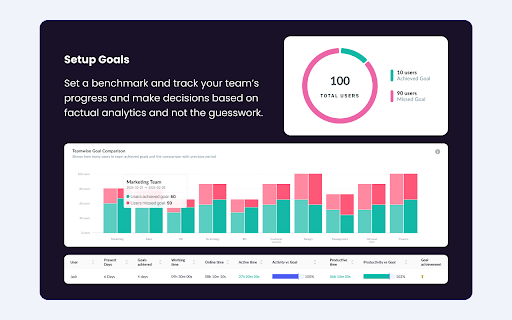


Gain insights into remote/hybrid productivity, website usage analysis, screenshot, monitor team performance with We360.ai Extension. We360.ai Workforce Analytics presents Chrome time tracker with screenshots, online timesheets, URL & app monitoring, real-time team insights. Struggling with manual timesheets, scattered spreadsheets, or tools that miss the full picture of remote and hybrid work? End the frustration. We360.ai delivers powerful, browser-based tracking that automates everything—capturing time, activity, and insights—so you can focus on growth, not guesswork. Thousands of teams rely on We360.ai for smarter workforce management, turning raw data into clear actions that boost efficiency and prevent burnout. Jump in with our free trial (no card required) and see the difference AI-driven analytics make. We360.ai combines flexible attendance-based and project-based tracking to fit any workflow. For attendance - style monitoring, punch in with one click to mark the start of your workday. We360.ai runs quietly in the background, logging total time, browser activity, apps used, and locations (where enabled). Take breaks by pausing or marking break time. Resume when ready. Punch out at day's end. It also supports auto punch-in based on your configured daily schedule for hands-free starts on consistent days. For project and task - based work, select or switch to a specific project/task before or during your session. Hit 'Start'—We360.ai runs quietly in the background, logging time, browser activity, and more as you work. You can stop when needed. It's seamless, non-intrusive, and always precise down to the second. Perfect for teams mixing general attendance with detailed project tracking. We360.ai is subscription-based: Choose a free tier for basics or upgrade to Pro/Enterprise for full features after trial. * Accurate Time Tracking: — Log hours automatically with second-level precision—no more disputes or forgotten entries. * URL & App Usage Monitoring: — See exactly where time goes—productive sites/apps vs. distractions — with smart categorization and trends analysis. * Productive vs. Unproductive Insights: — AI classifies activity in real-time, highlighting focus time, idle periods, and optimization opportunities to streamline workflows. * Screenshot Capture: — Get visual proof of work with customizable, periodic screenshots (up to 60/hour in higher plans)—build trust without constant oversight. * Real-Time Team Dashboards: — Live view of who's active, current projects, and performance metrics—full control at your fingertips. * GPS & Location Tracking: — Monitor field or on-site teams with geofencing and real-time location—perfect for verifying travel time or site presence. * Workload Balance & Alerts: — Detect imbalances, burnout risks, or anomalies with AI recommendations and 25+ customizable alerts. * Automated Reports & Exports: — Generate timesheets, productivity summaries, and payroll-ready data instantly—export to tools like QuickBooks or HRMS. INTEGRATES WITH THE FOLLOWING SITES Seamlessly connects with: * Project tools: — Asana, Trello, Jira, Slack, Microsoft Teams, and more. * HR & Payroll: — GreytHR, Zoho, Keka, SAP, QuickBooks, and 20+ others. (coming soon) * Productivity suites: — Microsoft 365, Salesforce, Active Directory. More integrations added regularly! Why Teams Switch to We360.ai – Save Time, Reduce Costs, Scale Confidently * 100% Precision & Reliability: — Eliminate errors from manual entry; track billable hours flawlessly. * Payroll Simplified: — Attendance logs and time data feed directly into your payroll process—choose rates, periods, and automate exports. * Cloud-Based & Secure: — Real-time sync, access from anywhere, GDPR/ISO/HIPAA/SOC2 compliant, encrypted data, and role-based access. * Minimal Impact: — Optimized for low battery/CPU use; runs silently so you focus on work. * Employee-Friendly: — Optional self-view dashboards promote transparency and self-improvement. • A We360.ai account is required to start tracking. • Subscription-based: Free plan available, or upgrade after trial for full team features and advanced analytics. Note: Full screenshot capture, detailed GPS, and enterprise monitoring work best with the companion desktop app alongside the Chrome extension. **Ready to stop the manual hassle and gain real visibility into your team's work? Install now and boost productivity today.!**

News Storyline
Know Thy History and Be Notified About Future A Chrome sidebar extension and companion newsletter that gives you an unbiased, context-rich timeline of any news story and quietly watches for what happens next—so you never miss a beat (or waste time scrolling). 📖 On-Demand Timelines in Your Sidebar • One-click access while you’re reading any article: hit the extension icon to slide open a concise, chronological view of past reports on that story. • Facts, not opinions: we aggregate across dozens of reputable outlets, stripping out commentary bias so you see the unvarnished sequence of events. • Top highlights only: instead of drowning you in every mention, we surface a handful of the most relevant milestones—headlines, timestamps, and sources—so you instantly understand “what led here.” 🤖 Background Story Scanning & Positive Alerts • Hands-free monitoring: once you’ve opened a timeline, our service continues scanning in the background for new developments on that very story. • Positive-only notifications: you decide what matters—receive alerts only when something significant (and positive) happens, so your inbox isn’t full of noise. • Peace of mind: no more endless manual refreshes or fear of overlooking a breaking update. 📰 Daily Newsletter & “New Developments” Bulletin • Daily digest delivered each morning: a simple roll-up of every event we tracked across your subscribed stories in the past 24 hours—no grouping, no spin. • On-demand “New Developments” email: when fresh updates arrive mid-day (for critical beats), we’ll ping you separately so you stay in the loop around the clock. 🔔 Story Subscriptions & Future Tracking • Subscribe in one click: any timeline can be turned into a “watched” story. From that moment on, we’ll keep you posted on each follow-up report. • Tailored alerts: choose your stories—finance, politics, tech, climate—and we do the rest, surfacing only the most impactful next chapters. 🔧 Platform & Integration • Chrome-based browsers supported (Chrome, Edge, Brave, Opera). • Privacy-first: minimal permissions, no tracking beyond the stories you opt in to follow. • Lightweight: sits quietly in your toolbar, loading only when you ask. Who It’s For • Journalists & analysts who need quick, neutral context before filing next headlines. • Researchers & students chasing down backstory and evolution of key events. • Curious readers who want more than a single outlet’s perspective—and zero surprises when the story moves on. Why Know Thy History? • Context at your fingertips—instantly see what happened before. • Stop missing updates—positive alerts mean you’ll always catch the next big development. • Save time & mental bandwidth—no more endless feeds or biased roundups. Install now and start each story with the past in view—and the future on your radar.

Ether-Spell
Warning: Turning Spellchecking on can deteriorate your performance (especially on older computers and with more active participants.) As a very dyslexic person that is highly dependent on spellcheckers, and considers them as assistive devices. I'm increasingly frustrated that Etherpad does not provide a spellcheck solution. Again and again I found myself going for Google Docs instead of Etherpad or at least typing in another program with better spellcheck support. Which totally goes against the collaborative aspect of Etherpad… This stops now! … at least for me. And maybe it is also useful for you :) This plugin is still a work in progress, so if you find an Etherpad installation that does not function with this plugin, please reach out to me.

Follows You GitHub
Adds a "follows you" label on a GitHub follower profile or hovercard Follows You GitHub adds a label on a GitHub follower profile or hovercard. It also works on gist.github.com.

Loop8 Privacy Manager
Browser extension for Loop8 Privacy Manager. Loop8 Privacy Manager Chrome Extension is a seamless method for users to safely and securely store their login credential information.
