
eoagmdboiealblmpaahjlhajggndaahi

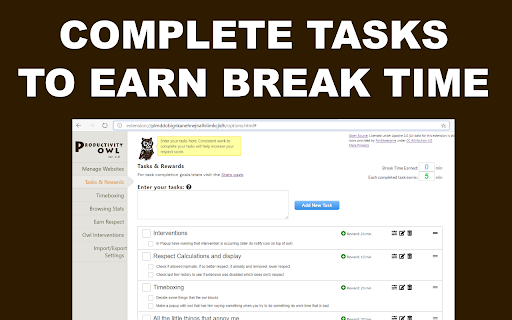


Want to be productive? Let the Productivity Owl guide you to accomplishment. *** WARNING: This extension is very annoying. The owl is flying across your pages, annoying you, criticizing you, giving you psychological exercises, and closing your tabs. If you are not serious about being productive, this extension may not be for you.*** Do you need a new boss when working from home? Meet the Productivity Owl. The owl is very strict. He will berate and mock you. You'll be forced to complete tasks to earn break time. If you do consistent work, use the timeboxing scheduler for work/vacation, and complete the owl's psychological exercises then you might be able to earn the owl's respect. Just like the first version, the owl has 3 types of websites: Allowed, Blocked and Countdown. If a website is not on the allowed/blocked lists, you'll get a certain amount of time to get the information you need before the owl closes the tab. You can still use the scheduler to schedule free-time, and now you can also schedule work time. Version 2.0 introduced a task manager, and you get rewarded break minutes for each task you complete. There are also psychological interventions and browsing statistics in this version. Although it is technically possible to earn the owl's respect - it's highly unlikely. The owl is very judgmental. It may take years before anyone earns the owl's "ultimate respect." Of course if you uninstall the extension or disable it, all respect is lost. *************** APACHE 2.0 LICENSE OPEN SOURCE *************** Since this extension is on every webpage you visit, I wanted to let everyone know there are NO TRACKERS or DATA COLLECTORS in the owl. The owl is 100% open source. You can view the source code on Github: https://github.com/mrieck/productivityowl *Thanks to everyone who has been using the Productivity Owl over the years. He's been helping me be productive for the last 15 years. Hope he can help you too.

Habitica Pomodoro SiteKeeper
Pomodoro Timer and Site Blocker that Plugs into Habitica and turns your time-wasting navigation tendencies into rewards. This extension has two main features: 1."Pay to Pass" Website Blocker: Website Blocker that plugs into Habitica and limits you from visiting websites that you decide. You can decide to visit these sites by spending Habitica currency, which you'll earn by developing good habits and doing chores. 2.Pomodoro Timer: Including a Pomodoro Timer. You can read about the pomodoro technique here: https://habitica.fandom.com/wiki/Pomodoro During Pomodoro mode, all websites in the list are blocked, websites with cost 0 are blocked only during pomodoro. A Pomodoro habit is created automatically for the user in Habitica, with an option in the extension settings to automatically score [+] or [-] of the habit when a Pomodoro is done successfully or fails accordingly. How to use: After installing the extension, click on the icon at the top right to open the menu. In here, you must set your API Credentials. You can then block a site by navigating to it and clicking block site. It will ask you to enter a cost. From this point on, when you visit this site, the extension will ask you if you'd like to spend GP to access it. To start a pomodoro timer simply click on the Tomato character. Click again to stop the timer. In the settings you will find a lot of option that allow you tweak and change the pomodoro behavior to fit best for you. For more information, recommended settings and version update log: https://habitica.fandom.com/wiki/Habitica_Pomodoro_SiteKeeper

SiteBlock
Find yourself visiting websites unrelated to your current task, even without thinking? Place a barrier in your way by blocking the sites with SiteBlock. Set the list of sites to block in the Extension Options. Access it through the Chrome menu, under Extensions -> Manage Extensions -> SiteBlock -> Details -> Extension Options. Changelog: - 0.3.1 - improve look of settings page - 0.3.0 - option to use Chrome sync storage to sync settings across devices - 0.3.0 - first dot and asterisk in an entry was handled differently than subsequent ones. Now all dots and asterisks in an entry are handled the same way. - 0.2.9 - add an example of how to block just x.com (//x.com)

News Feed Eradicator
Eradicate distractions and take back control of your browsing Do you often want to check social media, and then find yourself disappearing for hours as you're consumed by the endless scrolling? Do you want your life back, but can't bear to delete social media altogether? News Feed Eradicator removes the most addicting part of Facebook, Twitter and other social networks - the feed - and replaces it instead with an inspirational quote. You can still use the other functionality as usual, you just won't get sucked into the attention hole. See screenshots for supported websites.

Pause - Stop Mindless Browsing
Pause distracting websites before they open. Be mindful and intentional with your browsing using this simple extension. Pause breaks the cycle of distraction and mindless browsing and helps you be more focused, productive, and intentional with your technology use. When you open a distracting website, Pause creates a gentle interruption by displaying a calming green screen. After pausing for five seconds (adjustable), you can choose to continue to the site, remain on the green screen with the site temporarily blocked, or close the tab. The interruption created by Pause gently nudges you to make informed, intentional decisions about how you are spending your time. - Pause comes pre-seeded with a list of 50 top distracting websites, which you can add to or edit as needed. - You can also adjust the length of the Pause time (5 seconds is the default.) Keep Pause enabled in your browser. It’s a simple and powerful tool to help you control distraction and create more mindful browsing habits that will help you stay focused. Pause is a product of Freedom Labs, where we develop new ways to meaningfully interact with technology. Like our other extensions, Pause is highly privacy-conscious. None of your data is sent anywhere (the cloud, our servers, etc.) It remains secure on your own device. Learn more about Freedom here: https://freedom.to
