
ofjehpieeaiggoefffoimlgpnbooecek

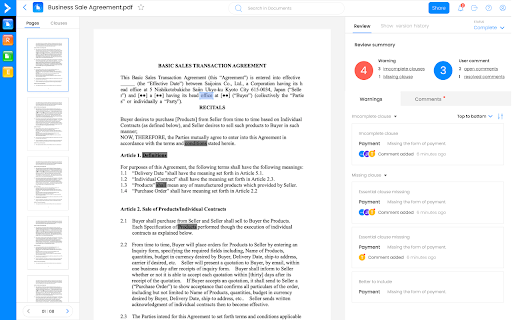
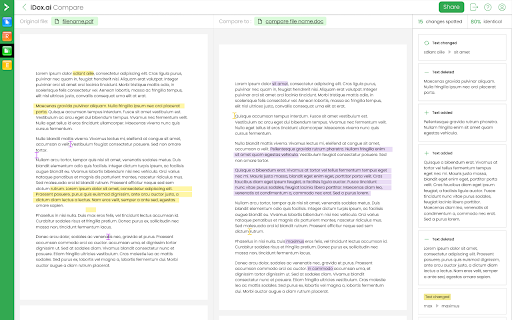
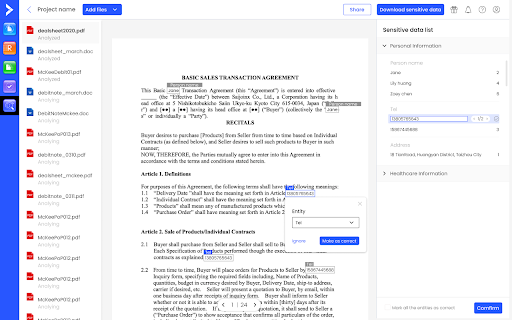

iDox.ai discovers and pinpoints sensitive data in documents for you to review and redact before disclosing and sharing. Remove sensitive information fast and easily to protect your valuable information. Compare two different digital documents side by side to ensure that the final is what you expect. Review before signing a contract for accelerating contract review and reducing risks for your business. iDox.ai is all about accelerating the process of how businesses handle their documents. We automate sensitive data discovery and redaction so that you can focus on what’s important: your business! PII (personally identifiable information) and PHI (personal health information) are very important to customer privacy. If such data is made public, it leads to huge legal issues. iDox.ai is proven to help save time and money in this process, allowing you to be fully compliant with regulations such as GDPR or HIPAA. Achieve efficiency in your business with the ability to collaborate simultaneously on documents across the Internet. All files are saved securely in the cloud, allowing rapid access from anywhere by any authorized user. By installing the extension, you agree to iDox.ai Privacy and Terms (https://www.idox.ai/privacy-policy and https://www.idox.ai/terms-of-service)

SOCMaster
Get info on OS Commands, IPs, Domains, URLs, Hashes, Windows Events and Registry keys, Strings, and Files with one click. In-browser threat intelligence companion that streamlines artifact analysis—IPs, domains, URLs, and beyond—through one-click lookups across leading security vendors. SOCMaster integrates with leading threat intelligence platforms such as VirusTotal, AbuseIPDB, and others, allowing users to swiftly transform data into actionable insights. 1. From the web browser, select or highlight an artifact and right-click 3. Click one of the options available 4. Menu will appear on lower right side containing information on the artifacts Bulk lookups --allows you to quickly assess multiple artifacts at once, saving time during intensive investigations. 1. From the web browser, gather a list of either IP addresses, Domains, URLs, File Hashes, File Names. Each entry separated by new line or spaces For example: 2. Highlight all of the objects to be scanned, right-click, and select "SOCMaster" 3. Click one of the options available (IP/Domain/URL/Hash scan using vendor API keys or Get file (Linux/Windows) information) - Uses Threat intelligence vendors such as AbuseIPDB, VirusTotal, AlienVaultOTX, HybridAnalysis and others to obtain the reputation and information on an IP address, Domain, Hash. Data available is dependent on the vendor. - Submits URLs to URLscan.io, VirusTotal, AlienVault, HybridAnalysis and others for analysis using API keys. - Click the vendor link to view the URL scan result. - Get information on over 3,300 Powershell cmdlets from Powershell modules, almost all Linux commands (Man Sections 1-8), Windows commands, and OSX commands. - Shows information on Operating System binaries and commands. For example, Windows commands such as "ipconfig" or "tasklist", "Set-ExecutionPolicy" for Powershell, and "rm" for Linux. - Retrieve information on known files such as "kernel32.dll" for Windows or "passwd" for Linux. To query an IP, Domain, and Hash using vendor API keys, an API key is required. Follow the steps: 2. Click the "SOCMaster" icon > Settings 3. On the settings page, on the upper right corner click "Add API key" 5. Paste vendor API key on the API key field A user can highlight the above command and select the "Find command information" option and will be able to view the syntax and parameters of the command. 2. Suspicious IP address from the firewall logs: x.x.x.x A user can highlight the IP and select the "IP scan using vendor API keys" option and will be able to view IP reputation and data from vendors. A user can highlight the above command and select the "Find command information" option and will be able to view the syntax and parameters of the command. 4. Windows Event IDs on the SIEM show: eventID 4624 A user can highlight the event ID number and select the "Get event ID information" option and will be able to view the fields and description of the Windows event Supports the following vendors: VirusTotal AbuseIPDB AlienVaultOTX Twitter URLscan HybridAnalysis GoogleSearch Pulsedive

Nurturebox
Data entry is a drag. Sync candidate data to your ATS with a single click. Get their contact details and interact with them over common messaging platforms. NurtureBox was built to easily fit into your existing technology stack. It ties all your tools together, automates engagement without sacrificing personalization, and gives you analytics on what’s working. We understand that recruiters have to switch to different tools to get information on candidates. That’s why our extension eliminates the hassle of elaborate steps before onboarding the right candidates. We aim to improve the recruiter experience while they look for the right fit. ➤ Find prospects from various platforms Use our Chrome Extension to find the email addresses & phone numbers of prospective candidates from the recruitment sites & add those directly to your campaign. ➤ Engage across multiple channels Execute a multi-touch multichannel sequence with emails, calls, SMS, ATS, and popular messaging applications to engage with more candidates. ➤ Track and analyze your progress Find out how well your outreach is being received. NurtureBox automatically tracks every touchpoint and gives you analytics on what’s working with candidates. Follow-up with them through personalized messages. ➤ Faster approach to candidates Nurturebox eases out the task of waiting for a candidate’s response. Recruiters can have instant conversations with candidates. The extension also allows for a quick interview feedback feature.

Redact PDF
Use Redact PDF to make editing easy. Fill and sign PDF, make PDF fillable, and edit text and information in your documents online. Redact PDF Chrome extension allows you to create, edit, and fill PDF form easily, ensuring professional results every time. Whether you’re looking to create fillable forms or edit documents online, this tool has you covered with its advanced features and user-friendly design. 🌟 Key Features ▸ Fill and sign your documents directly in your browser for seamless workflows. ▸ Seamlessly add text to PDF and edit files directly in your browser. ▸ Use features of extension to protect sensitive information. ▸ Create fillable forms for contracts, applications, and surveys, or create editable PDF files for continuous updates. ❓ Why Choose Redact PDF? 1. Efficiency: Quickly redact text in PDF and make files secure. 2. Versatility: Perfect for editing, filling, or creating fillable forms. 3. Reliability: Ensure sensitive data is protected with advanced tools. 4. Flexibility: Allows you to make document fillable and interactive for various needs. 5. Accessibility: Fully browser-based with no software downloads required. 🧩 How It Works • Add interactive fields like checkboxes and dropdowns to enhance your Text for better usability. • Upload your document to the Redact PDF extension. • Choose your desired action: remove text from PDF or replace text PDF to refine your documents. 👤 Customize your file by adding or redacting information using intuitive tools. You can also PDF change color of text to match your document style. Save and share your updated file instantly. Redact information in static files to ensure confidentiality. 🎯 Benefits of Using Redact PDF 1️⃣ Redact on PDF directly without additional software. 2️⃣ Create fillable forms for seamless data collection and collaboration. 3️⃣ Edit and add text to documents effortlessly. Use the tool for instant revisions. 4️⃣ Redact PDF document to maintain professional confidentiality. 5️⃣ Protect data with tool features designed for security. 💻 Just like Word document: 🔹 Effortlessly highlight key sections for better readability and navigation. 🔹 Add annotations or comments to collaborate seamlessly with team members. 🔹 Convert static content into interactive forms to streamline data collection. 🔧 Advanced Tools for Professionals 🟢 Edit sensitive details. 🟢 Use the extension to redact from PDF and ensure private information stays private. 🟢 Perfect for legal, financial, and business documents needing redact information PDF capabilities. 🟢 Transform static files for contracts and agreements. 🤵♂️ Who Can Benefit? - Businesses: Simplify contracts, invoices, and proposals with creating a fillable forms. - Educators: Use the extension to design quizzes or assignments. - Freelancers: Streamline workflows by redacting information and creating forms. - Organizations: Ensure data security with advanced redact in PDF features. Easily transform documents into editable formats with this powerful extension. Add text fields, checkboxes, and dropdown menus to create dynamic, interactive forms. Perfect for contracts, applications, or surveys, this tool simplifies the process of customizing files for seamless collaboration and updates. 💎 Features You’ll Love ➤ Edit documents online with a user-friendly interface. ➤ Easily edit your documents for sensitive or confidential information. ➤ Remove text from file while maintaining the original document layout. Use tools to fill PDF online. ➤ Create interactive forms. ➤ Share safely using redact PDF online functionality. 📌 Why Redact PDF Stands Out - All-in-one solution for redacting documents and creating forms. - Comprehensive redaction tool for secure editing. ✔ Additional Information 1) Merge Documents Seamlessly: Combine multiple files into a single cohesive document, streamlining your workflow. 2) Annotate: Add comments, highlights, and notes to enhance collaboration and document review processes. 3) Advanced Formatting Tools: Adjust fonts, sizes, and layouts to ensure your documents maintain a professional appearance. 4) Dynamic Element Integration: Add dropdowns, checkboxes, or radio buttons to create fully interactive forms. 5) Secure Sharing Options: Share your updated files securely using advanced encryption features. 📒 Wrap-Up Redact PDF empowers you to take full control of your document workflow. From redacting information PDF files to creating forms and editing text, this Chrome extension simplifies complex tasks. Redact PDF is the ultimate solution for efficiency and security. Install it today and elevate your productivity!

EmailTree.AI
The powerful EmailTree.ai application and extension are a new way to respond quickly to questions and considerably increase your productivity. Save precious time (up to 80%, depending on the confidence levels). Every new reply you generate helps improving the knowledge base you are building. The question-answer cycle permanently increases the machine learning knowledge, helping you to answer better, faster, and more accurately. Spike up your team's productivity and install the EmailTree extension, quick and easy. Added: Improved login flow for SSO compatibility: The login process was improved to support single sign-on (SSO) options. Added: Improved Display of Reply Suggestions: Enhancements were made to optimize the visibility and functionality of reply suggestions. Security Improvements: Updated security protocols to strengthen the protection of user data and interactions. Added: Preserve formatting for most used blocks We have improved the copy function for the most used blocks to ensure that formatting is preserved when content is copied. Previously, formatting was visible in the preview but lost upon copying. This update ensures consistency, similar to the "Learn and Copy" feature. Added: Uneditable Chrome Extension Suggestions: With our Chrome Extension, OpenAI suggestions are now locked in, ensuring data integrity and preventing accidental edits. "No Suggestions Available" Notification: We've added a user-friendly feature that informs you with a clear message when there are no suggestions available, streamlining your workflow. Content Color Blocking in Edit Response Area: Enjoy enhanced visual clarity with content color blocking in the edit response area, making it easier to differentiate and organize your text. Added: A notification to not leave empty the section field (feature to be activated on request) Display "No suggestions available" when there are no suggestions available (e.g when treating a new scenario) Added: A quick way to access the most frequently used blocks (feature to be activated on request) Added: Alert for missing block title when adding a new one Fixed: Deactivated the “Get Suggestion” button after the first click, for preventing multiple accidental requests Reference ID bug fixes Select block from search single result Extension used in multiple tabs saved initial detected language to AI (cross learning) Mouse event not captured in TinyMCE on edit block Font & size are kept for all information copied from outside and pasted in the extension Added Reference ID field in order to offer the possibility to reference the issue to an external ticketing system Fixed bugs related to text formatting Preserve the formatting for unordered lists (ul), ordered lists (ol), subscripts ( sub), superscripts (sup) Added: Option to unify Learn & Copy + Reset Autocorrect on edit reply and edit blocks Changed description on the button Copy to Learn & Copy Font format Arial 10 black formatted on click on Learn & Copy Search for a section and a language in the dropdown Insert and remove hyperlinks in the reply & blocks text editor Usability enhancements in order to remember the tabs on which the extension should be active, open, hidden Fixed login when the option "On specific sites" is activated
