
lbakdofljpnpdakcoabckinlfgoaaopf

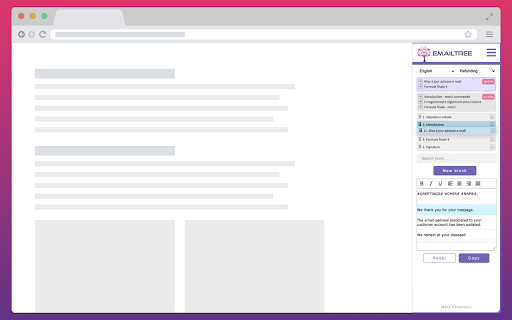
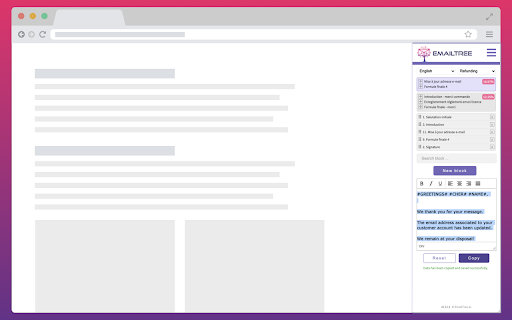
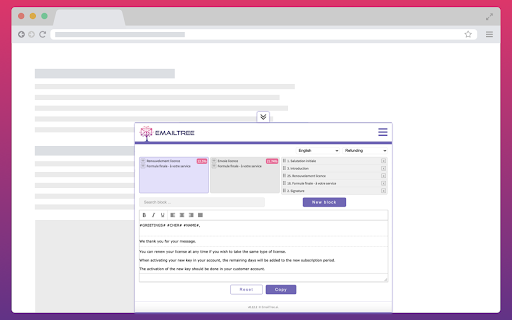
The powerful EmailTree.ai application and extension are a new way to respond quickly to questions and considerably increase your productivity. Save precious time (up to 80%, depending on the confidence levels). Every new reply you generate helps improving the knowledge base you are building. The question-answer cycle permanently increases the machine learning knowledge, helping you to answer better, faster, and more accurately. Spike up your team's productivity and install the EmailTree extension, quick and easy. Added: Improved login flow for SSO compatibility: The login process was improved to support single sign-on (SSO) options. Added: Improved Display of Reply Suggestions: Enhancements were made to optimize the visibility and functionality of reply suggestions. Security Improvements: Updated security protocols to strengthen the protection of user data and interactions. Added: Preserve formatting for most used blocks We have improved the copy function for the most used blocks to ensure that formatting is preserved when content is copied. Previously, formatting was visible in the preview but lost upon copying. This update ensures consistency, similar to the "Learn and Copy" feature. Added: Uneditable Chrome Extension Suggestions: With our Chrome Extension, OpenAI suggestions are now locked in, ensuring data integrity and preventing accidental edits. "No Suggestions Available" Notification: We've added a user-friendly feature that informs you with a clear message when there are no suggestions available, streamlining your workflow. Content Color Blocking in Edit Response Area: Enjoy enhanced visual clarity with content color blocking in the edit response area, making it easier to differentiate and organize your text. Added: A notification to not leave empty the section field (feature to be activated on request) Display "No suggestions available" when there are no suggestions available (e.g when treating a new scenario) Added: A quick way to access the most frequently used blocks (feature to be activated on request) Added: Alert for missing block title when adding a new one Fixed: Deactivated the “Get Suggestion” button after the first click, for preventing multiple accidental requests Reference ID bug fixes Select block from search single result Extension used in multiple tabs saved initial detected language to AI (cross learning) Mouse event not captured in TinyMCE on edit block Font & size are kept for all information copied from outside and pasted in the extension Added Reference ID field in order to offer the possibility to reference the issue to an external ticketing system Fixed bugs related to text formatting Preserve the formatting for unordered lists (ul), ordered lists (ol), subscripts ( sub), superscripts (sup) Added: Option to unify Learn & Copy + Reset Autocorrect on edit reply and edit blocks Changed description on the button Copy to Learn & Copy Font format Arial 10 black formatted on click on Learn & Copy Search for a section and a language in the dropdown Insert and remove hyperlinks in the reply & blocks text editor Usability enhancements in order to remember the tabs on which the extension should be active, open, hidden Fixed login when the option "On specific sites" is activated

AI Answer Generator
Use AI Answer Generator: Chat instantly, get quick result. Your go-to question AI, answer AI assistant! 🚀 Meet AI Answer Generator, a Chrome extension that turns prompts into polished results in one click. It streamlines your work, study, and daily research. With Answer Generator, you get crisp output fast, ready to copy or export without fuss. Capture any region of your screen with a quick drag Paste a prompt or attach an image for instant context Let the AI answer generator shape tone, language, and length to match your need Tweak creativity to suit formal reports or imaginative drafts Export results to TXT, RTF, or PDF in one step Right-click anywhere to open the Screenshot tool for rapid capture 💬 You know the struggle: tight deadlines, scattered sources, and unclear wording. When you need to ask AI for help, speed and clarity matter. Answer Generator reduces rework and confusion. It also serves as an AI homework helper for learners who need guidance and clean structure. ➤ Create structured content for emails, briefs, and study outlines ➤ Use AI response generator to convert ideas into clear, usable text ➤ Turn rough notes into summaries with AI question answer generator for smoother workflows ➤ Remove friction from research by producing concise explanations on demand 🤖 Generator keeps your flow simple and direct. Add text, drop in visuals, and refine outputs with controls that stay out of the way. When you must phrase a complex prompt or include a figure, AI question support ensures context lands cleanly. ▸ Click the toolbar icon to open a tidy workspace ▸ Type your prompt or add a screenshot; get an AI-generated answer tailored to your settings ▸ Adjust sliders for tone, creativity, and length before you run ▸ Review the draft, then copy to clipboard or save locally ▸ Reuse your favorite settings so the generator stays consistent session after session 🌟 Use it for daily tasks, briefs, and academic work. The answer generator helps turn messy inputs into clear takeaways. It also assists with quick explanations for concepts, giving you a fast path from idea to shareable text with answer AI when speed matters. 1️⃣ Students and educators shaping study guides or rubrics 2️⃣ Professionals preparing proposals, tickets, and handoffs with question AI in the loop 3️⃣ Creators outlining scripts and posts, plus rapid ideation with AI ask for fresh angles 📚 Perfect AI Homework Helper 📘 Quickly find explanations 📘 Get homework answers instantly 📘 Learn efficiently through smart, relevant ai-generated answers 📘 Ask ai for help anytime you're stuck 🧠 Your work stays yours. AI Answer Generator operates with minimal footprint, favoring local actions where possible. It avoids storing personal content beyond what is required for processing. You remain in control of exports, history, and cleanup. Capture any part of the screen without extra tools Paste or upload visuals to add instant context Set tone, language, and length with simple controls Export clean files in TXT, RTF, or PDF formats Keep drafts consistent across projects and teams Reduce editing time through clear, structured output Start fast, then refine with lightweight adjustments using the answer generator 🔒 Secure and Private 🛡️ No data tracking 🛡️ Full compliance with privacy standards 🌈 User-Centric by Design 🎨 Clean interface 🎨 No distractions, just pure functionality 🔍 FAQs ❓ How do I use the Generator? 🔹 Install it, highlight any question, and get instant ai generated answers. ❓ Can I use it for multiple subjects? 🔹 Yes! From science to history, the ai question answer generator works across all fields. ❓ Is the Generator safe to use? 🔹 Absolutely. It’s secure, private, and browser-optimized. ❓ What makes it better than others? 🔹 The answer generator gpt model, speed, and flexibility make it the best in class. ❓ What if I need shorter answers? 🔹 Use the ai short answer generator for quick responses. 📥 Ready to upgrade your daily productivity? Download AI Answer Generator today and unlock the smartest way to generate answers and handle questions with confidence. Perfect for school, work, and curiosity-driven browsing. 🚀

Chat with AI
With Chat with AI Assistant, access swift answers through ai chat using advanced LLM tech every single time 📌 Discover features with Chat AI New to AI Chat or not, this tool makes modern tasks simple. Through Chat experience firsthand how cutting-edge technology transforms complex problems into clear solutions. Wondering what is Chat AI? It's your reliable partner for quick, context-rich knowledge whenever you need them. List of models, available in extension: - Claude Sonnet - Gemini - ChatGPT - Grok ⚡️ Why Choose Chat AI? ▸ Global Versatility: Adapt effectively to diverse demands, easily bridging language barriers worldwide. ▸ Efficiency Boost: Rely on llm for rapid data analysis and precise responses. ▸ Seamless Communication: The Chat ai understands you clearly—even if you make spelling mistakes. ⚡️ Tap into the Strength of Artificial Intelligence Whether you're exploring chat gpt ai for the first time or tackling challenging queries, gpt tool optimizes your operations. It performance efficiency, streamlining your process together with helping you achieve results faster. 💡 Key Elements of Chat AI 🔹 Simple Interface: Instantly access valuable knowledge via a straightforward, user-friendly platform. 🔹 Smart Assistant: Rely on an accurate, efficient system to manage your queries. 🔹 Global Compatibility: Seamlessly adapt to diverse languages, international user needs. 🔹 Chat AI: Benefit from the latest improvements and advanced reasoning capabilities. ⭐️ Top-Notch proficiency Use the tool for instant responses, quickly gathering essential details from vast datasets. Whether clarifying what is llm or refining your queries, it intelligently adapts with ease. ⚡️ Fuel creativity From brainstorming fresh concepts to wrapping up detailed projects, llm inspires plus boosts a wealth of creative ideas. Enjoy instant, actionable feedback that accelerates your procedure, slashing unnecessary delays and guaranteeing exceptional, top-notch results every step of the way. 💼 Top scenarios for using 1️⃣ Enhance with optimize your coding endeavors and development work effortlessly, improving productivity across every undertaking. 2️⃣ Tap into Chat with AI cloud capabilities anywhere, anytime, offering unmatched accessibility, convenience for your needs. 3️⃣ Blend flawlessly into your everyday activities and processes on all gadgets, delivering consistent, fluid functionality throughout. 4️⃣ Automate routine lookups to reclaim precious hours, allowing you to prioritize key projects with little effort involved. ⚡ Enhancing efficiency ➤ Instant Solutions: Complete tasks faster with swift responses. ➤ Smart AI Chat: LLM customizes solutions based on your habits, surpassing gpt tools. ➤ Multi-Platform Integration: Smoothly transition across devices and browsers. ➤ Organized system: Easily manage tool interactions and organize valuable insights. 📝 Professional and personal utility This tool addresses every requirement—from quick facts to in-depth research. Utilize its chatbot to understand what is Chat ai or explore complex investigations, allowing AI to streamline your workflow. 🚀 Continuous Evolution LLM continuously evolves, incorporating the latest technological breakthroughs. Depend on regular updates to maintain peak performance and transform your questions into actionable insights. 🧩 Delight in the seamless harmony as Chat with AI effortlessly transforms your curiosity into precise, clear answers, no matter how you express your thoughts or frame your questions.

MailMaestro - Gmail AI assistant
Get to Inbox Zero in no time with AI. Write, reply, improve, and summarize email threads in seconds Start today for free. No credit card required. What if you could effortlessly summarize email threads and attachments in Gmail and quickly reply with AI, all in seconds? With a free trial, you can experience MailMaestro's full potential as your personal Gmail AI email assistant, using a combination of the latest LLMs like GPT4o and Claude 3.5 for faster, higher quality emails in your preferred tone, language, and length. MailMaestro is a generative AI tool built for Gmail users with a simple interface that lets you write and reply to emails in seconds. It's designed for teams and professionals who want to save time and communicate without stress, increasing productivity and minimizing the risk of data breaches. Increase your productivity by up to 86% with MailMaestro. Our AI-powered tool provides instant summaries of long email threads and attachments, and helps you reply to any email in seconds using a combination of conversational context and custom prompts. ✉️Improve the Quality of Emails Quickly create high-quality business emails to improve relationships and engagement. Our AI email assistant currently supports 14 languages, including English, Spanish, Portuguese, German, French, Dutch - and more. No more generic AI. MailMaestro adapts based on your feedback, making it the ultimate email assistant. Choose from 7 writing styles (from professional to casual to fun) and 4 preferred email lengths (from extra short to long). Each time you prompt our artificial intelligence assistant, it will provide you with 3 suggestions you can choose from. 🛡️Stay protected with enterprise-grade user privacy Unlike many AI tools, MailMaestro keeps your data secure. While 70% of professionals use various unprotected AI tools, posing security risks, we strictly adhere to protocols to protect your sensitive data. To ensure your security, we anonymize data before it is shared with machine learning algorithms, and we are AICPA SOC and SOC2 compliant. 🚀New features right inside your Google Inbox on a weekly basis We're constantly evolving our extension to bring you a new Gmail AI feature every week, so you're always using the latest technology to help you navigate your inbox. - Use AI's compose window to write emails from prompts in your chosen tone, language, and length directly in Gmail - Quickly reply to emails using data from all previous messages in the email thread - Let our AI assistant improve the draft message for your important emails, giving you 3 different options to choose from - Instantly summarize the entire conversation. Get to the most relevant information in less time with a summary card - whether the thread is 3 or 30 emails long - Sync with your Google Calendar for 1-click meeting responses - Save your favorite templates in the add-on and use them to communicate even faster Revolutionize your Gmail management, write better emails faster, and increase your productivity. Install MailMaestro today and achieve email zen. Get started now for free! How the Gmail Chrome Extension works ❓ - Start by installing the MailMaestro Gmail Chrome Extension into your browser. - Either open any email account or create a new message and click MailMaestro Gmail Chrome Extension in your browser's Extensions. - Write a prompt as if you're instructing an AI writing assistant to compose the message for you. - Make it easier by using our magic templates that will compose the email for you. - Or compose your own email and let our AI improve your draft using the Improve with Artificial Intelligence feature. - Voila! Your Ai Email Assistant has now created 3 versions of your desired email for you to choose from. - MailMaestro works in Chrome with the latest version of Gmail. - If you have any problems launching MailMaestro for Gmail, please contact us at feedback@maestrolabs.com. MailMaestro uses a combination of advanced language models from OpenAI and Anthropic, including models such as GPT4-o and Claude 3.5. This fusion of leading language technologies gives MailMaestro unparalleled natural language processing capabilities, helping you write important messages faster than ever before. Using unprotected AI tools for work puts your company's security at risk. At MailMaestro, protecting your data is our top priority. All emails containing sensitive information such as names, birthdates, purchase details, etc. are anonymized and encrypted before being sent to Large Language Models (LLMs). Our commitment to data security is further demonstrated by our SOC2 compliance, which ensures adherence to rigorous industry standards for both security and privacy, so you're safe whenever you use AI in your inbox. Google, the search technology giant, recently introduced AI capabilities to Gmail as part of its Gemini for Google Workspace launch. However, if you're not a Google Workspace subscriber, the best way to try out some of the Gmail AI features is to download a Gmail extension like MailMaestro. 4. Is there a ChatGPT plugin for Gmail? To access ChatGPT-like features in Gmail, you need to download one of the AI extensions or sign up for Google Workspace Labs. MailMaestro has some free basic AI features to help you write and improve your emails, as well as more advanced features like email thread summarization, machine learning powered 1-click replies, and more.

Window AI
Use your own AI models on the web Window is the simplest way to connect AI models to the web. Use a variety of models for text generation and 3D creations (new!). FOR USERS: bring your own models to the web, including ones running locally. Set up your models once, and use them everywhere. FOR DEVELOPERS: no need to pay for OpenAI or other language model APIs. Make model-agnostic & multi-media AI apps. Users can try them for free. Configure your models once; after that, a web app can request your permission to send a prompt to your chosen model. You get visibility on what's being asked and when. Discover Window AI apps with live usage metrics on https://openrouter.ai. FOR MODEL PROVIDERS: access more users on the web, without needing developers to change their code. Supported text models: - OpenAI's GPT-3.5, GPT-3.5 16k, and GPT-4 - Google's PaLM 2 Chat and Code Chat (Bison) - Anthropic's Claude, Claude Instant, and Claude 100k - Local models like Alpaca, Llama, and GPT4All. See https://www.localai.app/ - Together's GPT NeoXT 20B - Cohere Xlarge
