
cbhbgmdpcoelfdoihppookkijpmgahag

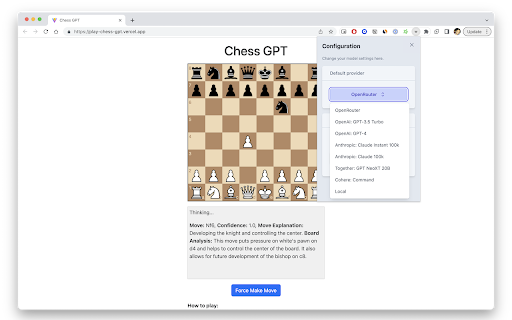
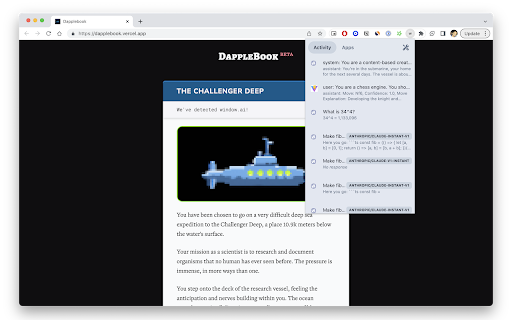
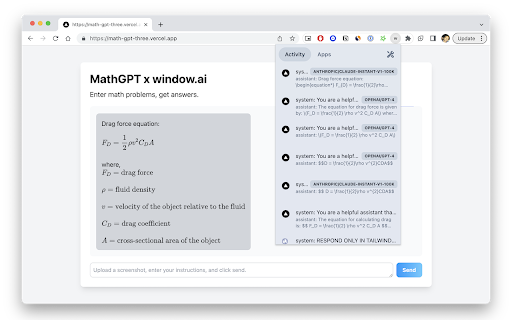
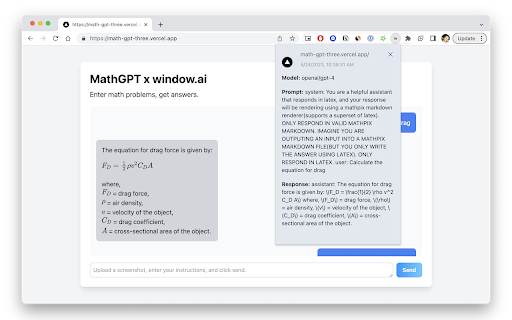
Use your own AI models on the web Window is the simplest way to connect AI models to the web. Use a variety of models for text generation and 3D creations (new!). FOR USERS: bring your own models to the web, including ones running locally. Set up your models once, and use them everywhere. FOR DEVELOPERS: no need to pay for OpenAI or other language model APIs. Make model-agnostic & multi-media AI apps. Users can try them for free. Configure your models once; after that, a web app can request your permission to send a prompt to your chosen model. You get visibility on what's being asked and when. Discover Window AI apps with live usage metrics on https://openrouter.ai. FOR MODEL PROVIDERS: access more users on the web, without needing developers to change their code. Supported text models: - OpenAI's GPT-3.5, GPT-3.5 16k, and GPT-4 - Google's PaLM 2 Chat and Code Chat (Bison) - Anthropic's Claude, Claude Instant, and Claude 100k - Local models like Alpaca, Llama, and GPT4All. See https://www.localai.app/ - Together's GPT NeoXT 20B - Cohere Xlarge

ChatGPTBox
Integrating ChatGPT into your browser deeply, everything you need is here Features: 🌈 Call up the chat dialog box on any page at any time. (Ctrl+B) 📱 Support for mobile devices. 📓 Summarize any page with right-click menu. (Alt+B) 📖 Independent conversation page. (Ctrl+Shift+H) 🔗 Multiple API support (Web API for Free and Plus users, GPT-3.5, GPT-4 and more). 📦 Integration for various commonly used websites. 🔍 Integration to all mainstream search engines, and custom queries to support additional sites. 🧰 Selection tool and right-click menu to perform various tasks, such as translation, summarization, polishing, sentiment analysis, paragraph division, code explain and queries. 🗂️ Static cards support floating chat boxes for multi-branch conversations. 🖨️ Easily save your complete chat records or copy them partially. 🎨 Powerful rendering support, whether for code highlighting or complex mathematical formulas. 🌍 Language preference support. 📝 Custom API address support. ⚙️ All site adaptations and selection tools(bubble) can be freely switched on or off, disable modules you don't need. 💡 Selection tools and site adaptation are easy to develop and extend, see the Development&Contributing section. 😉 Chat to improve the answer quality.

ChatGPT Workaround
Censorship by ChatGPT can sometimes lead to limited or censored results, but Workaround GPT provides a solution by offering the latest jailbreaks that bypass these restrictions. It's time consuming to scour forums for latest workaround yourself and there's a good possibility that the prompt you find might already be patched. Hence, users can use this extension where I'll do all the legwork for you. It's important to note that Workaround GPT is an independent development and is not officially supported or connected with OpenAI.

BrowseGPT
Automate your browser with artificial intelligence. Give BrowseGPT instructions like "Find a place to stay in Seattle on February 22nd" or "buy a children's book on Amazon", and it will use artificial intelligence to attempt to complete the task for you. BrowseGPT uses OpenAI's gpt-4o-mini model to process web pages and issue commands like CLICK, ENTER_TEXT or NAVIGATE. Is it useful? Sort of... sometimes it will get stuck in a loop, click on the wrong thing, or navigate to a URL that 404s. It provides a reason for every decision it makes so you can help it correct course if necessary. ⚠️ This is an experimental extension and should be used with caution. Don't use this on pages with private information, or pages where taking the wrong action could cause a serious problem. ⚠️

open-os LLM Browser Extension
Quick access to your favorite local LLM from your browser (Ollama). Ollama UI. A lightweight, open-source extension for Chromium-based browsers (Chrome, Brave, Edge) that gives you instant access to your local AI assistant while you browse. Features: - Works with any Ollama model — Llama 3, Qwen, Gemma, Mistral, DeepSeek, and more - Configurable Ollama host — connect to a remote server on your local network or anywhere - Switch between installed models on the fly - Streaming responses rendered token by token - Full Markdown support in conversations - Access from the sidebar (supported browsers) or as a new tab - Pre-prompts and scenarios to set the right context for your LLM - 6 built-in themes: Light, Dark, Light Modern, Dark Modern, Retro Terminal (MS-DOS), and NOSTROMO MU-TH-UR 6000 - Soul Identity Injection (experimental) — inject rich AI personalities like MU-TH-UR 6000, HAL 9000, or OS1 into your conversations. Powered by soul-protocol.com - Customization options: font size, username, assistant name, header text - Simple, fast, private — no accounts, no telemetry, no external servers 1. Install Ollama from https://ollama.com 2. Pull a model from your terminal, e.g.: ollama run llama3:8b 3. Click the extension icon to start chatting. Right-click to open in a new tab.
