
oemmndcbldboiebfnladdacbdfmadadm
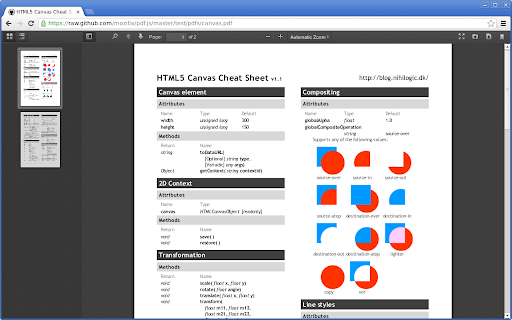

Uses HTML5 to display PDF files directly in the browser. PDF.js is a Portable Document Format (PDF) viewer that is built with HTML5. PDF.js is community-driven and supported by Mozilla. Our goal is to create a general-purpose, web standards-based platform for parsing and rendering PDFs. This extension offers PDF.js as the default PDF viewer in Chrome. This is the official Chrome extension of the PDF.js project. Be careful of unrelated copycats. If you want to use this viewer to view local files, visit chrome://extensions/?id=oemmndcbldboiebfnladdacbdfmadadm and put a check before "Allow access to file URLs".

Easy PDF Viewer
Efficiently View and Interact with PDFs: Easy Navigation, Zooming, and Annotations! Experience the Comfort of PDF Browsing with Easy PDF Viewer! The art of reading and interacting with PDFs has never been more efficient, thanks to our Easy PDF Viewer browser extension! Perfect for professionals, students, and tech-enthusiasts—our extension focuses on delivering a smooth, user-friendly PDF navigation experience straight from your browser. - Multi-purpose PDF Viewer: Effortlessly open, view, and interact with PDFs. Whether they already live in your tabs or are stored locally, our extension has got you covered! - High-Customizability: Set your preferred viewing defaults or adjust the settings for each PDF—you decide! - Dark Mode: Flip to dark mode for a pleasant, eye-friendly browsing experience during the night or in low-light conditions. - Zoom & Auto-Rotate: Choose your comfort. Zoom in or out, rotate your viewing angle, and adapt your reading to your needs. - Contains Various Settings: From controlling the view, zoom level, to your preferred mode—it’s all a click away! - Local PDF File Openings: Not only does it handle online PDFs, but our extension also supports local files for your offline needs. - Annotations: Add notes, highlight text, or draw—make your PDFs interactive

Open in Foxit™ Reader
Send PDF (Portable Document Format) links to the Foxit™ Reader from right-click context menu or browser's action button This extension simplifies the use of Foxit Reader to open PDF links. How to Use: 1. Use the right-click context menu item to direct PDF links to Foxit PDF Reader. 2. Click the action button on PDF pages to transfer the PDF file to Foxit PDF Reader. 3. On the options page, customize the extension settings to open PDF links with Foxit Reader. Notes: 1. Because Foxit Reader cannot directly open remote PDF links, this extension initially downloads the PDF file to your browser's default download directory and then activates the external PDF reader. 2. To establish communication with Foxit Reader, install a small native client specific to this extension. This client is compatible with Windows, Linux, and Mac operating systems. ChromeOS is not supported. 3. Ensure you have Foxit PDF Reader installed on your device. This extension only simplifies Foxit Reader integration with your browser and does not perform the installation. --- Legal Foxit Reader is a registered trademark of Foxit Software Incorporated, registered in the U.S. and other countries. This extension is an independent project and is not affiliated with Foxit Software. It serves as a tool designed to enhance the PDF reading experience.

Save as PDF
This add-on allows you to easily save web pages as PDF. It adds an icon to your browser's toolbar, which you can click to save the current page as PDF. The add-on is powered by the PDFCrowd HTML to PDF online service. *Please note* that for security reasons, it is not possible to create PDFs from pages that require a login, such as your webmail inbox, online banking, shopping cart contents, payment checkouts, and similar sites. Learn more about how the add-on works at https://pdfcrowd.com/save-as-pdf-addon/ If you need support or have suggestions, please visit https://pdfcrowd.com/contact/.

Docs Viewer
Easily view PDF and MS Office documents in your browser. Docs Viewer is an extension that let you open and view a wide range of online documents right in your browser (new tab). Simply add the add-on to your browser and start surfing. Once you see a document link (i.e. .doc, .docx, .ppt, .pdf), please right-click on the link and then select - View Document - from context menu. The document will be rendered and opened in a new tab. You can also, print the document to PDF or send it to a printer right away (via the print button within the page). Please note that this add-on uses the google gview engine to render the document. Moreover, it supports a wide range of documents, including pdf, doc, docx, ppt, and more. If you have a feature request or found a bug to report, please fill out the bug report form on the add-on's homepage (https://mybrowseraddon.com/docs-viewer.html).
