
kpdjmbiefanbdgnkcikhllpmjnnllbbc
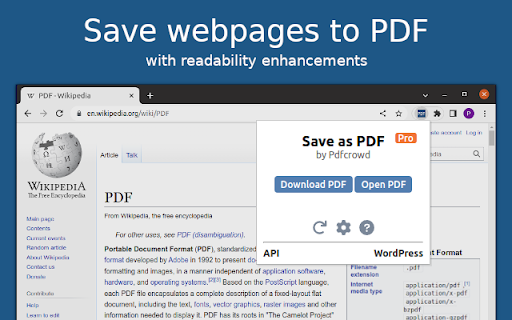
This add-on allows you to easily save web pages as PDF. It adds an icon to your browser's toolbar, which you can click to save the current page as PDF. The add-on is powered by the PDFCrowd HTML to PDF online service. *Please note* that for security reasons, it is not possible to create PDFs from pages that require a login, such as your webmail inbox, online banking, shopping cart contents, payment checkouts, and similar sites. Learn more about how the add-on works at https://pdfcrowd.com/save-as-pdf-addon/ If you need support or have suggestions, please visit https://pdfcrowd.com/contact/.

Veeva Web2PDF
Create a PDF of your website that captures user interactions and links. We understand that dynamic and interactive elements can make up a large portion of your website. Dynamic elements are any aspects of a webpage that may not be displayed immediately as the page loads, such as an image slider, dropdown menu, or questionnaire. These elements are usually JavaScript-based and may require some user interaction. You can browse your site and drop hints along the way with Hintify mode. Right click on anything you want to add a hint to and the Veeva Web2PDF Chrome extension automatically translates your clicks into hint actions that you can easily preview by generating a PDF directly from the Chrome extension. These hints are saved locally to your computer and you can share them with others by downloading a .json file from the Hint Tab. You can also download your hints as a .js file to make them permanent on your website via touchless hints. To learn more, please visit https://www.veevaweb2pdf.com.

Print Selection to PDF
Select a text and print it to PDF via mouse right-click. Print Selection to PDF is an extension that helps you print a selection of words or sentences to a PDF document. To work with this addon, simply select a word or sentence with your mouse, right-click on the selection, and then click on - Print Selection to PDF item. The selection (only the text content) will be downloaded as a PDF document to your machine in the default download folder. If you want to change the download folder, please head to the settings page in your browser and change the download folder from there. There are also several settings to adjust for this addon which you can find on the options page. For example, you can adjust the page layout, unit, type, font family, size style, etc. Note: This add-on uses the jsPDF library to print a document to PDF. jsPDF is a free and open-source client-side JavaScript PDF library; to get more information about this library please visit this (https://github.com/parallax/jsPDF) GitHub page. To report bugs, please fill out the bug report form on the addon's homepage (https://mybrowseraddon.com/print-selection-to-pdf.html).

Save website as PDF, JPG, PNG
Save your websites as PDF, JPG or PNG - your only one click away from taking screenshots of any webpage! Simply choose whether you want to save the whole page, the current area or select one by drawing a rectangle. Your Screenshot will be put into you downloads folder.

HTML to PDF
Convert webpage to pdf file online easily. Save and transform any links and sites with just one click using our HTML to PDF app. ✨ Transform your HTML to PDF with ease without any help or unnecessary steps. 🔄 Need to html convert to pdf quickly and efficiently? Our Chrome extension is perfect for you! Whether you’re - saving a webpage for offline reading, - sharing a document, - or archiving important content, this tool makes it easy to convert html to pdf with just a few clicks. 🌐 You can easily internet page to pdf and save important documents in a professional, easy-to-share format. ⏱️ In today's digital world, having the ability to quickly and efficiently convert html documents into pdfs is essential. Our extension is not only user-friendly but also packed with features that enhance your productivity. 🏆 Why choose our html to pdf converter? 1️⃣ Versatile: works with files, webpages, even entire websites. 2️⃣ Fast and Reliable: You can convert a link to pdf in seconds without compromising quality. 3️⃣ Easy to Use: No technical skills required—just install and start converting. 4️⃣ High-Quality Output: Preserve the layout, formatting, and images of your documents. 5️⃣ Browser-Based: Convert directly in your Chrome browser—no additional software needed. 💻 With just a few clicks, you can transform site to pdf professional-looking that are perfect for - sharing, - printing, - or archiving. 🛠️ How to convert html using pdf generator online effortlessly? It’s simpler than you think. ➤ Install our extension for transform chrome html document to pdf. ➤ Open the webpage you want to convert. ➤ Click the convert button and let the tool work its magic. ➤ Download your newly created file instantly. 🔑 Key features of our html to pdf file converter ▸ Batch Conversion: Convert multiple html file to pdf or webpages at once. ▸ Customizable Settings: Adjust margins, orientation, and page size. ▸ Secure Processing: Your files are processed locally, ensuring complete privacy. ▸ Lightweight Design: Doesn’t slow down your browser or device. ▸ User-Friendly Interface: Designed for both beginners and professionals. 🌟 Benefits of converting html documents • Save webpages for offline reading or archiving. • Share documents in a universally accepted format. • Preserve the original layout and formatting of your HTML files. • Print web content easily without losing quality. • Simplify your workflow with a single-click conversion tool. 🤔 Who can benefit from this html en pdf converter? 1. Students. 2. Professionals. 3. Web developers. 4. Bloggers and content creators. 5. Anyone. 🛠️ How to change html to pdf? The process is straightforward. 📌 Upload your html file or enter the URL of the webpage you want to convert. 📌 The tool html in pdf format automatically processes and converts the content. 📌 Download your newly created file to your device. 📌 Enjoy your hassle-free, high-quality document! 🤷♂️ Why convert html file to pdf? They are great for web content, but they’re not always ideal for sharing or printing. By using our app, you can: ✔ Ensure your documents are accessible on all devices. ✔ Avoid compatibility issues with different browsers or software. ✔ Create professional-looking PDFs for presentations or reports. ✔ Save time by simplifying the conversion process. 💬 Frequently Asked Questions (FAQ) ❓ How to transformar html a pdf? 💡 Simply install our Chrome extension, upload your file or enter a URL, and let the tool do the rest. ❓ Can I convert multiple files or webpages at once? 💡 Yes, our extension supports batch conversion for your convenience. ❓ Is the conversion process secure? 💡 Absolutely! Your files are processed locally, and no data is stored on our servers. Don’t miss out on the opportunity to simplify your conversion process. You can convert a webpage to pdf and another. With our generator online, you can easily convert and save page as pdf, and more. 🎉 Conclusion Say goodbye to the hassle of sharing or archiving html files and hello to seamless document conversion with our Chrome extension. Whether for personal, academic, or professional use, html to pdf delivers high-quality results every time. 📝 Whether you need a quick way to save an article or want to compile multiple pages into a single PDF document, this is your excellent solution. 🚀 Our powerful pages to pdf converter is specifically designed for users who need a straightforward solution for converting web content. Install it today and experience the convenience of translate html to pdf in just a few clicks! This extension contains ads for our other products. They do not interfere with your experience or limit any features — you can continue using all the functionality in full.
