
oeiodppocjabiedepbamdnifkhohgkpk
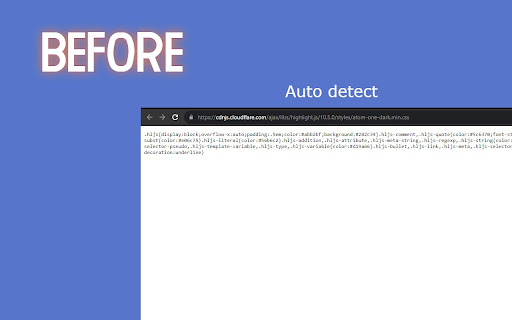
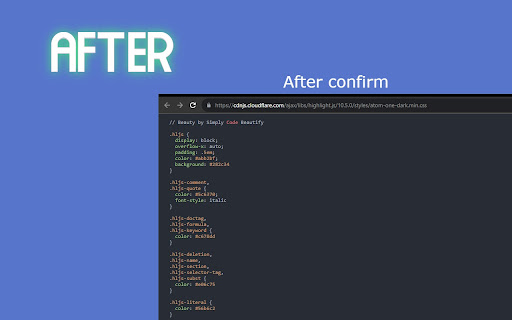

Beautify your js,css files Introducing "Simply Code Beautify" Chrome Extension Are you tired of dealing with messy and unorganized code while browsing the web? Look no further! Introducing "Simply Code Beautify," a powerful Chrome extension designed to streamline your coding experience. With a range of features and customization options, it's the ultimate tool for web developers and enthusiasts. Automatic Code Detection: "Simply Code Beautify" can automatically identify whether the webpage you're visiting contains CSS or JavaScript code. No need to manually analyze the source code anymore! Code Beautification on Demand: Once the extension detects code, it will prompt you to beautify it with a simple confirmation. Say goodbye to poorly formatted code blocks cluttering your view. Multiple Themes and Customization: We understand that everyone has their preferred coding style. That's why our extension offers a variety of themes and customizable settings, allowing you to tailor your coding environment to your liking. Free and User-Friendly: "Simply Code Beautify" is entirely free to use and easy to navigate. No hidden costs, no complicated instructions – just a seamless coding experience. We Value Your Feedback: We're constantly striving to improve our extension. If you have any feedback, suggestions, or encounter issues, please don't hesitate to reach out to us at httzip@gmail.com. Your input helps us make "Simply Code Beautify" even better! Experience the convenience and efficiency of organized code with "Simply Code Beautify." Download it now from the Chrome Web Store and take your web development journey to the next level. Happy coding!

Live editor for CSS, Less & Sass - Magic CSS
Run this extension and start writing your CSS/Less/Sass code which gets applied immediately. The code you write will be saved in the browser extension's storage space or the site's local storage. ✓ Live editor for CSS/Less/Sass code - Preview changes as you write code ✓ Autocomplete ✓ Live edit CSS files and auto-save on file system ✓ Open code editor in external window ✓ CSS reloader ✓ Option to reapply styles automatically ✓ Syntax Highlighting ✓ Auto-generate CSS selectors with point-and-click ✓ Emmet support ✓ Color picker ✓ Convert code from Less/Sass to CSS ✓ Beautify / Format code ✓ Minify code ✓ Highlight DOM elements matching the CSS selectors ✓ Option to load this extension in iframes as well ✓ Get SVG icons ✓ Lint CSS code This extension is available for: You might want to use it for: ➤ No need to refresh pages to test your CSS/Less/Sass code ➤ Auto-save your changes to filesystem as you write the code ➤ Reload CSS resources without refreshing the page ➤ Speed-up development by writing code directly on your page ➤ Develop and test your code before finalizing your changes ➤ Apply some temporary styles (like hiding some components) ➤ Do CSS changes on any website ➤ The CSS/Less/Sass code you write gets applied as you write it ➤ The CSS reloader watches CSS files and live updates them immediately ➤ You can develop the code and see the output at the same time ➤ The code is saved in file/browser as soon as you write it ➤ The code editor is draggable and resizable ➤ Use code editor in external window for developing responsive pages ➤ The code you write is auto-saved for the site ➤ You can use "TAB" key to indent your code ➤ Running Magic CSS again, while it is already loaded, disables the code ➤ Press "Esc" or click on close to hide it ➤ The code is added at the bottom of the tag ➤ It includes CSS/Less/Sass beautifier ➤ It includes CSS minifier ➤ It highlights the DOM elements matching the CSS selectors ➤ Use it along with Chrome/Edge/Firefox/Opera Developer tools ➤ You might find it useful in creating your custom themes for websites based on Stylish / Stylist ➤ This extension was previously known as "MagiCSS - Live CSS Editor" Security and privacy: ⓘ No permissions approval is required for installing the extension ⓘ For advanced features, like "Apply styles automatically", permissions are requested on-demand ⓘ Mixpanel is used to get anonymized stats for improving UX ⓘ Browser extension's storage, localStorage etc are utilized for the extension's core features. Visit https://webextensions.org/ for further details. Connect with us:

CSS inject
Very simple chrome extension to inject CSS into websites

Pretty Js
Pretty print your Javascript and JSON. Format your code for easier reading. Convert between XML and JSON. A simple tool to quickly and easily format your JavaScript and JSON. See your code formatted as you type! Or have your code instantly converted when you paste into the text area. Also lets you convert between JSON and XML. This tool is useful if you : - want a quick way to format JSON that is, for example, returned as a single line by a Web service call. - have a JSON structure that's just badly formatted, - just want to prototype a JSON structure and have it formatted as you type rather than worry about formatting it yourself. - want to see the formatted JSON while debugging a web service call - need your JSON as XML or want to convert some XML to JSON Features: - available as an icon on your Chrome toolbar - remembers the current state so when you reopen the tool you can carry on where you left off- you won't lose any of your work when you close the tool - convenient buttons for copy and pasting to and from the clipboard - provides a useful button for replacing the JSON in your work area with the formatted version - useful when prototyping a JSON structure - formats Javascript - basic json validation errors are shown - provides links to other tools from LinangData from the More tools menu - It's free!

RWeb
Simple tool for customizing websites by adding your own CSS & JS. This extension allows you to add per-domain custom CSS and JS. It stores those settings locally OR in your Google profile, depending on the setting per site. * StyleBot, but adds JS and a much simpler UI * Personalized Web, but adds online storage and a browser action button for easier access * add CSS to any domain * add custom JS to any domain * add custom CSS to the extension's options page (in case you don't like my UI design skillz) * store your settings online (optional, connected Google Drive) * export your sites to JSON format * import your JSON with UUIDs, so you can sync manually between computers or as backup * have a simple UI that saves with CTRL+S or ENTER and a browser action button to point to it 1.22 - 1.23 Added ** wildcard for anything. Fewer console messages. Bug in site order with 'all' and 'matches' sites. 1.20 Added wildcard domains: `*.wikia.com`, `my.*.com` etc. Improved temporary disable (on page action button). 1.13 Automatic sync with Google Drive. Added sync log. Added inline stats (option). 1.11 Moved from Google's Extension Data (sync) to Google Drive, because manually is better than automagic. Added 'all sites' token. Better document check (not in XML docs). More detailed import. 1.10 Handle errors in decoding online data. Discarding for now. **Back up your sites data!** 1.8 Stats+, faster loading for big online storage, browser action contextmenu label+. 1.7 Improved stats, help, options auto-indent, dis/enabling. **Disabling a site moved from page contextmenu to the icon's contextmenu!** 1.3 Added live CSS reload/refresh/update after saving a site on the options page, so no page refresh necessary anymore! 1.2 Added UUID and import. 1.1 Added (prefs and) onBrowserButtonClick option. Maybe added onBeforeUnload (or was that 1.0?).
