
kililblhcfpodipkcbobnbgnbbhgbkji

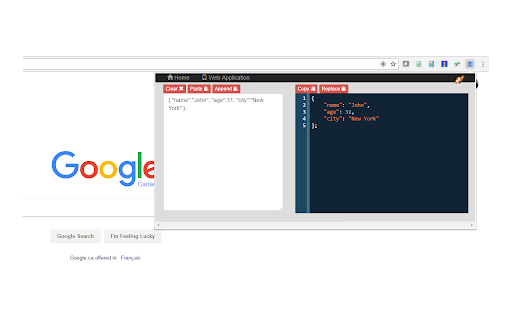
Pretty print your Javascript and JSON. Format your code for easier reading. Convert between XML and JSON. A simple tool to quickly and easily format your JavaScript and JSON. See your code formatted as you type! Or have your code instantly converted when you paste into the text area. Also lets you convert between JSON and XML. This tool is useful if you : - want a quick way to format JSON that is, for example, returned as a single line by a Web service call. - have a JSON structure that's just badly formatted, - just want to prototype a JSON structure and have it formatted as you type rather than worry about formatting it yourself. - want to see the formatted JSON while debugging a web service call - need your JSON as XML or want to convert some XML to JSON Features: - available as an icon on your Chrome toolbar - remembers the current state so when you reopen the tool you can carry on where you left off- you won't lose any of your work when you close the tool - convenient buttons for copy and pasting to and from the clipboard - provides a useful button for replacing the JSON in your work area with the formatted version - useful when prototyping a JSON structure - formats Javascript - basic json validation errors are shown - provides links to other tools from LinangData from the More tools menu - It's free!

JSON Lite
- Format JSON/JSONP responses and clipboard - Select and format/encode/decode text on every page - Collapsible arrays, objects and long values - Collapse all childs with Ctrl(Command) + Click - Collapse property also on all sibling items with Alt(Option) + Click - Count items and properties in a collection - Show collection sizes - Do its best to show large (10MB+) JSON files - Do its best to show invalid JSON files - Do not sort objects with numeric keys - Do not round large numbers - "Save as..." saves the original JSON document - Select and copy a working JSON from the formatted JSON Copyright (c) 2016-2024 Lauri Rooden The MIT License

JSON-handle
It's a browser and editor for JSON document.You can get a beautiful view. And transcoding Unicode Base64 URL with decode & encode. Edit and browse JSON document in a node tree diagram. After installed, open the URL will trigger JSON-handle: 安装后打开下面网址可以看到JSON-handle启动的效果: http://jsonhandle.sinaapp.com/demo.json

Code Formatter - JSON, CSS & JavaScript
Code Formatter – all-in-one extension offering sophisticated syntax highlighting for CSS, JSON, and JavaScript. A clean, fast code beautifier that makes reading code in your browser effortless. Automatically detects and formats code on any webpage - no configuration needed. Key Features: - Seamless integration in the browser - Smart Detection: Automatically identifies code blocks and process them - Beautiful Formatting: Transforms messy code into properly indented, readable formats - Syntax Highlighting: Makes code structure instantly clear with color coding - Practical Tools: Copy, download, and collapse code sections with one click - Lightweight: Minimal impact on browser performance - Support for local files Language Support: - Web technologies (HTML, CSS, JavaScript) - Popular programming languages - Data formats and markup languages No tracking, no data collection - just better code readability when you need it.

Code Formatter
A Chrome extension to identify fonts & stlyes used by a web page. Instant Code Formatting: Beautify your code with a single click, saving time and improving readability. Multi-Language Support: Supports a wide range of popular languages including JavaScript, TypeScript, React, HTML, XML, GraphQL, and SQL. User-Friendly Interface: Easy-to-use design that integrates smoothly into your workflow. On-the-Go Convenience: Format code instantly wherever you are, right from your browser.
