
oeanibkipknonchhelnfkddomgcpjajm

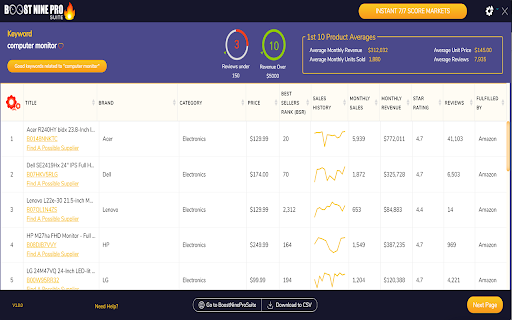
The Supercar of Amazon FBA Software, Find perfect products to sell using AI & proven supply/demand metrics. The Supercar of Amazon FBA Software. Boost Nine is "the supercar of Amazon FBA Software." Boost Nine provides you an easy way to check to see if a market on Amazon is a good or bad market to get into selling on Amazon through FBA with, and allows you to calculate your ROI, see related products, identify good keywords, and move forward with your Amazon FBA business!

Amazon Sourcing Tool & FBA Calculator
ScanScout - Advanced 3-in-1 Sourcing Extension and Analytics Software For Amazon Resellers ScanScout is your key to becoming a TOP seller on Amazon.com! Created by sellers for sellers, ScanScout gives you the necessary edge to get ahead of the competition, and stay ahead! ✅ 50 indicators to get a 100% overview of any product ✅ Instantly determine potential profits and analyze margins with the integrated FBA Calculator. ✅ Know whether it’s the right time to sell with the support of the historical data, tools, and the Stock Checker. ✅ See if an item is “Restricted” or “HazMAt”, or if Amazon itself is a seller. ✅ Manage listings you like and add them to your Seller Panel. !!! Start with the FREE plan for the Extension : 48 of the 50 functions available! !!! Limited only by 100 ASINs/day No payment information required. ⭐ FBA REVENUE CALCULATOR ⭐ No more spending countless hours estimating approximate revenue. ScanScout’s state-of-the-art software shows you exact profit, margin, ROI based not only off of current data directly from Amazon, but also off of packing fees, shipping fees, and more! ⭐ CATEGORY INDICATORS ⭐ Not sure if you can sell a specific item? Want to know if Amazon is also selling a particular product? Perhaps you’re unsure of whether or not an item is considered “HazMat”. Now, thanks to ScanScout’s extension indicators, all of this information, and more, is instantly accessible to you in a matter of seconds! Simply open up a listing in Amazon and know right away how this product is categorized. ⭐ SELLER DATA ⭐ ScanScout’s Chrome browser extension gives you everything you need to estimate the competition on a listing. See how many sellers are moving a specific product, as well as how often they have it in stock. You can even see how often Amazon itself is actually offering this item! Now you can adjust your seller strategy for maximum results! ⭐ STOCK CHECKER ⭐ With all of your data perfectly streamlined, you can check to verify which of your competitor has a particular product in stock and it’s quantity. You can also see which supplier has the best price for that item and other alternative supplier options. No more ordering in bulk, only to find out that you could have saved hundreds, or even thousands, just by going with a different supplier. ScanScout ensures that you’re always in the know! ⭐ HISTORICAL DATA ⭐ Not only does ScanScout show you an item’s ranking in Amazon, but also its performance over time. Track an item’s activity over a span of 30 days up to 1 full year! Your extension even shows you the estimated average sales per month. With easily adjustable charts and readily accessible figures, you can now rest easy knowing that you’ll always be making the most informed decisions! ⭐ QUICK-SAVE ⭐ Found an item you’d like to sell later? Instantly add an item to any one of your lists from ScanScout Seller Panel with the simple click of a button. With on-demand refreshable data, you can now select items, save them, and verify their potential profitability whenever you want, as often as you want. ⭐ INSTANT RESULTS ⭐ ScanScout’s advanced software is hosted in Amazon’s lightning-fast AWS servers, meaning you get the information you need as soon as you need it! Upload your supplier catalogs to your account and let ScanScout do all the heavy lifting for you. With thousands of results loaded in only a few minutes, you can spend less time waiting and analyzing, and more time selling! See how ScanScout could take your Amazon business to the next level! ⭐ START YOUR FREE 14-DAY TRIAL NOW! ⭐ No credit card required. After your free trial, select which plan fits you best, with options starting as low as $4.99 per month.

Amazon FBA Calculator Free by AMZScout
FBA Calculator shows Amazon fees, sales margins, revenue and product net profit and is free to use. Selecting the product is a pivotal point for your Amazon business. Check items you are considering selling with the AMZScout FBA Calculator to ensure that it has the profit margins needed to actually grow your business. With the FBA calculator widget you will: - Know your expenses beforehand so that you can choose products with lower fees, and maximize your profits. - See exactly how much you’ll make on every sale. Use this data to determine expected revenue and know whether it’s worth it to sell an item. - Get valuable product information for any Amazon product at no cost, because it's a free app. FBA calculator Chrome extension is the best way to estimate both expenses and profitability since it will provide you with: In addition, this ultimate seller’s tool lists the weight and size of each item. It also allows you to take into account your product cost, shipping, and cost per click to produce estimates tailored for your specific supplier right on the spot. How to Use the FBA Calculator: 1. Install the Amazon FBA Calculator. 2. Go to Amazon.com. 3. Find the product you’re interested in and open the listing. 4. Open the FBA calculator. 5. Enter your product, shipping, and CPC costs. 5. Your fees and profit margins will automatically be calculated. Does the FBA Calculator work for all marketplaces? You can use this calculator for Amazon marketplaces in the USA, the UK, Canada, Germany, Japan, France, Italy, Spain, Mexico, India, UAE, Saudi Arabia, Australia, and Brazil. No. Get the Amazon FBA Calculator for free, now! Simply click the blue «Install» button at the top right corner of this page. If you have any questions, don't hesitate to contact us at support@amzscout.net.

ZonResearch - Product Scanner
ZonResearch allows you to see behind Amazon products page. 1. Search for a keyword or product on Amazon.com 2. When viewing the Amazon results page, you will open the ZonResearch Chrome Extension. 3. You will see valuable behind the scenes data, both from Amazon.com as well as from ZonBase own database. 4. You will see predicted monthly sales per product, as well as how competitive that keyword is.

Amazon Product Finder - AMZScout PRO Extension
Find a profitable product and start selling on Amazon quickly! Amazon product research made easy! See sales estimates and FBA fees. How to check sales data for any product: 1. Install the AMZScout PRO Chrome Extension. Begin your FREE trial by entering your details with a quick sign-up. 2. Access Amazon and search for any items you want to analyze. 3. Open the extension. 4. Review the product and niche information. You can review sales history for both the product and the niche, as well as estimated net margin, sales, and revenue. You can also use a built-in FBA calculator to help you identify profitable products, and much more! What can you use the AMZScout PRO Extension for? • Evaluate niche potential • Check niche and product trends • Calculate potential product profitability • Check product and niche sales, price, and rank history • Evaluate competition in the niche • Estimate FBA costs • Find reliable suppliers • Monitor your competitors' sales, pricing, and keywords ✅ More than 300,000 users already trust AMZScout’s product analysis tools, keyword search, and much more. AMZScout PRO is simple to use and navigate. Here are some hacks for anyone who’s interested in become a seller: [Quickly assess the potential of your niche and product] AMZScout Product Finder provides a niche score rating and a product score for both the private label and reselling business models. With this tool, you can immediately determine if the product is worth considering without having to look deeper into detailed product analytics. [Find the best supplier] Find things to sell on Amazon, or any other marketplaces, to scale your business. Save time by filtering suppliers according to country and price range. [Improve your ranking] Export niche and product keywords to improve product listings and use them in your PPC campaigns. Help your listing rank higher in organic searches and get more sales. This smart product research tool is often considered to be the most accurate tool by sellers. It helps you find unsaturated opportunities, get sourcing options, monitor your competitors, and even improve your keyword research. Base your product choice on concrete data to protect your investment. Find a product to launch with FBA that will bring you $5,000/month or more! The AMZScout Chrome Extension works in the United States in addition to these other Amazon marketplaces: the UK, Germany, France, Italy, Spain, Canada, Mexico, India, Japan, UAE, Saudi Arabia, Australia, and Brazil. You can research 15 niches for free with the trial version. No credit card information is required. Download the PRO Extension and give this fantastic software a try! Q: How are the estimated values calculated? A: These values are calculated using formula-based, top-level categories (for example, Home & Garden or Books) and rank in one of these categories. Q: What does the “LQS” column mean? A: “LQS” is Listing Quality Score. AMZScout analyzes a variety of product description criteria and computes a score for it. A higher score indicates a higher position in the search results. To see details, place your cursor on any LQS value. Q: What does the “RPR” column mean? A: “RPR” means Revenue Per Review. A higher RPR means a better selling opportunity. Q: Can I also get help with how to start selling on Amazon? A: Of course, the AMZScout team publishes useful articles and videos every month that you can find on our blog. You can also participate in an AMZScout Seller's Course and free webinars. Q: If I have any other questions or problems with AMZScout, where can I get support? A: The fastest way to get support is by emailing your question to support@amzscout.net.
