
odoekjadkpplgjhcnhbmfafpaigebgbg
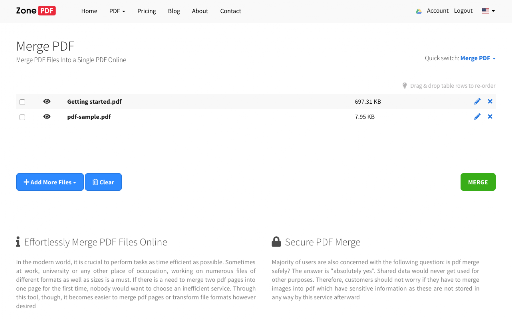


Easy and secure way to Merge PDF files online. Merge an unlimited number of files, easy and secure! You can also reorder your files with our drag & drop feature. Select or drag your files, then click the merge button to download your document into one pdf file. All merged files maintain the best quality which can be accepted on any web platform (when uploading to a website or attaching as email). Your files are fully secure as they are been transferred over a secure connection. All files are deleted permanently from our servers within few hours of the conversion.

PDF Combiner
A powerful and easy PDF combiner to merge documents in one click. Your go-to tool for PDF files. 🚀 Need a simple solution to join multiple PDF files? Combine them instantly with our lightning-fast PDF merger. No uploads. No limits. Just results. ✨ Why PDF Combiner is Your Ultimate Solution Transform scattered documents into one organized file. Built for speed, designed for simplicity, crafted for you. 1. Add Your Files - Drag and drop PDFs or click to upload. Even right-click PDFs from any website to add them instantly! 2. Arrange Your Order - Reorder files with simple drag-and-drop. Perfect sequence every time. 3. Merge & Done - Click "Combine" and your merged PDF downloads automatically. That's it! 🚀 Lightning Speed - Merge unlimited PDFs in under 10 seconds 🔒 100% Secure - All processing happens locally on YOUR computer. Zero server uploads. Your files never leave your device. 📶 Works Offline - No internet required. Perfect for sensitive documents. 🎯 Smart Right-Click - Save PDFs from any website directly into the combiner ✨ Intuitive Interface - Clean design. Zero learning curve. 💻 Universal Compatibility - Works on Windows, Mac, and Linux 📄 Unlimited Files - Combine 2 files or 200 files. We handle it all. 🎯 Perfect For Every Professional 👨💼 Office Managers - Organize reports and invoices seamlessly 💼 Corporate Teams - Maintain compliance documents for audits 📚 Teachers - Create comprehensive course materials 👨🎓 Students - Merge assignments and research papers effortlessly ✍️ Writers - Combine chapters into complete manuscripts 🔬 Researchers - Compile journals into single reference documents 💡 Key Benefits You'll Love ✅ No Registration Required - Install and start merging immediately ✅ Privacy First - Your data stays on your device. ✅ No File Size Limits - Handle large documents without breaking a sweat ✅ Instant Results - Process files faster than any online tool ✅ Professional Quality - Crystal-clear output every time ✅ Flexible Workflow - Upload first, arrange later Your privacy is sacred. Since everything runs locally, your files never touch our servers. No data collection. No storage. No tracking. Just pure, secure PDF combining. Most PDF tools force you to upload files to their servers. Not us. We built PDF Combiner to work entirely on YOUR machine. Faster processing. Better security. Total peace of mind. – Support for additional file formats – Split PDFs into separate files – Advanced editing capabilities – Custom page selection Install PDF Combiner in 2 clicks and experience the fastest, most secure way to merge PDFs. No learning curve. No complications. Just effortless document management. Your ultimate PDF combining solution is one click away!

Zone PDF: Edit and Convert PDFs
Edit, Convert, Merge, Compress and Split PDF Files in Seconds! Edit, Create, Sign, Merge, Split, Compress, and Convert PDF documents. Zone PDF: the easy, fast, and convenient way to manage PDF files and more. Zone PDF features powerful integrations like Google Drive, Dropbox, and DocuSign. Whether you prefer to upload your documents through online storage, our drag-and-drop feature, or directly from your files, we’ve got you covered. ➔ Edit & Create Content Manage text and pages, insert images and drawings, erase existing content, and much more! ➔ Merge Files Merge an unlimited number of files, easy and secure! You can also reorder your files with our drag & drop feature. ➔ Split PDFs Split a single PDF into multiple documents; split all pages in a single document, or select a range of pages and save them as a single new document. ➔ Compress Files Compress a PDF into a small pdf file; it’s fast, easy, and it stays high-quality! ➔ Convert To and From Images Convert unlimited images to PDF, or PDF to images; rest assured, all of your pictures and documents will retain their original quality. ➔ Convert To and From Office PDF to Word, Excel or PPT - no matter the type of document you’re working with, it’s no problem. The conversion process is easy, fast and secure. ➔ Integrations Load files from Google Drive and Dropbox, or sync all files with a Google drive as your storage. Link your DocuSign account for a smooth and easy signing process. ➔ Team Management Create, Edit and Manage your teams through simple and intuitive interface. Invite users from your organization to collaborate on your next big project. Trusted by millions of users online, we keep all of your information safe and secure. All of your documents are deleted from our servers just hours after being uploaded. Find out how Zone PDF can make your work life simple and easy by giving you the tools you need to succeed in an online world.

マイナポータル
様々なオンライン行政サービスで、マイナンバーカードを利用するためのアプリケーションです。 ■注意事項 Chrome拡張機能の他に専用インストーラが必要となります。ウェブサイトを参照してください。 ■対応OS ・Microsoft Windows 11 ・macOS Tahoe(バージョン26.0以上) ・macOS Sequoia(バージョン15.0以上) ・macOS Sonoma(バージョン14.0以上) ・macOS Ventura(バージョン13.0以上) ■リリースノート ・軽微な改善

Compress PDF
Easy, smart and secure way to Compress PDF Files Online! Reduce your PDF file size quickly and securely with our easy-to-use PDF compressor. Perfect for making small PDFs for: * Website Uploads: Meet file size limits and improve website loading speed. * Email Attachments: Send PDFs without exceeding attachment size restrictions. * Archiving: Save valuable storage space by compressing large PDF documents. * Select or Drag & Drop: Choose your PDF files from Browser or directly from your computer. * Compress with One Click: Simply click the "Compress" button. * Download Your Small PDF: Get your optimized PDF file instantly. * High-Quality Compression: Maintain excellent PDF quality while significantly reducing file size. * Web-Optimized PDFs: Create PDFs perfectly sized for websites, ensuring fast loading times and improved user experience. * Email-Friendly: Compress PDFs for easy attachment to emails without exceeding size limits. * Secure and Private: Your files are transferred over a secure (HTTPS) connection. We automatically delete all files from our servers within a few hours after processing. Your data is safe with us! Easy to Use: A simple and intuitive interface makes PDF compression a breeze. Our Compress PDF app provides a fast, reliable, and secure way to shrink your PDF files. Whether you need to optimize PDFs for your website, send them via email, or simply save storage space, our tool delivers high-quality results every time.
