
cedcilofdmcanmkgmbonodhoifnmmklg
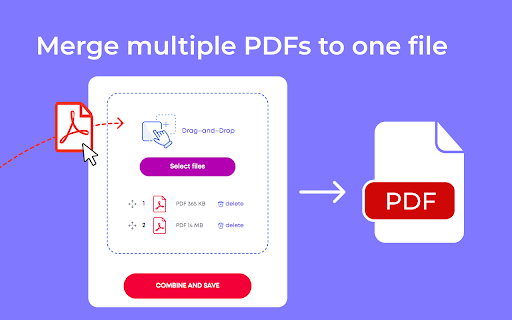
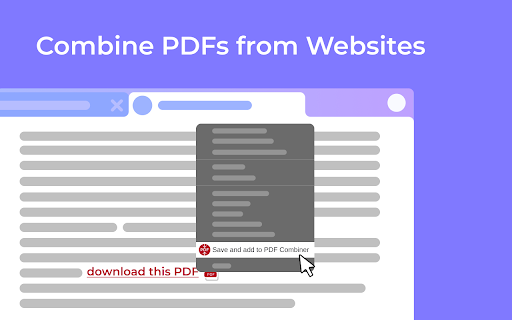

A powerful and easy PDF combiner to merge documents in one click. Your go-to tool for PDF files. 🚀 Need a simple solution to join multiple PDF files? Combine them instantly with our lightning-fast PDF merger. No uploads. No limits. Just results. ✨ Why PDF Combiner is Your Ultimate Solution Transform scattered documents into one organized file. Built for speed, designed for simplicity, crafted for you. 1. Add Your Files - Drag and drop PDFs or click to upload. Even right-click PDFs from any website to add them instantly! 2. Arrange Your Order - Reorder files with simple drag-and-drop. Perfect sequence every time. 3. Merge & Done - Click "Combine" and your merged PDF downloads automatically. That's it! 🚀 Lightning Speed - Merge unlimited PDFs in under 10 seconds 🔒 100% Secure - All processing happens locally on YOUR computer. Zero server uploads. Your files never leave your device. 📶 Works Offline - No internet required. Perfect for sensitive documents. 🎯 Smart Right-Click - Save PDFs from any website directly into the combiner ✨ Intuitive Interface - Clean design. Zero learning curve. 💻 Universal Compatibility - Works on Windows, Mac, and Linux 📄 Unlimited Files - Combine 2 files or 200 files. We handle it all. 🎯 Perfect For Every Professional 👨💼 Office Managers - Organize reports and invoices seamlessly 💼 Corporate Teams - Maintain compliance documents for audits 📚 Teachers - Create comprehensive course materials 👨🎓 Students - Merge assignments and research papers effortlessly ✍️ Writers - Combine chapters into complete manuscripts 🔬 Researchers - Compile journals into single reference documents 💡 Key Benefits You'll Love ✅ No Registration Required - Install and start merging immediately ✅ Privacy First - Your data stays on your device. ✅ No File Size Limits - Handle large documents without breaking a sweat ✅ Instant Results - Process files faster than any online tool ✅ Professional Quality - Crystal-clear output every time ✅ Flexible Workflow - Upload first, arrange later Your privacy is sacred. Since everything runs locally, your files never touch our servers. No data collection. No storage. No tracking. Just pure, secure PDF combining. Most PDF tools force you to upload files to their servers. Not us. We built PDF Combiner to work entirely on YOUR machine. Faster processing. Better security. Total peace of mind. – Support for additional file formats – Split PDFs into separate files – Advanced editing capabilities – Custom page selection Install PDF Combiner in 2 clicks and experience the fastest, most secure way to merge PDFs. No learning curve. No complications. Just effortless document management. Your ultimate PDF combining solution is one click away!

Super PDF Split Merge
Free! Merge multiple PDFs into one PDF, which can be split into multiple pages, then re-selected sorted and merged into a new PDF Merge multiple two or morePDFfiles into one for free. This plug-in will not upload files to the cloud, but only run locally on the computer. Merge multiple PDFs into one PDF for free. It supports splitting multiple PDFs into a single page, reselecting, sorting, and merging into a new PDF. PDF split will be launched in the next version.

PDF Splitter
Use PDF Splitter online to unmerge PDF documents. Split a PDF, easily separate pages and break up files in just a few clicks. ✂️ PDF Splitter Chrome Extension: A Fast, Easy Solution to Split PDF Files 🚀 With this PDF Splitter online, you can effortlessly split PDF files into individual chapters, divide sections, and unmerge documents with just a few clicks. Say goodbye to complex software and hello to simplicity with this easy-to-use tool! 💪 Key Features of the PDF Splitter tool - Easy PDF split No need to waste time figuring out complex software. With this PDF Splitter, separating parts is as simple as selecting and clicking. Customize the process to your needs and extract sections in seconds. - One-by-one Processing Handle files one by one, saving you time and boosting productivity. This was done to ensure that the user doesn't get confused while working with multiple files simultaneously. 👉 Split pdf pages This tool caters to a wide variety of professional needs, whether you’re working with contracts, research papers, or large e-books. Quickly arrange documents and access only the information you need. This splitter software helps maintain an efficient workflow without any unnecessary steps. 👉 Split pdf document in seconds Our tool is designed to maximize speed and ease. With just a few clicks, you can have your files divided exactly how you want. Whether you need to divide sections of a report or create a document for a presentation, the extension is optimized for a hassle-free experience. 👉 Extract pages from pdf anywhere Unlike traditional software, this Chrome extension is an online pdf splitter, which means you can arrange files from any device with internet access. No need to transfer files between computers – simply use Chrome and manage your documents wherever you are. 👉 How to separate pages in PDF With this pdf splitter, there’s no more confusion about how to separate sections in a text. Just select the pages you want, and the tool will take care of the rest. It’s as simple as dragging and dropping. Separate pdf pages with several options: 1️⃣ Separate every single page into individual files 2️⃣ Divide into sections by page range 3️⃣ Unmerge specific sections from the document 4️⃣ Multiple modes for pdf to pdf split 5️⃣ Choose how you want to split your files 📍 Seamless Online Access With splitter, there’s no need for software installation. All functions are available through your Chrome browser, making it accessible wherever you go. Simply open the extension, upload your paper, and start separating pages. 📍 Splitter is Simple The intuitive interface is designed to make page separation a breeze. Just select your pages, choose your preferred mode, and let the app do the rest. No prior experience needed! 📍 Fast Processing The speed of the process is our top priority. As soon as the file is uploaded, it’s ready to go. PDF Splitter will start separating as soon as you press the button. 📖 How to split a pdf with this Chrome app 1. Open the splitter in Chrome. 2. Upload the document you want to isolate. 3. Choose from the following options 4. Separate by pages 5. Divide into specific ranges 6. Extract selected pages for individual entries 7. Click Separate and download the arranged materials. This simple process makes it easy to unmerge and extract specific parts, offering a streamlined experience for users. 🏆 Main Advantages of Using PDF Page Splitter 🔹 No installation needed 🔹 Accessible anywhere online 🔹 Customizable sheets selection 🔹 Fast, secure, and reliable ❓ What’s the best way to separate leaves with the splitter? The extension offers multiple ways to arrange sheets. You can choose between dividing individual units or by setting custom sections or just choose: pdf splitt. ❓ Is the PDF Splitter online secure? Yes, files are processed locally and deleted after you complete the operation, ensuring your data remains private. ❓ How can I split file? Simply upload your paper, select the sheets, and download them as isolated files. The splitter has already finished. ❓ Boost Your Productivity with the pdf splitter online With our splitpdf solution, you can save time, improve workflow, and handle large books more effectively. Whether you’re looking to divide articles or unmerge specific sections, this splitter provides everything you need for efficient content management.

PDF Joiner
Use PDF Joiner to securely merge PDF files online and offline, combining documents into a single compiled file for easy sharing 🚀 Need to combine multiple documents into one tidy package before the next meeting? Files combiner makes it effortless. ✍️ Also, this pdf to pdf joiner software works whether you’re on a Chromebook at school or a desktop at work. With auto‑cleanup, huge documents stay under budgeted size limits, letting you email or archive without headache. Key productivity boosts ▸ merge pdf tasks in bulk ▸ combine docs from Drive, Dropbox, or desktop ▸ compile documents without losing bookmarks ▸ join files into presentations or bids This document joiner is more than a simple merge pdf tool; it’s your always‑ready workspace in the browser toolbar. Open a tab, drag to combine, press Merge, done. Teams across marketing, engineering, and legal appreciate how the extension trims admin overhead, turning scattered paperwork into one sleek packet ready for distribution. 💪 Quarterly report packets delivered 3× faster 🧑💼 Meeting decks stitched together in under 30 seconds 💁 Audit trails stay intact for effortless reviews 👍 Our pdf joiner merges documents in seconds while keeping every page crisp and searchable. Perfect for students, accountants, lawyers, and anyone who sends docs all day. How to use this pdfjoiner: ➤ How to combine docs with zero learning curve ➤ Click the blue icon ➤ Drop your pages or click Add ➤ Reorder with drag handles ➤ Hit Merge and save 📚 University libraries rely on the extension to consolidate research articles, lecture notes, and scanned archives into cohesive study packs. Librarians appreciate the drag‑and‑drop flow, while students enjoy a single download link that keeps citations intact and page order precise. 🖥️ Behind the scenes, the tool engine relies on multi‑threaded WebAssembly, giving the pdf joiner app native‑level speed while remaining sandboxed for safety. Our documents compiler respects privacy. All processing can run locally in offline mode, so sensitive audits never leave your machine. Delete buttons appear after every task, assuring peace of mind. 1️⃣ User‑friendly controls 2️⃣ File merger right in your browser 3️⃣ pdf joiner tool lets teams collaborate fast. Unify your scans easily: merger software queues everything, then one click unifies the documents. Need to unite figma exports and combine individual pages into one coherent proposal? Use offline pdf joiner even when you are in plane. Typical scenarios combine multiple pages into one board packet document merger for quarterly statements join photos of scanned receipts for tax time unify files online for quick student portfolio submissions 🌟 Everyday workflows in education, healthcare, and engineering benefit from a robust joiner software workflow tucked right inside the browser. Version control stays clean, because each output inherits timestamps and author metadata, letting teams trace revisions at a glance. For designers and developers, pdf joiner tool preserves vector artwork, fonts, and layers. Forget rasterized blurs—every curve stays sharp. Quick wins with combiner software 1. combine files into one to simplify storage 2. integrate files together in seconds 3. drag to combine docs from email into clean archives Have you ever asked: how do you join pdf files together? or hunted for documents binder software that doesn’t spam? This is safe solution is ad‑free and working oflline. ❓ Frequently Asked Questions 🤔 Can large presentations be handled without crashing? Absolutely—thanks to fast implementation, the program processes everything page‑by‑page, which keeps memory usage low even on modest hardware. 🔒 Will my confidential audits stay secure? Yes. When you toggle offline mode, every operation stays inside your browser; the pdf merger tool never transmits data to external servers. 🖇️ Is reordering pages possible before merging? Certainly. A simple drag‑and‑drop grid lets you rearrange thumbnails so combine pdf files workflows stay flexible until you hit Merge. 🌐 Do I need an account for cloud features? No account is required. When you pick items to pdf joiner online, a temporary session key manages uploads, then auto‑expires once you download the result. 🎯 Why should I choose this over a typical documents combiner website? Unlike generic sites, google pdf joiner app offers offline guarantees and because of that works fast. Install now and watch paperwork fold into a single, tidy file—before your coffee cools.

Combine pdf
Combine pdf instantly. Upload, reorder, and merge pdf right in your browser. Your files are handled locally, ensuring privacy. Introduction Welcome to combine pdf, the premier Google Chrome extension designed to revolutionize how you merge, arrange, and manage your pdf files. Our lightning-fast extension ensures a seamless, secure, and serverless experience, keeping your files safe and private throughout the process. 🌐🔒 Key features 🚀 Quick and instant ▸ With combine pdf, you can merge pdf at the speed of light. ▸ Experience instant merging without any unnecessary delays. ⚡ 🌈 User-friendly interface ▸ Our intuitive design caters to users of all technical levels. ▸ Simply open the popup, upload files, and merge pdf with unparalleled ease. 🤖🎨 🔄 Drag & drop functionality ▸ Effortlessly rearrange files using the drag and drop feature. ▸ Customize the order of your documents with a simple, intuitive gesture. 🚀🔧 Security matters 🔒 Serverless operation: ▸ Rest assured, your files never leave your device. ▸ Combine pdf operates without server uploads for maximum security. 🛡️💼 🛡️ Secure file handling: ▸ Your files are handled locally, ensuring utmost confidentiality. ▸ No external servers involved – your files are secure and sound. 🔒📂 How to combine pdf files 💡 Step-by-step guide 1. Open the combine pdf popup by clicking the extension's icon. 2. Upload or drop multiple files with ease. 3. Effortlessly rearrange files using drag and drop. 4. Click combine pdf for an instantaneous merge operation. 5. The merged document automatically opens directly in your preferred pdf viewer. 📝🔄 🚀 Efficiency tips: ▸ Utilize the drag and drop feature for swift rearrangement. ▸ Merge multiple files in one go for optimal efficiency. 🚀💡 Benefits ⏰ Time-saving ▸ Save time by merging pdf quickly and efficiently. ▸ Streamline your workflow with instant results. 🕒🚀 🔐 No upload anxiety ▸ Enjoy peace of mind with serverless operation. ▸ Your files remain on your device throughout the merging process. 🌐🔐 🎨 Versatility ▸ Use combine pdf for work, study, or personal projects. ▸ Adapt the extension to your specific needs effortlessly. 🎨🔄 Our pdf merger at your service 🚀 Effortless operation ▸ With our state-of-the-art pdf combiner, merge your documents seamlessly. ▸ Combine your files without hassle and save valuable time. 📑 Organized document management: ▸ Harness the power of our pdf combiner for organized document handling. ▸ Merge lecture notes, reports, or invoices into a single, well-organized document. 📊📑 FAQ ❓ Is my data safe with your tool? Absolutely! Your files are handled locally, ensuring privacy. ❓ Can I merge files in a specific order? Yes, utilize the drag and drop feature to arrange files as you prefer. 🔄🔍 Why combine pdf? 🌟 Simplified distribution ▸ Easily share multiple documents as a single file, simplifying communication. 📤🌐 🌟 Collaborative projects ▸ Streamline collaboration by merging contributions into a unified document. 🤝🔄 🌟 Reduced clutter ▸ Combine related documents to declutter your digital workspace. 🗄️🔄 🌟 Enhanced organization ▸ Merge lecture notes, reports, or invoices into a single, well-organized document. 📑📊 Compatibility 🌐 Chrome compatibility ▸ Combine pdf seamlessly integrates with your Chrome browser. ▸ Experience the benefits of pdf merging without leaving your preferred environment. 🌐🚀 📱 Cross-platform access ▸ Access the document merger across multiple devices for a consistent, efficient experience. 📱💻 Unlocking document merging potential ▸ Discover the simplicity of combine pdf as your go-to pdf merge tool. Seamlessly merge, rearrange, and manage your documents, transforming your document management experience. With combine pdf, you can merge pdf files effortlessly, ensuring a swift and secure process right within your Chrome browser. 🚀📄 Extensive capabilities ▸ Explore the extensive capabilities of combine pdf as your ultimate online pdf merging tool. Whenever you need to combine pdf instantly in your browser, our extension is here to elevate your experience. 🚀🔍 Enhanced functionality ▸ Unlock advanced features with our extension. ▸ Effortlessly merge pdf online with a simple click. ▸ Utilize the combine pdf option in the right-click menu when you open a document in your pdf viewer. ▸ Your file list is not lost even when you close the extension's popup. 🚀🌐 User-centric approach ▸ User satisfaction is our priority. ▸ Regular updates for improved performance and additional features. ▸ We designed the tool with quality in mind: we use it ourselves on everyday basis. ▸ Responsive customer support to address any queries or concerns. 🔄🤝 📧 Contact us📧 If you have any questions, suggestions, bug reports, or feature requests, feel free to send a message to pdftoolset@gmail.com anytime. Thank you! Conclusion Combine pdf is the ultimate solution for merging pdf instantly and securely within the Chrome browser. Bid farewell to upload anxieties and revel in the speed of serverless document merging. 🚀 Add combine pdf to your Chrome browser and take your document management to unprecedented heights! 🚀
