
hhnkgaakbmbcgaijmmjojpllnkimlbhj

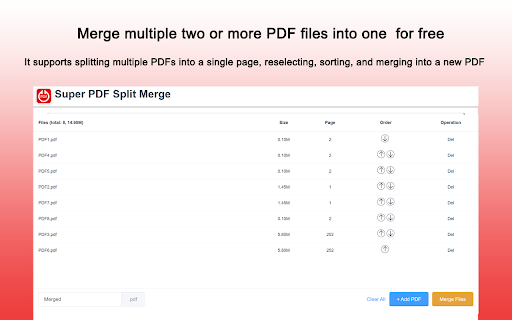
Free! Merge multiple PDFs into one PDF, which can be split into multiple pages, then re-selected sorted and merged into a new PDF Merge multiple two or morePDFfiles into one for free. This plug-in will not upload files to the cloud, but only run locally on the computer. Merge multiple PDFs into one PDF for free. It supports splitting multiple PDFs into a single page, reselecting, sorting, and merging into a new PDF. PDF split will be launched in the next version.

PDF Combine - Convert and Merge
Convert and merge multiple files with different formats into a single PDF document This extension converts document, HTML, and image file types into PDF format. Also, the extension can merge multiple files into a single PDF document. Use cases: 1. Append an image file to an existing PDF document 2. Merge multiple PDF files into a single PDF document 3. Convert Word to PDF 4. Convert multiple files with different formats into a single PDF document. 5. Change the order of a PDF page Conversion Method: Local: The extension runs the official "pdfunite" executable from the alpine Linux repository inside an iframe using blink's x86-64-Linux emulator. This method works offline. There is no server interaction whatsoever. Remote: The extension sends all your files to www.online-convert.com, and conversion happens on the server. You can convert any file type to PDF using this method. Notes: 1. This extension uses www.online-convert.com APIs to do the conversion, so there is no need to install a native program to convert each file. 2. The quality of the document is kept while merging or converting into PDF format. 3. It is recommended to get and use your API key to make sure you don't hit the rate limit if you prefer the "Remote" method.

PDF Merger
Looking for a simple and secure way to combine pdf files? Our PDF Merger app is a powerful, user-friendly solution designed for anyone who wants to merge pdf files into one without relying on online tools like PDF Mergy, iLovePDF, Adobe PDF merger, SmallPDF, or other services that upload your documents to external servers. With our app, all processing happens locally on your device. You stay in control of your documents from start to finish. 🏆 Why choose this pdf combiner? ✅ Keeps files on your device ✅ Works offline — no internet needed ✅ Easy to use, even for beginners ✅ Fast joining of multiple documents ❓ If you’ve been wondering how to merge pdf files without acrobat or complicated software, this is the answer. 1️⃣ Select the documents you want to combine from your computer. 2️⃣ Arrange them in the order you need. 3️⃣ Click "Merge", and you’re done! 🔑 Key features you’ll love: 1️⃣ One-click pdf combiner 2️⃣ Unlimited number of files to join 3️⃣ Easily re-order files before completing the task 4️⃣ Name your merged file before saving 5️⃣ Choose the destination folder for the output file 🔒 Privacy & security: Unlike online pdf merger tools, this app keeps your data private. No uploads, no sharing. Everything happens directly on your computer. That’s why it’s the best choice for anyone asking how to merge pdf files securely or how can I merge pdf files without risking privacy. 🌟 Benefits of using our pdf merger: ✅ Ease of use: effortlessly merge all pdf into one with just a few clicks. ✅ No internet dependency: combine pdf documents offline. ✅ No third-party servers involved. ✅ Merge files into one pdf instantly on your device. ✅ No file size limitations. ✅ No watermarks on the output file. ✅ OS Compatibility: use it to combine pdf files into one document in Windows, Mac, and Linux. ✅ Regular updates and responsive developers to keep improving our pdf merger tool. ❓ Who is this pdf merger for? ✍🏻 Accountants managing multiple reports 🧑⚖️ Lawyers compiling case files 👩🎓 Students submitting multi-document assignments 🧑🎓 Researchers combining papers for review 👷 Business owners gathering invoices, contracts, and reports for easy management 👨💼 Office managers organizing PDF documents for easy retrieval Whether you’re a student combining notes, a lawyer combining contracts, or an accountant organizing reports, this pdf merger is perfect for you. Forget about complicated steps or needing expensive software like Acrobat. Now you know how to merge pdf files without acrobat or complex tools. 👍 Popular use cases: 📌 Storing invoices for accounting 📌 Combining legal documents into one pdf 📌 Joining multiple research papers 📌 Compiling student notes into a single file 📌 Merging scanned pages into a book format ⚠️ Risks of using a pdf merger online: 1️⃣ Privacy and security concerns: uploaded files may be stored on third-party servers, risking exposure of sensitive data. 2️⃣ Data leaks and breaches: even reputable sites can be hacked, making your data accessible to unauthorized parties. 3️⃣ Retention of your data without transparency: online tools may keep files longer than disclosed or use them for analytics. 4️⃣ No control over file deletion: you can’t be sure files were fully deleted even if you click "delete." 5️⃣ Exposure to malware or phishing sites: some merger sites could inject malware or redirect you to malicious pages. 6️⃣ File size limitations and upload failures: many online tools have limits or fail on large files. 7️⃣ No offline access: no internet? You can’t do the job when you need to. 8️⃣ Legal or compliance violations: uploading client or patient documents could violate privacy laws (GDPR, HIPAA, etc.). 9️⃣ Reduced quality or missing features: some tools compress files or strip bookmarks and links. ✅ Why offline merging is safer: Using an offline tool like our pdf merger ensures that your documents never leave your device, maintaining full control, security, and compliance. ✅ DO’s of merging PDFs: 1️⃣ Do check the page order before combining them: ensure the final document reads in the correct sequence. 2️⃣ Do keep original copies of the PDFs: back up files in case you need them separately later. 3️⃣ Do name the output document clearly: use descriptive filenames like ProjectReport_Final.pdf. 4️⃣ Do review the page after combining: check for missing or duplicated pages. 5️⃣ Do use offline tools for sensitive documents: protect privacy by avoiding online mergers. 6️⃣ Do compress the resulting document if large: reduce file size for sharing. 7️⃣ Do verify compatibility with the recipient’s software: make sure the PDF opens properly in standard readers. ❌ DON’Ts of merging PDFs: 1️⃣ Don’t combine files with different page sizes or orientations without reviewing: standardize formats first. 2️⃣ Don’t assume the resulting file is error-free: double-check bookmarks, links, and navigation. 3️⃣ Don’t overwrite important files: save the merged PDF as a new file. 4️⃣ Don’t unite files you lack permission to combine: respect copyrights and privacy. 5️⃣ Don’t upload sensitive files to unknown online mergers: avoid risking data leaks. 6️⃣ Don’t ignore email or upload limits: compress or split large files as needed. ❓ Is PDF merging the right solution for you? Not everyone needs to combine pdf pages into one in all situations. Consider these alternatives: ➤ Using hyperlinks between PDFs: link related files instead of joining them, useful for manuals or research references. ➤ Zipping multiple PDFs into a compressed folder: send a zip archive rather than a single merged file, keeping originals intact. ➤ Embedding PDFs into a master document: insert PDFs into a Word, PowerPoint, or LaTeX file for combined presentation. ❓ Why merging Is still the preferred method: While alternatives work, combining all pdf into one creates a seamless, easy-to-manage document that: ➤ Preserves page order ➤ Simplifies storage and sharing ➤ Ensures compatibility across devices No more worrying about sensitive data exposure. Our app gives you peace of mind while offering all the benefits of an online pdf merger — but offline and secure. In summary, whether you need to merge adobe pdf documents or unite pdf files for a project, PDF Merger is the perfect solution. 👉 Install today and experience easy and safe pdf merge. 📁👌

Split PDF Document
Use Split PDF Document to extract pages from file. Split or unmerge PDF documents with ease. Separate pages and break up PDF files. 📌 Split PDF Document Chrome Extension: an effective and user-friendly tool to manage your files. 🚀 This Split PDF Document into multiple pages online solution may be used as a page extractor online to divide books into sections, or unmerge PDF pages with just a few clicks. Forget about complicated tools and embrace a simple powerful extension to splitpdf! ✅ Essential Features of the Split PDF Document Online - Effortless chapters division No need to wrestle with cumbersome software. This split tool simplifies the task, letting you extract sections or pages in just seconds. - File-by-File Processing Handle one document at a time for optimal productivity. Split pdf document helps prevent confusion when working on multiple files. 💪 Separator Perfect for contracts, research, or e-books, this feature enables quick and efficient organization. The tool makes it easy to focus on the data you actually need, skipping unnecessary steps to split pdf document fast. 💪 Extract pages from anywhere Unlike desktop programs, you can divide text into 2 parts by page ranges using this extension that works on any internet-enabled device. Manage and edit your files directly in Chrome—no installations required. 💪 How to split pdf document Quickly divide your files, whether you're preparing a report or organizing a presentation. The extension ensures a seamless experience. 💪 How to separate pages With this tool, separating sections is intuitive. Simply drag, drop, and select the desired pages, and the rest is automated. Options to do pdfsplit ① Save each page as a separate chapter ② Split PDF document ③ Split doc parts from the document ④ Use multiple book split modes ⑤ Customize splitting to splitpdf ☞ Accessible Anytime Online No need for downloads or installations—everything works via your Chrome browser. Simply upload your doc and start splitting. ☞ User-Friendly Design The interface ensures anyone can figure out how to divide chapter into 2 parts. No advanced skills required—just follow the prompts and split pdf document with ease. ☞ Fast and Reliable Processing Upload your book, and the extension takes over. The speed of splitting ensures minimal wait times. All you need is a browser and no internet connection needed. 📖 Steps: How to Splitpdf Using This Chrome Tool 1) Open the extension in Chrome. 2) Upload your item. 3) Choose the option you need. 4) Press Splitpdf. 5) Divide into custom ranges. 6) Check selected sections. 7) Split pdf document. 8) Download the results. 🥇 Key Benefits of the Split PDF Document Tool 💎 No software installation required 💎 Manage files online, anywhere 💎 Customizable page selection 💎 Secure and fast file handling ❗️ How do I separate pages in a PDF? This tool offers several options, from extracting individual pages to setting custom ranges. Select your preferred mode and complete the process in seconds. ❗️ Is the Split PDF Document secure? Yes, files are handled locally during the process and deleted afterward, ensuring complete privacy. No server uploads. Nobody can see your documents. ❗️ How do you splitpdf? Upload the file, select the pages to separate, and download the result. The process is optimized for efficiency. User-friendly interface provides you a step by step guide. ❗️ How to split and save a document by pages? Split PDF document, it is an online-only tool designed for seamless integration with Chrome. But if you have already installed the application you can splitpdf offline. ❗️ Can I split pages for large books? Yes, this tool works effectively with large files, allowing you to manage even extensive documents effortlessly. You can choose all the files you want to divide pdf. ❗️ Does anybody check the extension before publishing? Yes, the review team of Google Chrome Web store checked the split pdf document and submitted that it is safe and secure for the end customer. You can splitpdf with ease. Boost Your Workflow with the pdf split Tool! Save time and improve organization with this easy-to-use solution. Whether you're dividing content into smaller sections or extracting essential pages, this pdf splitter is your go-to option. Split PDF document efficiency with this powerful tool for handling books!

Split PDF
Split PDF: Effortlessly divide your document into separate parts with the ultimate PDF split tool! ✨ Before we dive in, Split PDF is your ultimate browser extension for seamlessly dividing files into multiple segments. 😊 Whether you need to extract individual pages for editing, create custom sections for distribution, or reorganize your document entirely, this intuitive tool ensures effortless splits every time. 💖 👉 The extension is designed for: ⏩ Students & Researchers 📚 – Effortlessly divide study materials and research files for essays, theses, or assignments. ⏩ Business Professionals 🧑💼 – Quickly segregate large documents into manageable sections for reports or presentations. ⏩ Writers & Editors ✍️ – Precisely divide source files into editable parts to streamline content revision. ⏩ Teachers & Educators 🍎 – Easily organize lecture notes or reading materials into distinct segments. ⏩ Archivists & Librarians 🗃️ – Seamlessly divide archived documents into searchable sections. ⏩ Anyone Needing Reliable Document Management 🚀 – Divide your file instantly without the hassle of complex software. 🔎 What can this extension do? ✅ Instantly divide a file into separate segments with superior accuracy. ✅ Process multiple documents simultaneously, saving valuable time. ✅ Leverage advanced OCR for splitting scanned images when necessary. ✅ Preserve original formatting and layout to ensure structured results. ✅ Secure your data with robust encryption during every operation. ✅ Enjoy complete functionality at no cost with its split PDF free feature. Lightning-Fast Extraction 💥 • ⏩ Experience ultra-rapid segmentation using our PDF to PDF split capability, dramatically accelerating your workflow. • ⏰ Perfect for tight deadlines and immediate access. Highly Accurate Processing 📖 • 🏹 Achieve precision by learning how to split PDF with ease. • 🔎 Eliminate manual errors for flawless results. Streamlined Transformation 🖌️ • 👍 Achieve smooth transitions with our integrated split PDF to PDF method for clear-cut file division. • 🙂 Perfect for rapid content conversion. Efficient Multi-File Handling 📁 • 📂 Discover how to effortlessly manage bulk operations by learning how to split a PDF into multiple files. • 🗄️ Ideal for managing extensive digital libraries. Precise Format Preservation 🌎 • 🌎 Rely on our advanced PDF spliter feature to ensure every section is accurately divided. • 🖥️ Designed for clarity in every output. Instant Conversion Action 🥳 • ➡️ Master techniques on how to split pages of PDF for customized output. • ⏩ Experience speed without compromise. Custom Page Management 📅 • 📄 Learn to split pages in PDF effortlessly, offering unparalleled control over your document’s structure. • 📝 Ideal for creating individualized sections for later editing. Precise Sectioning Tools 🔎 • 📜 Utilize the feature to split PDF into pages with exact precision, ensuring every fragment is correctly processed. • 💡 Perfect for detailed document reorganization. Professional-Grade Standards 🏆 • 🖥️ Rely on compatibility with adobe split PDF standards to guarantee high-quality outcomes. • 📈 Achieve industry-level results with every operation. Consistent Output Quality 📃 • ✔️ Benefit from dependable results using our PDF split pages functionality that ensures uniform segmentation. • 📏 Perfect for maintaining consistency across extensive projects. Effortless File Division 🔄 • 📂 Master the process to split PDF file into pages with just one click, streamlining your workflow dramatically. • ⏩ Enjoy rapid, user-friendly operation every time. III. Getting Started with Split PDF 🚀📝 Quick Installation 🔧 • 📍 Install Split PDF directly from your browser’s extension store in seconds. • 🤔 Pin the icon for immediate accessibility whenever you need to divide a document. Select & Upload 🗂️ • 📁 Drag-and-drop or choose a file from your device to begin the division process. • 📤 Upload swiftly and start processing without delay. Customize Your Settings 🎛️ • 📝 Configure output preferences before you initiate a split PDF document conversion. • ⚙️ Adjust parameters to suit specific project needs, ensuring optimal segmentation. One-Click Splitting ✔️ • 🖲️ Initiate the division with a single click and watch as your file is partitioned seamlessly. • ✨ Experience instant, error-free processing. Save & Export 📚 • 💿 Download the resulting segments individually or save them directly to your preferred cloud service. • 📮 Effortlessly share the separated sections with colleagues or collaborators. Review & Edit 📝 • 🔍 Quickly review each segment to ensure accuracy and completeness. • 📖 Make any necessary edits within your favorite document editor. Intelligent Dashboard 🔧 • 📈 Monitor the progress of each operation and manage multiple tasks concurrently. • 📍 Benefit from clear, organized indicators that enhance usability. Batch Processing Capability 📫 • 📦 Handle bulk document divisions with ease by processing several files at once. • 💥 Ideal for managing large-scale projects efficiently. Robust Security Measures 🔐 • 🔐 All operations are protected through secure encryption protocols. • 🔧 Your sensitive information remains fully protected. Flexible Output Customization ✒️ • 🖊️ Adjust settings to retain original formatting or opt for plain content. • 📄 Meet diverse project requirements with ease. V. Split PDF: Who Benefits the Most? 🌍✨ Students & Academics 🎓 • 📖 Easily divide lengthy study materials into individual pages or chapters for focused review. • 📑 Organize extensive research papers into manageable segments to save time during studies. Business Teams & Analysts 🏢 • 📊 Separate comprehensive reports and presentations into clear, dedicated sections for efficient analysis. • 📈 Enhance productivity by breaking down complex documents into easily digestible parts. Writers & Journalists 🖊️ • 📝 Isolate specific sections of source documents or interviews for streamlined editing and rewriting. • 📔 Accelerate content creation by splitting long articles into concise, reworkable segments. Educators & Trainers 🍏 • 🖨️ Divide extensive instructional materials into topic-specific sections for better classroom management. • 📚 Improve lesson planning by segmenting PDFs into clear, organized parts for distribution. Archivists & Librarians 📖 • 📚 Segment archival documents into searchable, individual pages or chapters for improved cataloging. • 🔎 Enhance retrieval and organization of historical records by splitting large files into structured segments. Legal & Medical Professionals ⚖️🩺 • 📁 Divide complex legal or medical documents into relevant sections for precise review and analysis. • 📝 Ensure clarity and efficiency in managing records by isolating essential pages. VI. Split PDF: Daily Advantages for Every User 💼📌 Drag-and-Drop Simplicity 🌈 • 🖲️ Simply drag your file onto the interface to instantly divide your document into individual parts. • ⏩ Eliminate extra steps and boost your daily efficiency with effortless splitting. Unified Workspace 🗂️ • 🖥️ Manage all splitting operations within one streamlined platform for seamless organization. • 🗂️ Keep your files neatly arranged without clutter, ensuring easy access. Instant Preview & Validation 👁️ • 👁️ Quickly preview each segment to confirm accurate division before finalizing your work. • ✔️ Validate results in real time to avoid any splitting errors. Comprehensive Tutorials & Guides 📖 • 📖 Access detailed, step-by-step resources on how to effectively split PDF documents. • 💡 Gain expert insights to optimize your file division process. Efficient File Management 🗄️ • 📁 Automatically organize your sections for hassle-free retrieval in the future. • 🖇️ Enjoy seamless archiving that makes managing divided documents effortless. Multi-Device Support 📲 • 🗂️ Divide your documents easily on mobile, tablet, or desktop with a consistent experience. • 🔄 Maintain an uninterrupted workflow across all your devices. Browser Integration 🌐 • 🌎 Access splitting tools directly from your browser’s toolbar without extra installations. • 🖥️ Enjoy instant use on any web platform. Mobile-Friendly Interface 📲 • 🗂️ Perform divisions effortlessly from smartphones or tablets. • 🚗 Stay productive on-the-go. Cross-Device Synchronization 🔗 • 📡 Begin splitting on one device and seamlessly continue on another. • 📋 Ensure uninterrupted workflow across all platforms. Automatic Updates 🔔 • 🔄 Receive regular improvements and new feature rollouts automatically. • 🆕 Stay current with cutting-edge functionality at all times. Immediate Results 💥 • ⏩ Divide your documents in seconds, ideal for fast-paced work environments. • ⏰ Achieve rapid segmentation to meet urgent project deadlines. Streamlined Team Collaboration 🤝 • 📂 Share divided sections effortlessly with team members for coordinated work. • 🗣️ Enhance communication with uniformly segmented files. Efficient Document Handling 📄 • 📑 Reduce the time spent managing large documents by creating focused sections. • 🖨️ Simplify workflows and accelerate review processes. Automated Batch Splitting 🔄 • ⏰ Process multiple files simultaneously to automate routine divisions. • ⏳ Free up valuable time for more critical tasks. Customizable Output Options 🎨 • 🖌️ Tailor segmentation settings to create files that match your exact needs. • 📋 Ensure every section meets your formatting requirements. "Can I divide scanned files effectively?" 📖 • 📸 Yes – advanced OCR features ensure clear splits even for image-based documents. • ✔️ Perfect for converting hard-copy scans into editable segments. "Is my data secure during splitting?" 🔒 • 🛡️ Absolutely – robust encryption protocols safeguard your information at all stages. • 🔐 Confidence is built into every operation. "Can large files be divided without issues?" 📂 • 📦 Yes – our solution handles extensive documents with ease and precision. • ⏩ Ideal for lengthy reports and complex records. "Is the extension available at no cost?" 💸 • 🎁 Yes – benefit from a completely split PDF free experience with no hidden fees. • 🎉 Enjoy full access to all features without charge. "Will the tool impact my browsing speed?" 🚀 • ⚙️ Not at all – the extension is optimized for smooth, uninterrupted performance. • 🖥️ Continue your work seamlessly during conversions. Versatile Utility 🎨 • 📚 Suitable for academic, professional, or personal use cases. • 🎯 A flexible tool that adapts to your document management style. Community & Support Network 👥 • 🌐 Engage with a vibrant user community to share tips and discover innovative uses. • 🤝 Gain insights that further enhance your splitting efficiency. Consistent Output Quality 📑 • 📏 Deliver uniformly segmented files that maintain the integrity of the original document. • 📝 Trust our tool to provide professional-level divisions every time. Quick Content Adjustments 💥 • ✏️ Easily perform minor edits immediately after conversion. • ⏱️ Save time by minimizing the need for post-processing edits. XI. Your Everyday Document Division Partner 🤗🚀 Split PDF stands as your reliable companion for daily file segmentation tasks. It offers an intuitive interface, precise splitting, and rapid processing—all essential for modern document management. Boost your productivity and streamline file organization with this indispensable browser extension. Cutting-Edge OCR Technology ⏩ • 📸 Utilize advanced recognition to accurately process even image-based pages. • 🔬 Achieve professional-quality segmentation for scanned documents. Comprehensive Document Toolkit 🔧 • 🛠️ Manage, organize, and edit sections—all within one powerful interface. • 🗃️ Eliminate the need for additional software to handle file divisions. Robust Cloud Integration ☁️ • ☁️ Easily save and access your segmented files through your favorite cloud service. • 🔗 Ensure your documents are available wherever you are. XIII. Make Split PDF Your Preferred Choice 🌈⭐ Simplify Complex File Division 🤸 • 🧹 Streamline your workflow with one efficient solution for conversion. • 🗃️ Maintain an organized digital workspace with effortless segmentation. Enhance Team Collaboration 🤝 • 📤 Share divided sections easily for improved communication and project coordination. • 💬 Standardized outputs ensure every team member is on the same page. Maintain Organized Archives 📂 • 🗄️ Quickly search, retrieve, and manage sections from previously divided files. • 🔍 Simplify future reference and archival processes. Accessible for All Users 🌎 • 👩💻 Designed for both novices and experts, ensuring an easy learning curve. • 🌟 Empower your team with a tool that adapts to every skill level. XIV. Proven Tips for Expert Use 🔧⭐ Organized File Naming 📝 • 📅 Clearly label files before conversion to streamline future searches. • 🗂️ Keep your archives tidy with intuitive naming conventions. Utilize Offline and Online Modes 🌐 • 📶 Process files offline and sync once connectivity returns for uninterrupted work. • ✈️ Ideal for travel or areas with limited internet access. Leverage Batch Splitting 📚 • 📂 Process multiple files at once to reduce overall project time significantly. • ⌛ Optimize your workflow for large-scale document division. Split PDF is engineered for reliability and intuitive functionality. Integrate it into your workflow to quickly divide documents into manageable parts while ensuring high-quality results. Robust encryption and regular updates drive productivity gains and simplify your file management process. Acquire & Integrate 📲 • 📤 Locate Split PDF in your browser’s extension store and install effortlessly. • 📍 Pin the icon for quick, anytime access. Divide & Review 🎉 • ⏩ Begin the division process by uploading your file—let the extension handle segmentation instantly. • 👁️ Review each section for accuracy with real-time previews. Save & Export 📮 • 💿 Download the resulting segments individually or save them directly to your preferred cloud service. • 📮 Effortlessly share the separated files with colleagues or collaborators. Master File Organization 📚 • 📂 Efficiently organize and manage your newly sections for easy retrieval. • 🗃️ Enjoy streamlined archiving and long-term file management. 📥 Acquire & Install: Head to your browser's extension marketplace and seamlessly integrate Split PDF into your workflow. 🚀 Begin Instant Splitting: Simply upload your file—let the extension handle document division effortlessly in seconds. 📝 Verify Before Completion: Always review the separated segments before finalizing, ensuring every section meets your expectations. 🌐 Distribute & File: Effortlessly share the individual parts with colleagues or securely store them in your favorite cloud platform. 🔄 Stay in the Loop: Look forward to exciting new updates designed to elevate your document management experience. Discover unparalleled convenience and consistently precise results with Split PDF. Integrate it once, and you'll wonder how you ever managed without it. From academic research to professional document management, this extension transforms file handling into a fast and straightforward process. 🎉
