
cndcekipmknppjimkblnklbiaaljhoda
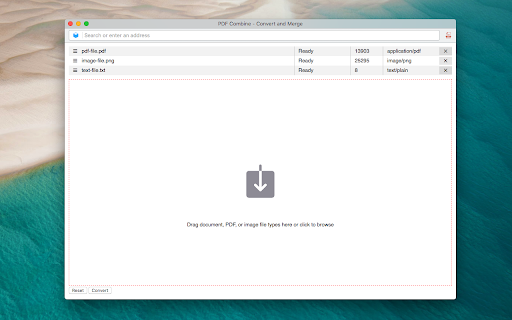
Convert and merge multiple files with different formats into a single PDF document This extension converts document, HTML, and image file types into PDF format. Also, the extension can merge multiple files into a single PDF document. Use cases: 1. Append an image file to an existing PDF document 2. Merge multiple PDF files into a single PDF document 3. Convert Word to PDF 4. Convert multiple files with different formats into a single PDF document. 5. Change the order of a PDF page Conversion Method: Local: The extension runs the official "pdfunite" executable from the alpine Linux repository inside an iframe using blink's x86-64-Linux emulator. This method works offline. There is no server interaction whatsoever. Remote: The extension sends all your files to www.online-convert.com, and conversion happens on the server. You can convert any file type to PDF using this method. Notes: 1. This extension uses www.online-convert.com APIs to do the conversion, so there is no need to install a native program to convert each file. 2. The quality of the document is kept while merging or converting into PDF format. 3. It is recommended to get and use your API key to make sure you don't hit the rate limit if you prefer the "Remote" method.

Combine pdf
Combine pdf instantly. Upload, reorder, and merge pdf right in your browser. Your files are handled locally, ensuring privacy. Introduction Welcome to combine pdf, the premier Google Chrome extension designed to revolutionize how you merge, arrange, and manage your pdf files. Our lightning-fast extension ensures a seamless, secure, and serverless experience, keeping your files safe and private throughout the process. 🌐🔒 Key features 🚀 Quick and instant ▸ With combine pdf, you can merge pdf at the speed of light. ▸ Experience instant merging without any unnecessary delays. ⚡ 🌈 User-friendly interface ▸ Our intuitive design caters to users of all technical levels. ▸ Simply open the popup, upload files, and merge pdf with unparalleled ease. 🤖🎨 🔄 Drag & drop functionality ▸ Effortlessly rearrange files using the drag and drop feature. ▸ Customize the order of your documents with a simple, intuitive gesture. 🚀🔧 Security matters 🔒 Serverless operation: ▸ Rest assured, your files never leave your device. ▸ Combine pdf operates without server uploads for maximum security. 🛡️💼 🛡️ Secure file handling: ▸ Your files are handled locally, ensuring utmost confidentiality. ▸ No external servers involved – your files are secure and sound. 🔒📂 How to combine pdf files 💡 Step-by-step guide 1. Open the combine pdf popup by clicking the extension's icon. 2. Upload or drop multiple files with ease. 3. Effortlessly rearrange files using drag and drop. 4. Click combine pdf for an instantaneous merge operation. 5. The merged document automatically opens directly in your preferred pdf viewer. 📝🔄 🚀 Efficiency tips: ▸ Utilize the drag and drop feature for swift rearrangement. ▸ Merge multiple files in one go for optimal efficiency. 🚀💡 Benefits ⏰ Time-saving ▸ Save time by merging pdf quickly and efficiently. ▸ Streamline your workflow with instant results. 🕒🚀 🔐 No upload anxiety ▸ Enjoy peace of mind with serverless operation. ▸ Your files remain on your device throughout the merging process. 🌐🔐 🎨 Versatility ▸ Use combine pdf for work, study, or personal projects. ▸ Adapt the extension to your specific needs effortlessly. 🎨🔄 Our pdf merger at your service 🚀 Effortless operation ▸ With our state-of-the-art pdf combiner, merge your documents seamlessly. ▸ Combine your files without hassle and save valuable time. 📑 Organized document management: ▸ Harness the power of our pdf combiner for organized document handling. ▸ Merge lecture notes, reports, or invoices into a single, well-organized document. 📊📑 FAQ ❓ Is my data safe with your tool? Absolutely! Your files are handled locally, ensuring privacy. ❓ Can I merge files in a specific order? Yes, utilize the drag and drop feature to arrange files as you prefer. 🔄🔍 Why combine pdf? 🌟 Simplified distribution ▸ Easily share multiple documents as a single file, simplifying communication. 📤🌐 🌟 Collaborative projects ▸ Streamline collaboration by merging contributions into a unified document. 🤝🔄 🌟 Reduced clutter ▸ Combine related documents to declutter your digital workspace. 🗄️🔄 🌟 Enhanced organization ▸ Merge lecture notes, reports, or invoices into a single, well-organized document. 📑📊 Compatibility 🌐 Chrome compatibility ▸ Combine pdf seamlessly integrates with your Chrome browser. ▸ Experience the benefits of pdf merging without leaving your preferred environment. 🌐🚀 📱 Cross-platform access ▸ Access the document merger across multiple devices for a consistent, efficient experience. 📱💻 Unlocking document merging potential ▸ Discover the simplicity of combine pdf as your go-to pdf merge tool. Seamlessly merge, rearrange, and manage your documents, transforming your document management experience. With combine pdf, you can merge pdf files effortlessly, ensuring a swift and secure process right within your Chrome browser. 🚀📄 Extensive capabilities ▸ Explore the extensive capabilities of combine pdf as your ultimate online pdf merging tool. Whenever you need to combine pdf instantly in your browser, our extension is here to elevate your experience. 🚀🔍 Enhanced functionality ▸ Unlock advanced features with our extension. ▸ Effortlessly merge pdf online with a simple click. ▸ Utilize the combine pdf option in the right-click menu when you open a document in your pdf viewer. ▸ Your file list is not lost even when you close the extension's popup. 🚀🌐 User-centric approach ▸ User satisfaction is our priority. ▸ Regular updates for improved performance and additional features. ▸ We designed the tool with quality in mind: we use it ourselves on everyday basis. ▸ Responsive customer support to address any queries or concerns. 🔄🤝 📧 Contact us📧 If you have any questions, suggestions, bug reports, or feature requests, feel free to send a message to pdftoolset@gmail.com anytime. Thank you! Conclusion Combine pdf is the ultimate solution for merging pdf instantly and securely within the Chrome browser. Bid farewell to upload anxieties and revel in the speed of serverless document merging. 🚀 Add combine pdf to your Chrome browser and take your document management to unprecedented heights! 🚀

Xodo | PDF Editor, Converter & Merger
Free PDF tool to edit, convert, compress, merge, combine, crop, and redact PDF files. Enjoy the better PDF experience by adding Xodo to your Chrome browser! Access PDF converter, PDF combiner, PDF filler, PDF editor, PDF merger and more to supercharge your productivity online. Powerful PDF Converters and PDF tools to boost your productivity: - Convert PDF to Word, PPT, Excel, PDF/A, HTML, JPG, JPEG and PNG - Convert JPG, JPEG, PNG to PDF - Convert Word, Excel, Powerpoint to PDF - PDF Reader - Edit PDF - Merge PDF - Compress PDF - Crop and redact PDF - Fill PDF - Split PDF - Rotate PDF pages - Delete PDF pages - Reduce PDF size - Combine PDF files - Sign a PDF How to Use: - Install Xodo extension - Select an action from the top 5 tools - Upload your file and use our online tools to edit, convert, compress, merge, combine, crop, and redact. - Download your new file With Xodo you can process various file types: - PDF, PDF/A - Office: Word, Excel, powerpoint (doc, docx, xlsx, xlsm, ppt) - Images: JPG, JPEG, PNG, GIF, TIFF - HTML - DICOM NOTES: To access the full list of document processing tools, visit https://xodo.com By installing the Chrome extension, you agree to Xodo Terms of Use and Privacy Policy (https://xodo.com/legal)

PDF Combiner
A powerful and easy PDF combiner to merge documents in one click. Your go-to tool for PDF files. 🚀 Need a simple solution to join multiple PDF files? Combine them instantly with our lightning-fast PDF merger. No uploads. No limits. Just results. ✨ Why PDF Combiner is Your Ultimate Solution Transform scattered documents into one organized file. Built for speed, designed for simplicity, crafted for you. 1. Add Your Files - Drag and drop PDFs or click to upload. Even right-click PDFs from any website to add them instantly! 2. Arrange Your Order - Reorder files with simple drag-and-drop. Perfect sequence every time. 3. Merge & Done - Click "Combine" and your merged PDF downloads automatically. That's it! 🚀 Lightning Speed - Merge unlimited PDFs in under 10 seconds 🔒 100% Secure - All processing happens locally on YOUR computer. Zero server uploads. Your files never leave your device. 📶 Works Offline - No internet required. Perfect for sensitive documents. 🎯 Smart Right-Click - Save PDFs from any website directly into the combiner ✨ Intuitive Interface - Clean design. Zero learning curve. 💻 Universal Compatibility - Works on Windows, Mac, and Linux 📄 Unlimited Files - Combine 2 files or 200 files. We handle it all. 🎯 Perfect For Every Professional 👨💼 Office Managers - Organize reports and invoices seamlessly 💼 Corporate Teams - Maintain compliance documents for audits 📚 Teachers - Create comprehensive course materials 👨🎓 Students - Merge assignments and research papers effortlessly ✍️ Writers - Combine chapters into complete manuscripts 🔬 Researchers - Compile journals into single reference documents 💡 Key Benefits You'll Love ✅ No Registration Required - Install and start merging immediately ✅ Privacy First - Your data stays on your device. ✅ No File Size Limits - Handle large documents without breaking a sweat ✅ Instant Results - Process files faster than any online tool ✅ Professional Quality - Crystal-clear output every time ✅ Flexible Workflow - Upload first, arrange later Your privacy is sacred. Since everything runs locally, your files never touch our servers. No data collection. No storage. No tracking. Just pure, secure PDF combining. Most PDF tools force you to upload files to their servers. Not us. We built PDF Combiner to work entirely on YOUR machine. Faster processing. Better security. Total peace of mind. – Support for additional file formats – Split PDFs into separate files – Advanced editing capabilities – Custom page selection Install PDF Combiner in 2 clicks and experience the fastest, most secure way to merge PDFs. No learning curve. No complications. Just effortless document management. Your ultimate PDF combining solution is one click away!

Pdf Merger - Merge pdf files online
PDF Merger is a convenient and fast Google Chrome extension designed to help users merge two PDF files quickly and efficiently. There is no need to download any additional software or use cumbersome online tools, just install this plug-in and you can complete the PDF file merging operation in the browser. The main features of PDF Merger include: 1. Merge PDF files: With a few simple steps, you can merge two PDF files into one. Just open Google Chrome, click the plug-in icon, select the two PDF files you want to merge, and then click the "Merge" button to complete the merge operation. The merged file will be saved in the location you specify. 2. Efficient and fast: PDF Merger uses efficient algorithms and can complete the merge operation in a short time. No need to wait for long processing, you can get the merged PDF files immediately. 3. Easy to use: PDF Merger's user interface design is simple and intuitive, allowing you to easily complete the merge operation. Even inexperienced users can quickly get started and complete the operation. 4. Lightweight plug-in: PDF Merger is a lightweight plug-in that does not occupy a lot of computer resources. It does not affect browser performance and responsiveness, making your browsing experience smoother. All in all, PDF Merger is an easy-to-use, efficient and fast Google Chrome plug-in that provides users with a convenient way to merge two PDF files. Whether at work or in personal life, merging PDF files is a common and important need. By installing the PDF Merger plug-in, you can accomplish this task easily, saving time and effort. If you frequently need to merge PDF files, PDF Merger will be an indispensable tool for you.
