
odnddbdbkhgfnfiaakkdlhjmefnfpdnh
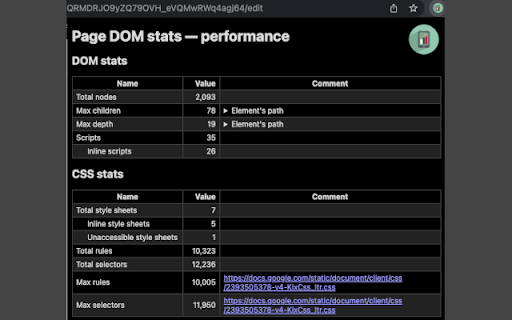
Gather statistics on DOM and CSS This is a simple Chrome extension to inspect performance-related properties of a web page:

Focus: The Elements - DOM Inspector & Editor
DOM Inspector & Editor, inspect and edit HTML element styles directly on any page. It is a lightweight DOM Manipulation Tool and powerful browser extension that helps developers, designers, and curious learners inspect and edit any webpage in real time. With a simple hover or double-click, you can instantly view detailed information about HTML elements such as width, height, font size, font family, font weight, colors, margins, padding, and background. The inline editor lets you change styles directly on the page with live updates, making it easy to experiment, debug, and customize without touching the source code. Whether you’re testing layouts, fine-tuning typography, or exploring how websites are built, this extension gives you a fast and intuitive way to take full control of the DOM.

DOM Outliner
Outline elements within a webpage. Activate the extension and watch as DOM elements are highlighted with different colors. Acting as an X-ray for your page, this extension allows you to visually outline and distinguish different elements within a webpage's Document Object Model (DOM). With this extension, you can easily identify and analyze the structure of a webpage, making it easier to debug and optimize your web projects. Simply activate the extension and watch as the DOM elements are highlighted with different colors, allowing you to quickly and easily identify and differentiate between them.

PageTrail
This Extension tracks your daily surfing activity PageTrails is designed to enhance productivity by tracking time spent on various websites. It records active browsing time, aggregates it at the domain level, and provides a concise summary of web activity. This extension is ideal for users seeking to monitor their web usage patterns and optimize their online time.

Dom Selector
A simple document element selector for styling and tagging purposes. Get NodeName, classList, and id along with width, height, display, padding, margin and border of elements without opening Console.
