
bagbmhiblmhlllddcpdalmdohgaknibd

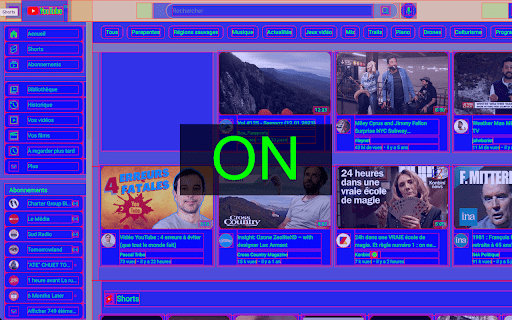
Outline elements within a webpage. Activate the extension and watch as DOM elements are highlighted with different colors. Acting as an X-ray for your page, this extension allows you to visually outline and distinguish different elements within a webpage's Document Object Model (DOM). With this extension, you can easily identify and analyze the structure of a webpage, making it easier to debug and optimize your web projects. Simply activate the extension and watch as the DOM elements are highlighted with different colors, allowing you to quickly and easily identify and differentiate between them.

DOM Tree Visualizer
HTML DOM Tree Visualizer is an educational Chrome extension that provides real-time visualization of how web browsers construct the… HTML DOM Tree Visualizer is an educational Chrome extension that provides real-time visualization of how web browsers construct the DOM (Document Object Model) tree when rendering HTML content. Key Features Real-time DOM Visualization: Watch as HTML elements are parsed and transformed into a visual DOM tree structure Educational Tool: Designed specifically for students and web developers learning HTML rendering fundamentals Interactive Learning: Gain deeper understanding of how browsers interpret and display HTML code Clean Interface: Simple, intuitive design focused on learning without distractions Who Is This For? Students learning web development and HTML fundamentals Web developers wanting to understand browser rendering processes Educators teaching HTML/CSS concepts Anyone curious about how web pages are constructed behind the scenes Understanding HTML parsing and DOM construction Debugging HTML structure issues Learning browser rendering fundamentals Educational demonstrations and tutorials This extension was created as a personal learning project to help visualize one of the most fundamental processes in web development - how browsers transform HTML markup into the interactive web pages we see. Note: This is an educational tool designed for learning purposes. Perfect for anyone wanting to peek under the hood of web rendering!

DOMTree Explorer+
Explore, inspect, and annotate the DOM tree of any web page. DOMTree Explorer+ is a powerful Chrome extension that helps you visualize, inspect, and interact with the DOM tree of any web page in a clean, modern interface. Perfect for both developers and non-developers, it combines intuitive design with advanced features like search, element highlighting, breadcrumbs, accessibility checks, and more — all in a lightweight popup that doesn't cover your page. 🔍 Key Features: DOM Tree Visualization: Clean, expandable tree view of the page’s HTML structure. Element Highlighting: Click any node to highlight the matching element on the page. Details Panel: View tag, ID, class, selector, and children count. Copy unique selectors with one click. Jump to Element: Instantly scroll to any selected element on the page. Breadcrumb Navigation: Easily navigate from the root to any selected element. Dark Mode: Toggle between light and dark themes, with your preference saved. Accessibility Checks: Instantly detect missing alt text, labels, and contrast issues. User-Friendly for Everyone: Tooltips, inline guides, and clean design make it easy to use — no DevTools knowledge required. 🧩 Why use DOMTree Explorer+ instead of Chrome DevTools? Accessible as a popup — doesn’t obstruct your view. Friendly for QA testers, designers, teachers, and non-tech users. Custom features like breadcrumbs, accessibility insights, and instant selector copy. Great for debugging, documentation, tutorials, and UI testing. Get a clearer view of your HTML. Inspect with ease. Install DOMTree Explorer+ and explore the DOM like never before!

Inline
Extract and analyze fonts from any webpage, and copy the SVG, CSS or HTML code to use in your own projects. With Inline, you can easily figure out which fonts are used in any website and use them in your own projects. You can copy the font and its styling as an SVG file, allowing you to integrate it into your own design projects. You can also copy the whole CSS code of the font, or copy the font and its styling as an HTML code. And if you're only interested in a particular CSS property, you can copy that too. (Please be sure to restart Chrome the first time you install Inline)

html-dom-lens extension
extension for checking DOM element information on the screen Extension that helps you get things done in Front-End development!
