
aifjpngbegpnahbmnajckckddcgfnodk
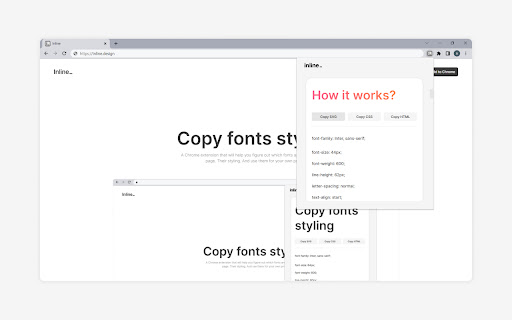
Extract and analyze fonts from any webpage, and copy the SVG, CSS or HTML code to use in your own projects. With Inline, you can easily figure out which fonts are used in any website and use them in your own projects. You can copy the font and its styling as an SVG file, allowing you to integrate it into your own design projects. You can also copy the whole CSS code of the font, or copy the font and its styling as an HTML code. And if you're only interested in a particular CSS property, you can copy that too. (Please be sure to restart Chrome the first time you install Inline)

Supertweak
Visual editor for Tailwind CSS Supertweak is visual editor for Tailwind CSS to quickly tweak your website live, preview instantly and copy classes or html to use in your project. You can try it free for 7 days. Continued use requires activation key. You can purchase your copy of the extension at https://supertweak.dev 🎨 Tailwind editor Quickly modify property values for Tailwind classes, add or edit variants, manually add, edit or remove classes etc. right inside your browser. You can then copy the classes or html code from the elements with one click. Supports adding arbitrary values and variants and custom Tailwind config as well. 📱 Responsive Switcher You can quickly resize the window to responsive device widths. Since this resizes window, you will be able to use the editor in small screen widths too unlike the Devtools responsive mode. 📷 Quick Capture Supertweak lets you quickly take screenshot of visible screen or a selected area, which you can later download or copy to clipboard. This makes it easier to share the changes you made with your team and get feedback. 🪟 Children Editor You can easily re-arrange, remove or duplicate elements. Adding elements and text nodes are also supported. ⌨️ Edit Mode In Edit mode, you can edit the text in the page quickly without other distractions.

CSS Scanly - Copy CSS | Tailwind & Bootstrap
Copy CSS properties from any web element with CSS Scanly. Supports Tailwind & Bootstrap, Helpful for developers and designers CSS Scanly: Inspect, Analyze, and Edit CSS in Real-Time Discover the power of advanced CSS inspection and editing with CSS Scanly, the must-have tool for web developers, designers, and CSS enthusiasts. This Chrome extension transforms how you interact with web page styles, providing an intuitive and feature-rich environment for exploring and manipulating CSS on any website. Hover over any element to instantly view its applied styles See computed styles, including those from stylesheets and inline CSS Explore pseudo-class styles etc. without leaving the page Edit CSS properties on-the-fly and see changes immediately Experiment with styles without affecting the original page Perfect for prototyping and troubleshooting design issues Automatically detects and highlights Bootstrap and Tailwind CSS classes Gain insights into how popular frameworks are used on different websites Pin multiple CSS information boxes for easy comparison Ideal for analyzing styles across different elements simultaneously 5. Copy-to-Clipboard Functionality Quickly copy any CSS styles with a single click Streamline your workflow by easily transferring styles to your projects View applied media queries for responsive design analysis Understand how styles change across different screen sizes Intuitive control bar for easy navigation and tool management Keyboard shortcuts for enhanced productivity Pause and resume the scanner as needed Move the control bar to your preferred location on the screen Perfect For: Web Developers seeking to debug CSS issues Designers looking to analyze and draw inspiration from other websites Students learning web design and CSS QA testers verifying style implementations Anyone curious about the styles behind their favorite websites Elevate your web development and design process with CSS Scanly. Download now and start scanning the world of CSS like never before!

Captr
Take and edit beautiful screenshots on the fly Captr is an extension that takes screenshots and let you edit them directly on the browser. With Captr, all it takes is one click to select an area and voila! 💥 You have a stunning screenshot complete with proper padding, gradients, and rounded corners. Share your screenshots on social media and Impress your friends 🤓. Extension contains one time payment to "Remove watermark" and enable paid features. Clarification on Extension Permission -> Read your browsing history - Chrome adds this line as we request tabs permission to take the screenshot.

SuperDev Pro
One extension that replaces all your browser tools — inspect, design, modify, capture, scrape, automate, and more in a sidebar. SuperDev Pro packs 50+ developer, designer, marketer, and power-user tools into a single keyboard-driven sidebar. Stop hoarding one-off extensions — open one sidebar, get everything. ⌨️ Open with Ctrl+Shift+E (Cmd+Shift+E on Mac). Hit Ctrl+Shift+S for the command palette and jump straight to any tool. • CSS Inspector — live styles + computed values, copy any rule • Layout Tools — box model, flex/grid overlays, parents/children • Ruler & Measure — click two points: distance, angle, ΔX/ΔY • Color Picker — eyedrop + history + HEX/RGB/HSL • Color Palette — extract every color used, highlight where it appears • Site Stack — detect frameworks, CMS, analytics, CDN, server • SEO Meta — full on-page audit: meta, social, headings, images, links • Page Speed — Core Web Vitals, resources, page weight • Accessibility — contrast, alt text, ARIA, headings, labels • AI Assistant — BYOK chat over any OpenAI-compatible API with page context • Font Changer — pick element, 50+ Google Fonts, live preview • List Fonts — detect every font on the page, highlight usage • Pattern Background — 8 patterns, presets, copy CSS • Dark Mode — force dark on any site, per-domain control • Code Injection — JS / CSS / HTML per-domain with snippet library • Live Text Editor — click to edit, track changes, export HTML • Image Replacer — drop file or URL, persists across reloads • Move / Delete Element, Page Outliner — surgical DOM tweaks • Screenshot — visible, area selection, or full-page (JPG / PNG) • Save as PDF — live preview, A4 / Letter, custom margins • Table Capture — every table on the page to CSV / TSV / JSON / Markdown • Export Element — pick any element, send HTML + matched CSS to CodePen • Web Scrape — auto-detect lists & tables, scrape, export • API Tester — any origin, CORS-free, request history • URL Opener — bulk-open URLs with pause / stop control • Extract Images — img + background + SVG + favicon + og, bulk download • Broken Link Checker — parallel HEAD checks, live progress, CSV • Webpage → Markdown — page / main / picked element to GFM • Stripe Analytics — charges, MRR, refunds, breakdowns • Subreddit Insights / User Analyzer / Cross-Post Finder — full Reddit toolkit • Todo — per-site task list • Sticky Notes — drop notes anywhere, drag, 6 colors, per-site persist • Tab Manager — list, filter, bulk close / copy / move • UTM Builder — campaign URLs with templates and custom params • Cookie Editor — list, search, add, edit, export cookies • Clear Browsing Data — this site or all, 11 categories, time-range • Redirect Path — trace full chain with status + headers • Currency Converter — live FX, detect amounts on page, 30+ currencies • Email Finder — scan text, mailto, obfuscated, group by domain • QR Code — URL, vCard, Wi-Fi, custom color, embedded logo • JSON Formatter — format, minify, sort keys, validate • Encoder / Decoder — Base64, URL, HTML, hex, Unicode, MD5 / SHA • World Clock — multi-timezone with floating widget Everything runs locally in your browser. Zero tracking, zero analytics, zero telemetry. Your data never leaves your machine unless YOU explicitly send it somewhere — Export to CodePen, BYOK AI calls, etc. 16 tools are free forever. The rest are free during a 7-day trial (extendable to 14 days), then require a one-time lifetime license. No subscription, all future updates included.
