
odmglmjpojlhploiiaemcdohkeoapakf

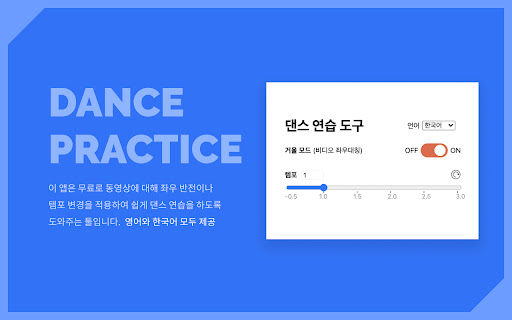
You can mirror, loop, and change tempo of a video to practice dance. 댄스 연습을 위해 춤 동영상에 대해 좌우 반전, 템포 변경, 구간 반복 등 다양한 조작을 할 수 있습니다 A free tool to mirror and change the tempo of a dance video for practice. It is provided in both English and Korean. 이 앱은 무료로 유튜브 등 춤 동영상을 좌우 반전시키거나 템포를 변경하여 편하게 댄스 연습을 하도록 도와주는 툴입니다. 영어와 한국어 모두 제공됩니다 💯무료 제공 ✓ HTML5 video detection ✓ Mirror mode ✓ Tempo shift ✓ Remember settings for each video ✓ Unlimited usage 🔒This app does not collect your browser history or your private information ⭐️Upcoming feature We will soon add a feature that allows looping a certain part of the video. 구간 반복 기능을 조만간 추가할 계획입니다.

Mirror Videos
Mirror videos for lefties and dancers. Works on Youtube, ESPN, Vimeo, and more! Simple and light-weight extension that mirrors videos by flipping them horizontally. Great for lefties wanting to understand their favorite athletes and dancers looking to learn choreography. Just press the Mirror icon (M) on the extension toolbar!

YouTube Looper
Custom loops extension for Youtube videos This is a great tool to help you do music training, or any kind of thing you can leverage repetition on video sections! Features - create multiple loops so you can train sections with ease - your loops are locally stored, when you get back to your videos your loops will still be there - set a custom playback rate (you can use very precise rates as 0.7 0.85 so you can train on your speed) - automatically generate loops for videos that have markers - quickly navigate to recent videos you looped at using the popup window - Manage, export / import and sync loops between different devices using the dashboard page Pro tips: - Hold shift key to adjust time in steps of 100ms instead of 1 second. - Hold shift and click on play to start loop 3 seconds before the loop time. - Click on the Speed label to reset speed to 100% - Click on the time numbers to edit via text (for very precise editing) - If you end a loop before the start, it will flip start/end automatically (actually, that happens if try to make the start to go after the finish in any editing way possible). You can find the source code and documentation for this project at https://github.com/wilkerlucio/media-looper.

Mirror
This mirror flips your online activity! This mirror flips your online activity!

Mirror Page
Mirrors the page when you click the icon Simple app for using Chrome with your teleprompter. Vertically flips (mirrors) the contents of the page. (Does not support all websites (for example YouTube) and does not support scrolling).
